

| Select Software Type | V1 (Base), V2 |
|---|---|
| Availability | In Stock |
| Condition | Brand New |
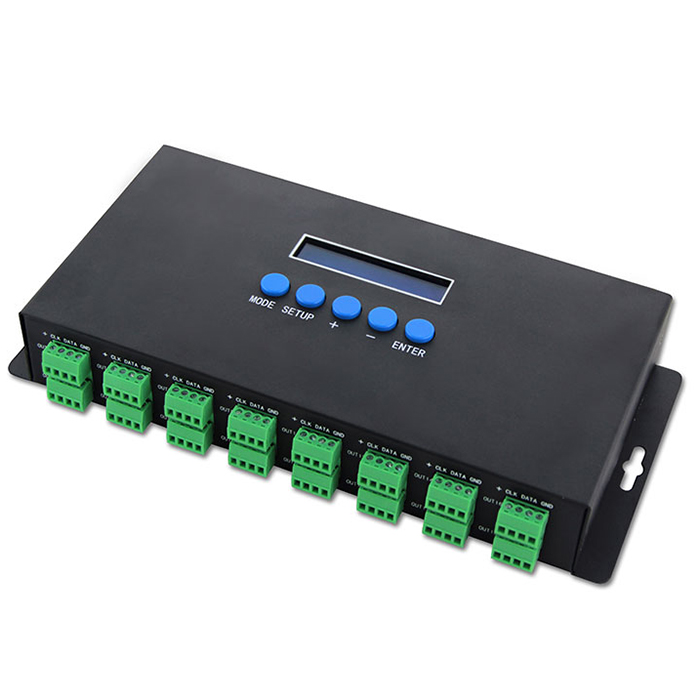
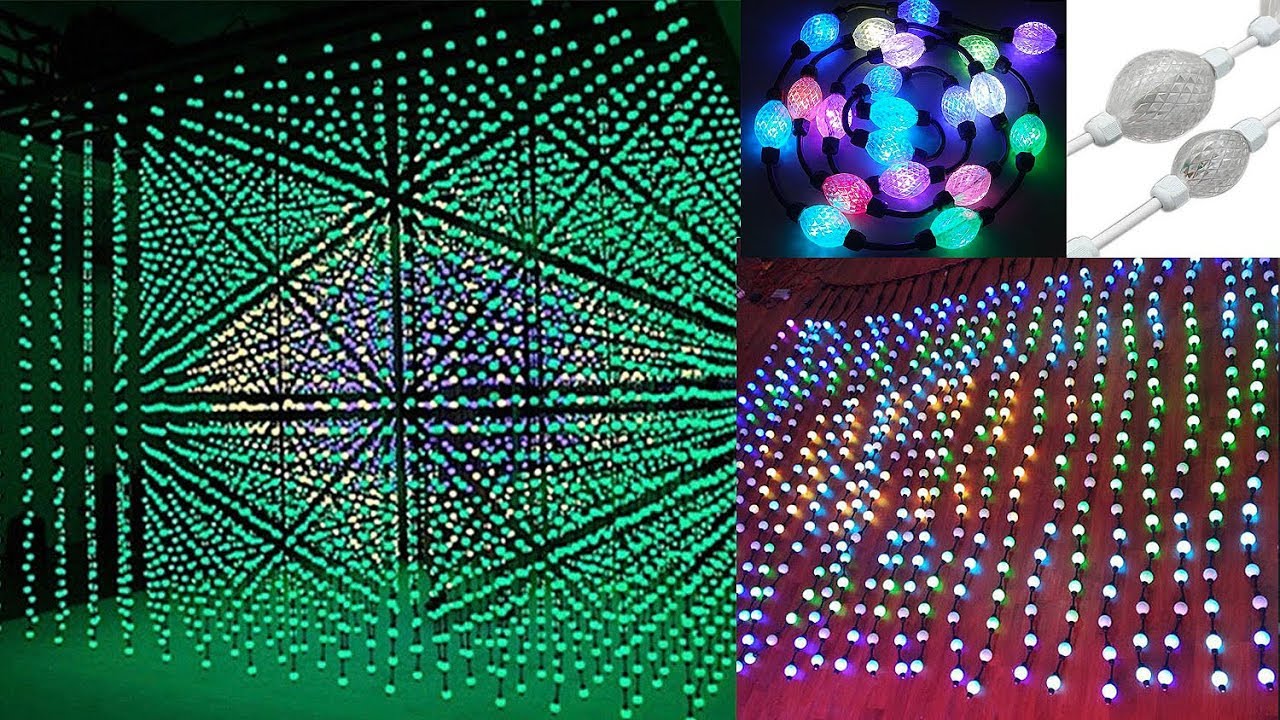
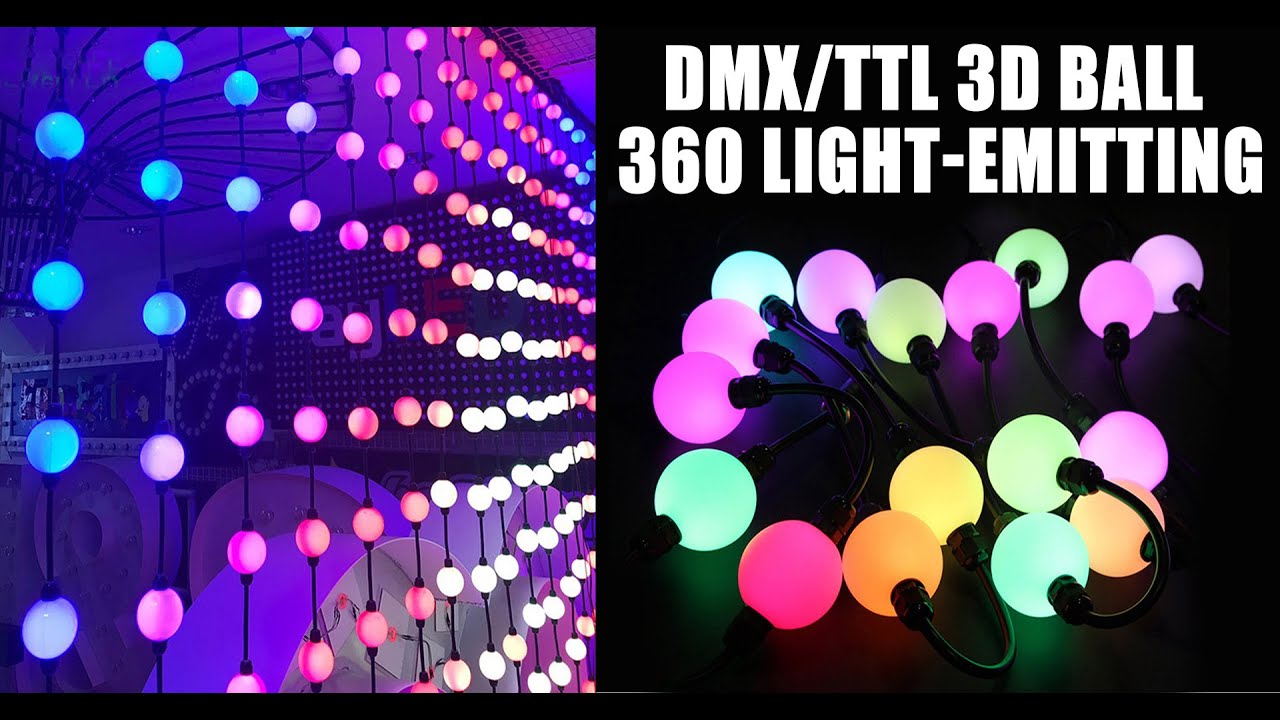
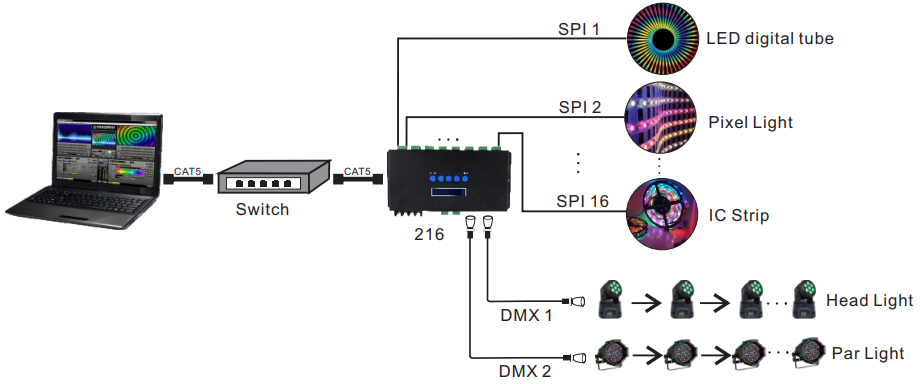
This Ethernet-SPI/DMX pixel light controller is dedicated to converting the Ethernet signal into SPI pixel signal, which is designed for a large project with high-density pixel light, such as matrix panel lights, construction's contour lamp, etc. Besides converting Ethernet-based control protocols into various LED driving IC signal, it also outputs DMX512 signal at the same time, convenient for the connection of different types of led lamp, and to achieve the unified control of all kinds of the led lamp in the same project.
This software has 2 versions V1 and V2, V1 version is with Artnet protocol, V2 version is with Artnet and sACN E.1.31 protocol. Notice: The factory software of V1 can't be upgraded to V2 software, but the factory software of V2 can be upgraded to V1 software.
With the BC-216, you can only control DMX led light fixtures through software.
BC-216 V1 EN PDF Download
BC-216 V2 EN PDF Download
● With LCD display and built-in WEB SERVER setting interface, easy operation.
● Support Ethernet DMX protocol ArtNet can be expanded to other protocols.
● Multi SPI (TTL) signal output, up to 5440 pixels control.
● Output DMX512 signal at the same time, convenient for the connection of different types led lamp.
● Support various LED driving IC, flexible control.
● Support online firmware upgrade.
● Adopt DIP plug-in design for the easily-worn parts, Users can repair the damage caused by wrong wiring or short circuit.
● Built-in test mode, using a network interface with indicator light, work status is clear when at a glance.
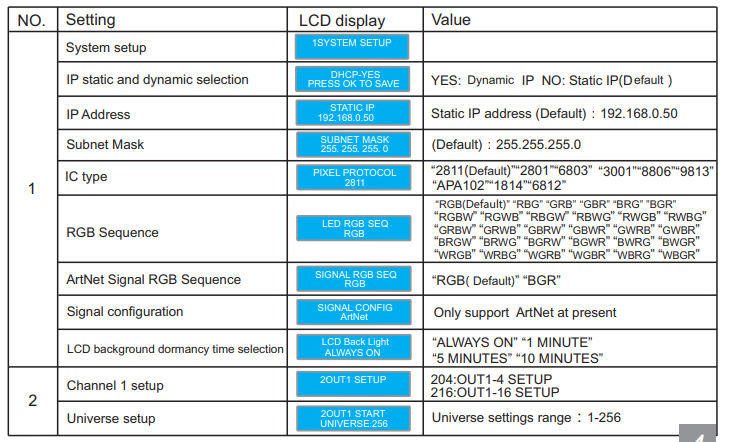
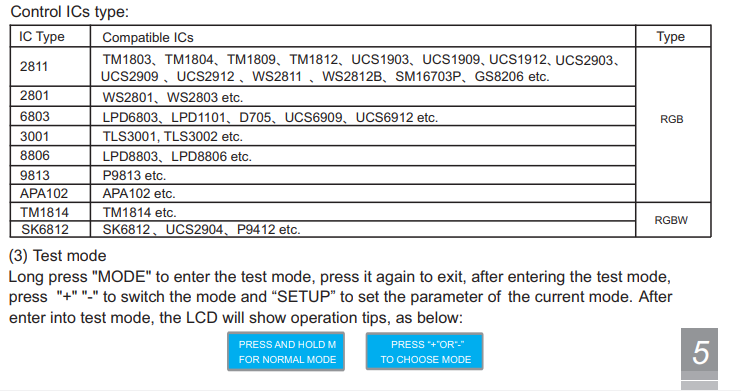
SPI IC type and product support list
Anything that supports the Art-Net protocol is possible, such as: Madrix, FreeStyler, Resolume,sunlite, madmapper, arena, arkaos
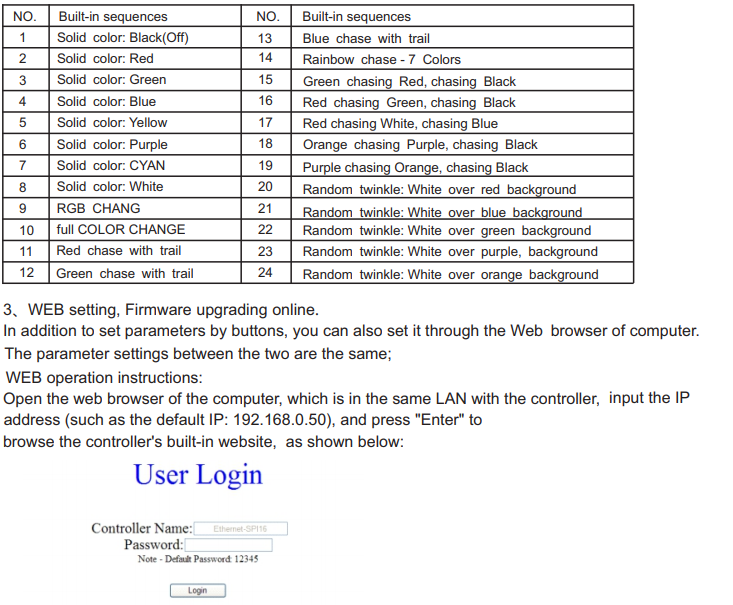
Built-in web server, support parameter setting and firmware upgrading on-line
Support ArtNet and can expand sACN(E1.31)
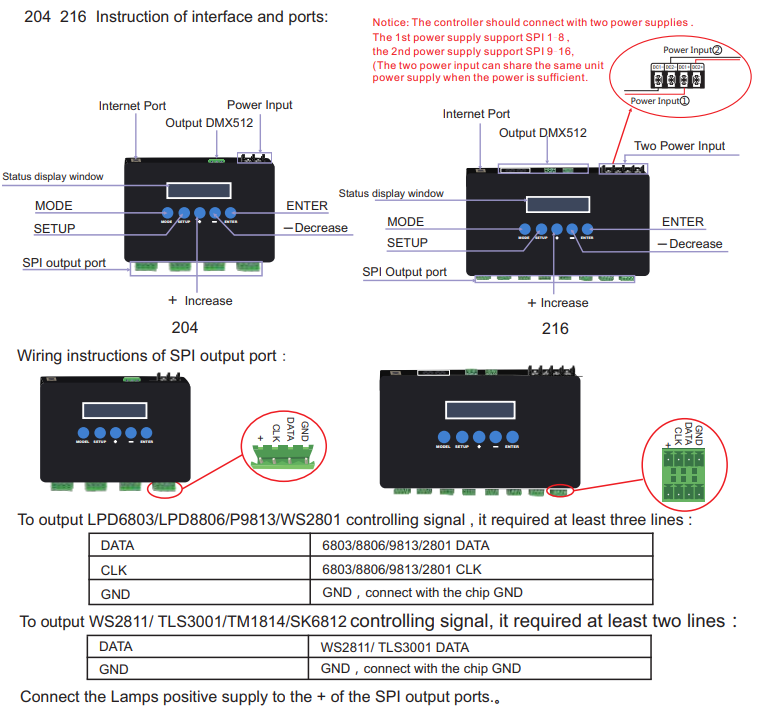
BC-204: 4 SPI output , 1 port DMX, 2720(680*4CH)+170 DMX pixels
BC-216: 16 SPI output , 2 port DMX, 5440(340*16CH)+340 DMX pixels
Q: What are the brands of software controllers that can be used with BC-216/BC-204 products?
A: Madrix, FreeStyler, Resolume, Madmapper, Arena, Arkaos, XLIGHTS, etc. are all compatible with the V1 version of BC-216/BC-204. Generally speaking, as long as the ARENET protocol is supported, it will work.
Software Download: https://www.superlightingled.com/PDF/Madmapper 5.1 Install.zip
https://www.superlightingled.com/PDF/madrix-5.0.zip
https://www.superlightingled.com/PDF/MadrixWygInstall.exe
https://www.superlightingled.com/PDF/2021-LedEdit_setup.rar
https://www.superlightingled.com/PDF/ArtnetSettingTools.exe
Madrix Offline Program Recording Software Download
https://www.superlightingled.com/PDF/CaptureArtnetTools%20V1.49.1-EN.rar
Mardix Software setup demo video
Standards and Certifications


Model: BC-216
Working Voltage: DC5-DC24V /1A
Output Current: 3A X 16CH(Built-in 5A fuse)
Input Ethernet control protocol: ArtNet
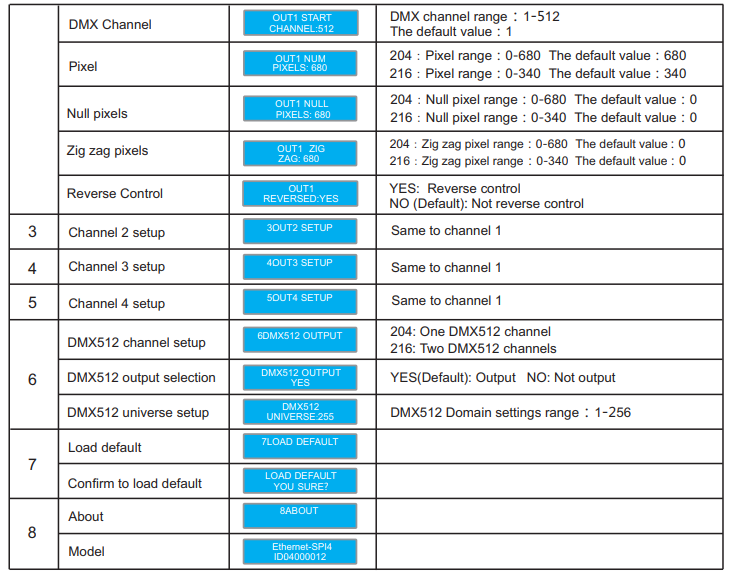
Output Control IC: 2811/2801/6803/3001/8806/9813/APA102/TM1814/SK6812 Series
Control Pixels: RGB: 340 Pixels X16CH RGBW: 256 Pixels X16CH
Output DMX512: Two-port(2X512 Channels)
Working Temp: -20~55℃
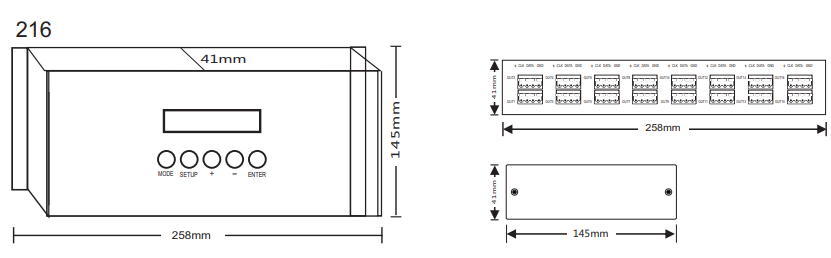
Product Dimension: L258×W145×H41(mm)
Weight(G.W): 1100g
 [ VIDEO: Watch on YouTube ]
 [ VIDEO: Watch on YouTube ]
Working Step:
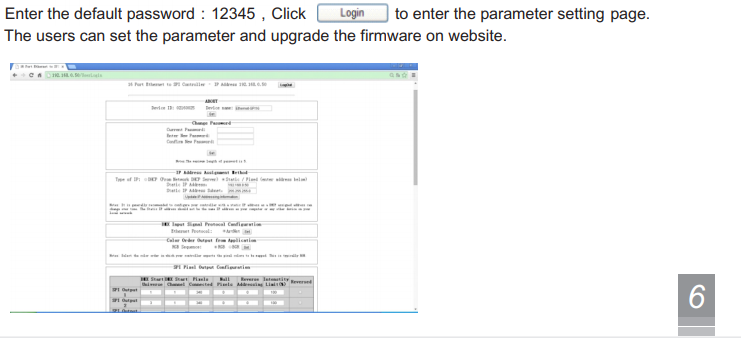
1.Open the computer browser
2.Enter the IP address of 216 in the address bar of the browser, and then press Enter to enter the account and password interface.
3.Enter the default password and press Enter or login to enter the parameter setting panel.
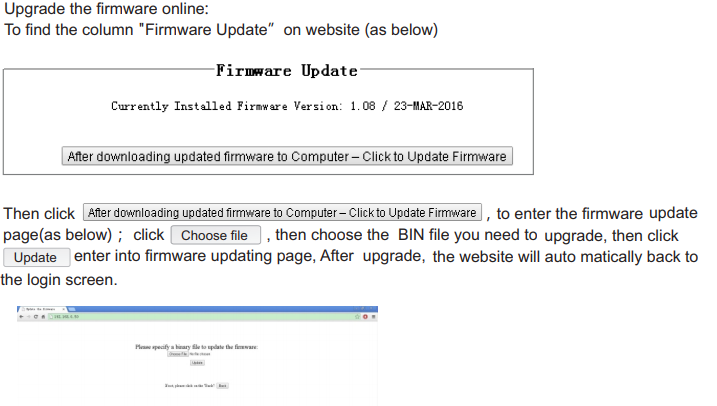
4. Drag the web page to the bottom, and click the bottom upgrade box.
5. The page for selecting the firmware to be upgraded appears, and then click select, an interface will open, and then select and confirm the downloaded firmware.
6. Click Upgrade, and the upgrade will be successful after the progress bar has passed.
Safety warnings
Please don’t install this controller in lightening, intense magnetic, and high-voltage fields.
1.To reduce the risk of component damage and fire caused by a short circuit, make sure the correct connection
2.Always be sure to mount this unit in an area that will allow proper ventilation to ensure a fitting temperature.
3.Check if the voltage and power adapter suit the controller
(please select DC5-36V power supply with constant voltage)
4.Donot connect cables with power on; make sure a correct connection and no short circuit checked with the instrument before power on.
5.Please don’t open the controller cover and operate if problems occur.
The manual is only suitable for this model; any update is subject to change without prior notice.
After-Sales
From the day you purchase our products within 3 years, if being used properly in accordance with the instruction, and quality problems occur, we provide free repair or replacement services except for the following cases:
1.Any defects caused by wrong operations.
2.Any damages caused by an inappropriate power supply or abnormal voltage.
3.Any damages caused by unauthorized removal, maintenance, modifying circuit, incorrect connections, and replacing chips.
4.Any damages due to transportation, breaking, flooded water after the purchase.
5.Any damages caused by earthquake, fire, flood, lightning strike, etc force majeure of natural disasters.
6.Any damages caused by negligence, inappropriate storing at high temperature and humidity environment, or near harmful chemicals.
Kindly Reminder
Power Source Selection:
The power source must be a DC constant voltage type of power supply. Due to the efficient output in some power supplies are only 80% of the total, so please select at least a 20% higher output power supply than the consumption of LED lights.