

| Select Current: | 6A/CH, Max 6A Total (Base) |
|---|---|
| Availability | In Stock |
| Condition | Brand New |
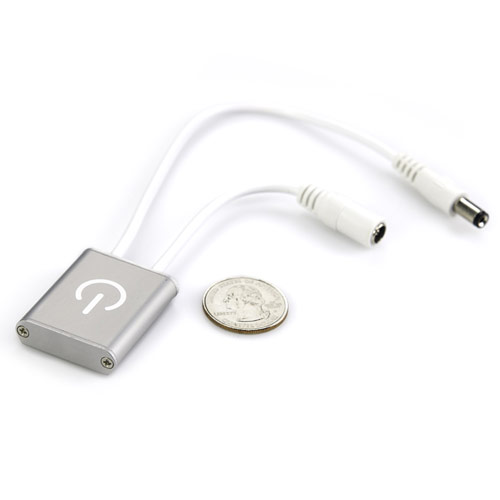
We have upgraded this product. Its dimensions are now 39 mm (L) × 30.8 mm (W) × 9.0 mm (H), and the power symbol on the surface has been replaced with a hand symbol. The new model uses capacitive touch technology, allowing users to turn the light on and off and adjust the brightness via touch. It supports a maximum output of 6A now.
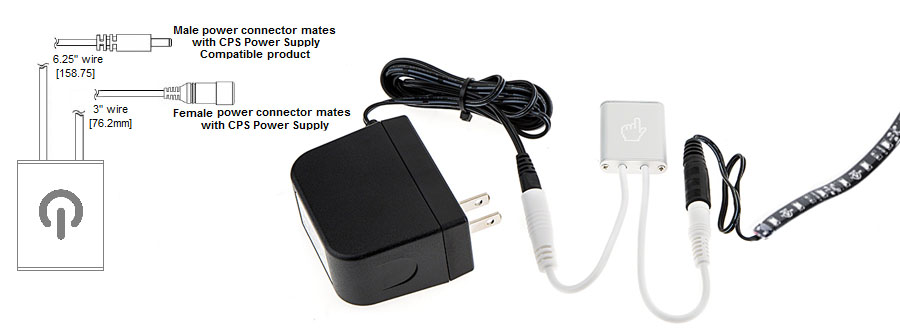
Universal iTouch 12/24 Volt DC 6 Amps Touch LED Dimmer can turn on and off and dim any 12~24VDC LED products from 10 to 100% using Pulse Width Modulation (PWM) touch sensitive control. Maximum load is 6 Amps. Male and female 5.5mm barrel power connector for connecting in-line with our CPS series Power Supplies. 3M double sided adhesive is not included.
Directions: Touch finger pad for less than 5 seconds for ON/OFF function - hold for more than 5 seconds for dimming function.
Product Specification
Amps: 6.00 Amps
Dim Control: Touch Control
Input Voltage DC: 12 ~ 24 VDC
Working Temperature: -20 ~60 ℃
Type: DC Dimmers / DC In-line Dimmer
Dimensions: 39mm x 30.8mm x 9mm
Output Channel: 1CH
Output Power: 72W @12V, 144W @24V
Installation Instructions
1. The device is in the OFF state when powered on. A short tap on the hand icon switches the dimmer from OFF to ON; another short tap switches it from ON to OFF.
2. Long-press the hand icon to adjust brightness:
A. If the device is in the OFF state, a long-press will cycle through brightness levels starting from the maximum brightness.
B. If the device is in the ON state, a long-press will cycle through brightness levels starting from the current brightness.
3. Adjusting brightness mid-cycle during a long press:
If you release your finger while holding down the hand icon, the brightness will stop at the current level. When you press and hold again, the dimming direction will reverse.
Note: When using this product, do not hold it in your hand. Place it on a table or mount it on a wall; otherwise, the touch function may become unresponsive!
 [ VIDEO: Watch on YouTube ]