

| Availability | In Stock |
|---|---|
| Condition | Brand New |
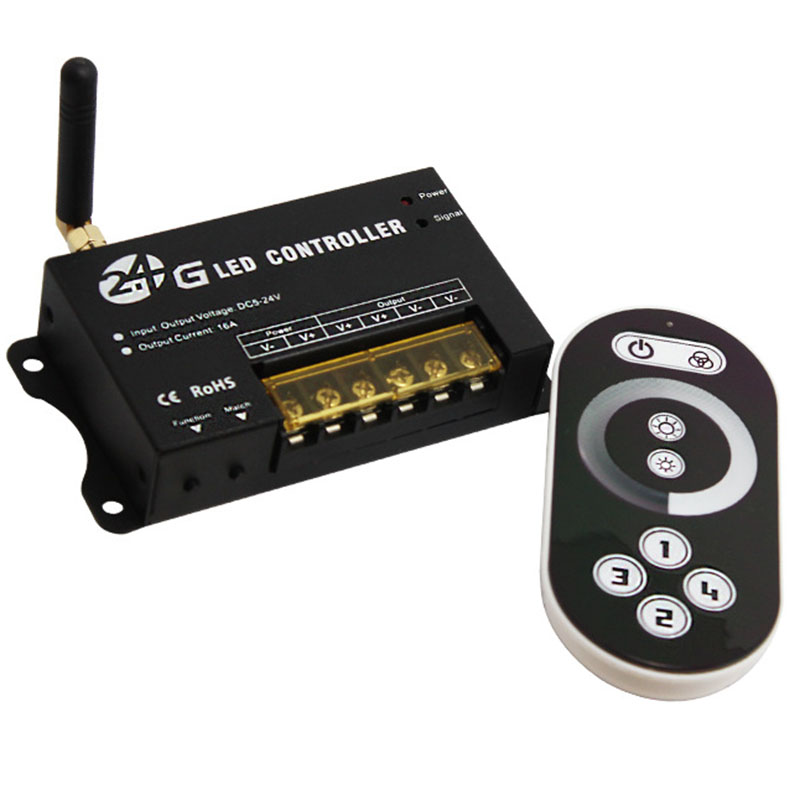
This 2.4G controller is newly introduced wireless high-power LED controller of our company. It equips with touch remote control, touch remote control adopts high precision capacitance touch control technology, you can select the color you need by one button. It is convenient and easy. Each controller has a globally unique address code, in order to prevent confusion caused by controlling repeated address code. Each controller can be equipped with four remote controls, can achieve multiple controllers synchronization control. It is used for controlling a variety of lamp whose source of light is LED. For instance, point source of light, flexible light strip, wall washer lamp, glass wall light etc. It has many advantages such as convenient to connect, easy to use and others. According to the actual need of customers, it can carry out jumpy changing, gradual changing, stroboflash and other effects of change. It can achieve single control and group control, easy for user to use.
Product Specification Download 


Product Specification
Controller
Working Temperature: -20-60℃
Power Supply Voltage: DC5V-24V
Output: 1 Channel
Connection Method: common
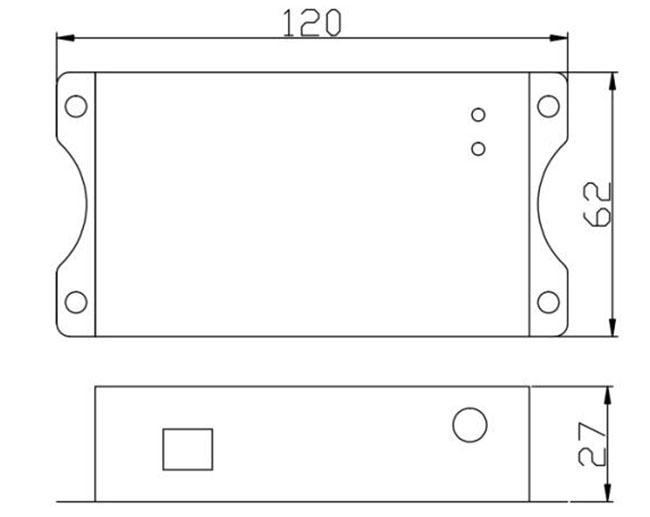
Dimensions: L120ΧW62ΧH27mm
Packing Size: L185ΧW145ΧH55 mm
Net Weight: 220g
Gross Weight: 314g
Static Power Consumption: <1W
Output Current: <16A (each channel 8A)
Output Power: 5V: <80W, 12V: <192W, 24V: <384W
Controller comes with short circuit protection
Controller Output Frequency: 325HZ
remote control
Working Temperature: -20-60℃
Power Supply: AAA*3
Power Supply Voltage: 1.5V*3
Transmitting Frequency: 2.4GMhz
Standby Power Consumption: 0.015mW
Standby Current: 60uA
Working Current: 200uA
Emitting Current: 10mA
Remote Control Distance: about 30 meters
Standby Time: 6 months
Remote Control Weight: 94g
Dimensions
Controller Instructions
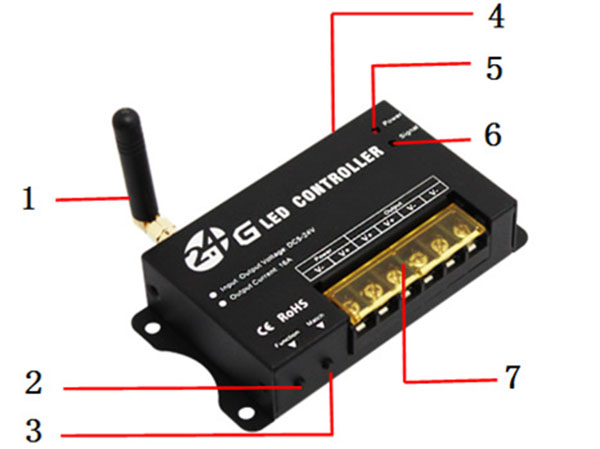
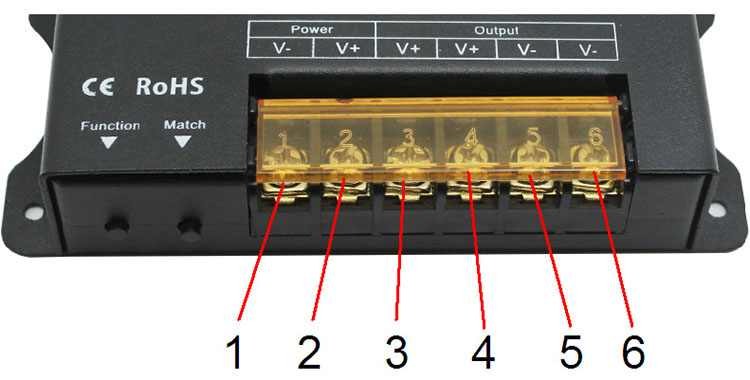
1. Antenna: 2.4G remote control signal receiving antenna;
2. Function: switch and mode key, long press this key switch, short press mode switch;
3. Match: For the code key, please refer to 4 for the method of use; clear the code. If the controller no longer uses the remote controller that has been coded during use, then it can be achieved by clearing the code. Operation method: the controller is powered off, press and hold the "Match" button, power on, and test with the remote control. If it cannot be controlled, the operation is successful, otherwise, repeat the operation;
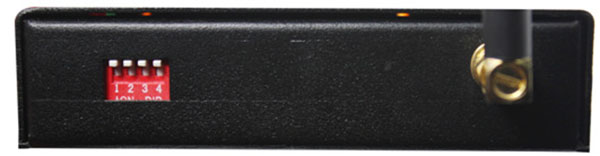
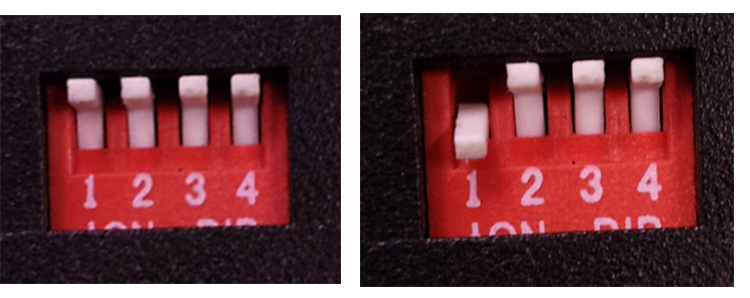
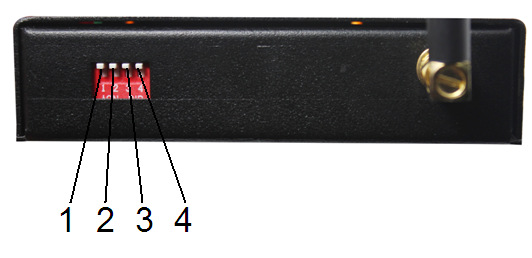
4. Group dial code: as shown in Figure 3. Used for controller's four sets of address code matching and working group setting;
5. Power: Power indicator light, which lights when external power is connected;
6. Signal: RF signal indicator light, flashes when the remote control signal is correctly received;
7. Input/output terminal: controller power input and load output port, refer to Figure 4 and Table 1 for detailed description;
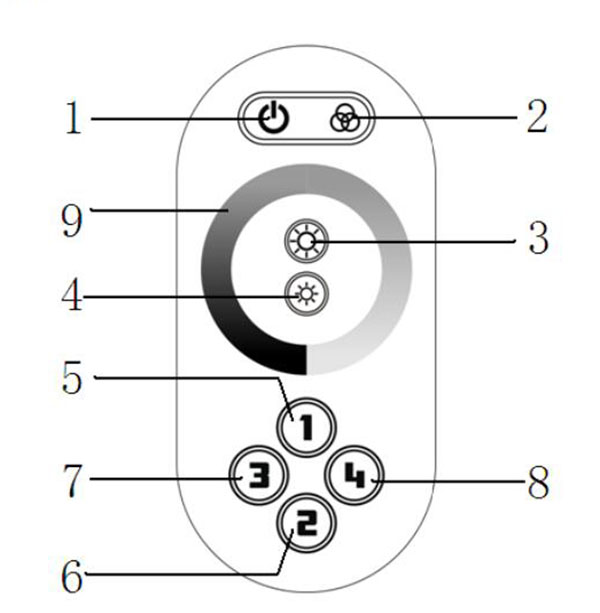
Remote control instructions
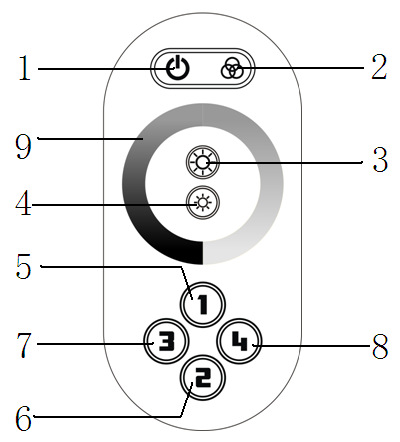
1. Switch key 2. Group control 3. Brightness increases by 4 and brightness decreases
5. Group 1 6, Group 2 7, Group 3 8, Group 4
9. Brightness adjustment ring
Remote control code
The controller can be controlled by four remote controllers at the same time, you need to match the controller and the remote controller first. To match the code, use "match" and "dial code" together. When the controller is working, if the first digit of the dialing code is "ON" (Figure 6), press the "Match" key, and then touch the switch button of the remote control, the indicator "Signal" flashes to indicate that the address code is successfully matched, The other three groups are the same. It is used to group controllers during use. If all are "OFF", they can only be controlled during global control.
Instructions
There are 64 touch buttons (points) on the touch remote control panel. The functions of each button are as follows:
1. Open key: in any state, the controller output can be turned on or off;
2. Group control key: select all the controllers matching the address of this remote control to control all the controllers as a whole;
3. Brightness plus: overall brightness plus, each press of brightness adds one level, a total of 22 levels;
4. Brightness reduction: the overall brightness is reduced, each time the brightness is reduced by one level, a total of 22 levels;
5. Group 1: Select all the controllers with group address 1 that match the address of this remote control, and control their controllers as a whole;
6. Group 2: Select all the controllers with group address 2 that match this remote controller address, and control their controllers as a whole;
7. Group 3: Select all the controllers with group address 3 matching the remote controller address, and control their controllers as a whole;
8. Group 4: Select all the controllers with group address 4 that match the remote controller address, and control their controllers as a whole;
9. Brightness adjustment ring: used to adjust the brightness;
Power management
Stop using the remote control for a period of time, the remote control will automatically enter the standby state to extend battery life. At this time, the color ring cannot be used. You must press the button to wake up the remote control and enter the working state.
Function key operation instructions
This key has two functions, long press this key switch, short press mode switch;
Key mode table:
Serial Number
Brightness
Remark
Serial Number
Brightness
Remark
1
10%
Adjustable brightness
12
57%
Adjustable brightness
2
14%
13
61%
3
18%
14
65%
4
22%
15
70%
5
26%
16
74%
6
30%
17
78%
7
35%
18
83%
8
39%
19
87%
9
44%
20
91%
10
48%
21
95%
11
53%
22
100%
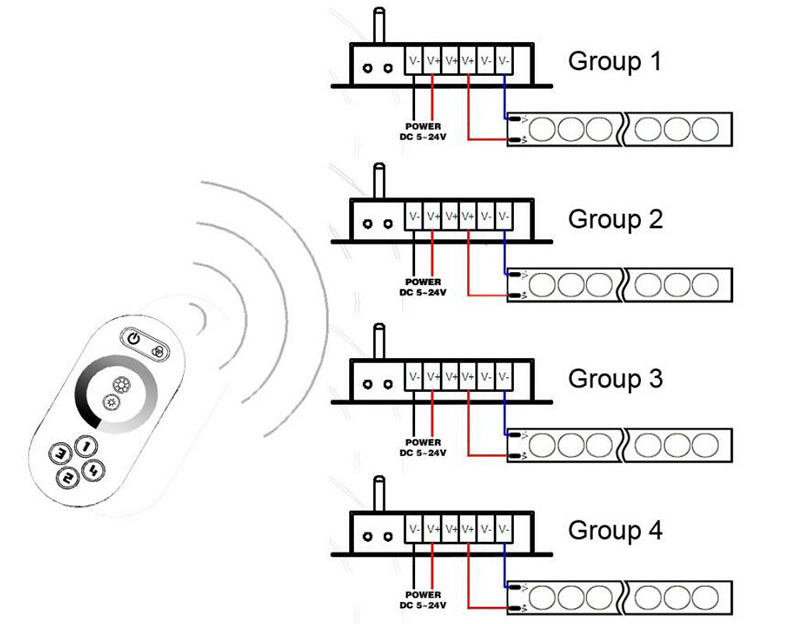
Typical application
Step 3: Remote control
For remote controller function description, please refer to "Remote Controller User Manual".
Group 1 control: first press the "5" key on the remote control, then you can control the first group, at this time the control is invalid for other groups. To control the second group, press the "6" key, the same is true for other groups. To achieve overall control, first press the "2" key, the master control button. In this way, the overall control can be achieved.
Precautions
1. Connect the load cable first, and then the power cable; make sure there is no short circuit between the input and output cables before powering on.
2. The controller's power supply voltage range is DC5 ~ 24V, the controller may be damaged if the voltage range is exceeded.
3. When the touch remote control is not used for a long time, it is recommended to remove the battery.
Package Included
1 x 2.4G led dimmer controller
1x Instruction Manual
1x Touch remote control