

| Availability | In Stock |
|---|---|
| Condition | Brand New |
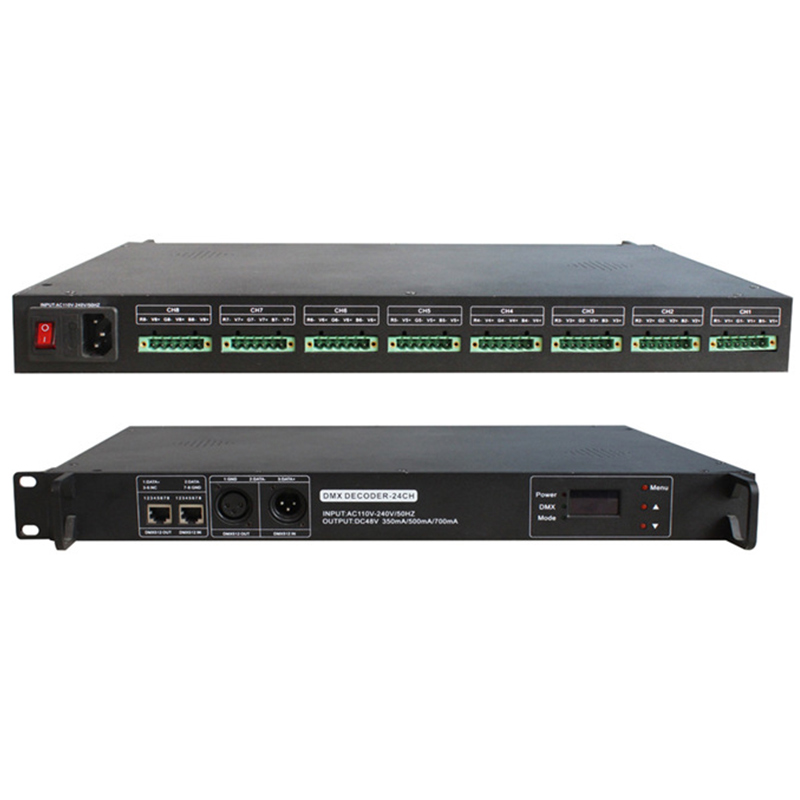
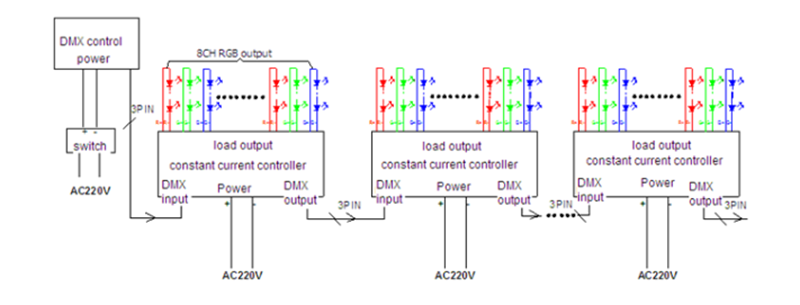
24-channel DMX constant current output decoder that supports 350mA, 500mA and 700mA current output. There are 22 kinds of lighting control modes inside the control board, and support the external standard DMX512 signal access, which can realize the diversified expansion output of the load lighting. And can support 3-level cascade expansion output, to achieve the purpose of a DMX main control to control more channels of products (3-level up to 72 channels). This product supports the power-off memory function. After the device is powered off and restarted, it can automatically return to the working mode before power-off, without manual intervention to continue working, making the product more convenient to use.


Product Features
The product supports 350mA, 500mA, and 700mA current output.
Support standard DMX512 signal.
With power-down memory function.
Technical Parameters
Working Temperature: -20-60℃
Power Supply Voltage: AC110-220V
Output Voltage: DC48V
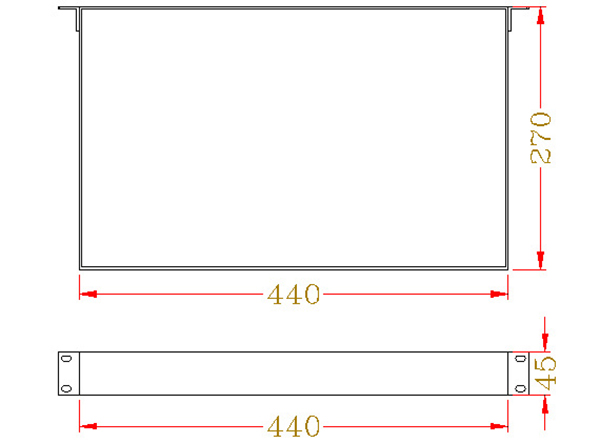
Dimensions: L440*W270*H45 mm
Packing Size: L570*W345*H75 mm
Net Weight: 3.6 kg
Gross Weight: 4.6kg
Decoding Channel: up to 24 channels
Output: 24 loops, 350mA/500mA/700mA per loop
External dimension
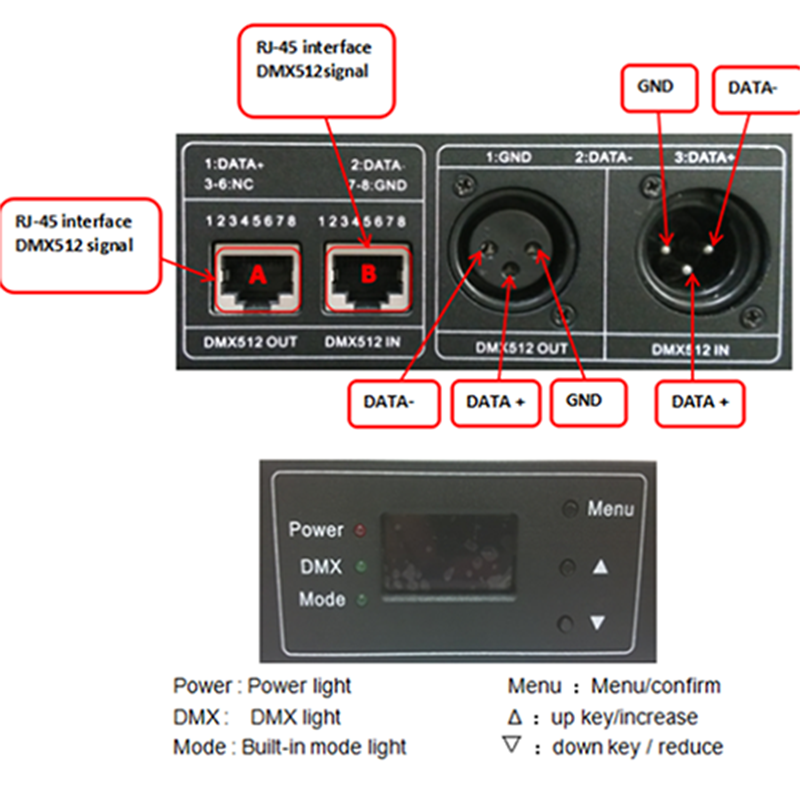
Interface description
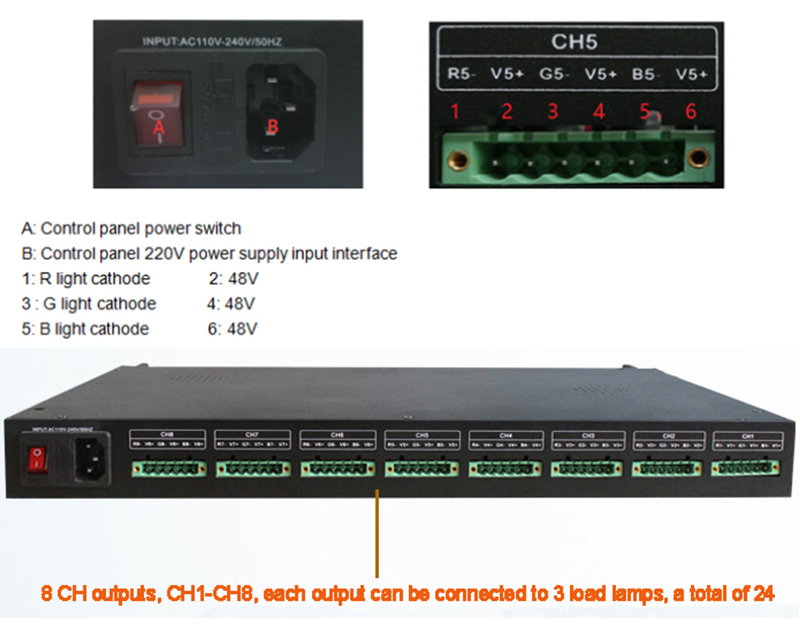
Power input and load output description:
Instructions for use
1. The power supply of the control board is 110V-220V, please make sure that there is no short circuit in the load before connecting the power supply.
The maximum output current of this product is 700MA, please confirm the maximum current that the load can bear before connecting.
2. The product has 8 CH output terminals, CH1-CH8, each CH output terminal can be connected to 3 load lights, such as RGB three-way light.
3. The V-voltage at the output of the CH is 48V and the voltage at the V+ terminal changes with the brightness and current settings. The current can be set to 350mA, 500mA, 700mA.
4. When the brightness is set to 100, the current reaches the maximum value of the set current. Note that the current setting value cannot exceed the maximum current the load can withstand, otherwise the load may be burned.
5. Turn on the power switch. Turn on the product into the default state, you need to manually change the setting current size, light control mode, brightness, speed, language, etc.
6. If you need to access the DMX signal, extended DMX signal output, or other hardware equipment operation, you need to cut off the power of the product to operate, otherwise, it may cause product damage.
Instructions
1.Main page operation instructions
①. When no DMX signal is connected, the main page of the power-on display shows "current value, mode, mode brightness, mode speed". Short press the "Δ" key to enter the current mode brightness adjustment state, press the "Δ" key or "▽" key to adjust the brightness, press the "Menu" key to confirm. On the main page, short press the "▽" key to enter the current mode speed adjustment state, press the "Δ" key or "▽" key to adjust the current mode speed size, press the "Menu" key to confirm.
②. On the main page of the display, short press the "Menu" key to directly switch the built-in mode status.
③. On the main page of the display, press and hold the "Menu" key for 3 seconds to enter the menu, press the "Δ" key or "▽" key to select "①. DMX start address, ②. the current setting, ③. built-in mode, ④ "Mode Speed, ⑤. Mode Brightness, ⑥. Backlight Time, ⑦. Language, ⑧. Version", press the "Menu" key to confirm and enter the submenu, and enter the submenu setting options.
2.DMX address settings
When the DMX signal is connected, the main page of the power-on display shows "Current" and "Start Address" of the DMX. On the main page of the DMX mode, short press the "Δ" key or the "▽" key to modify DMX start address code, range: 1-1023, press the "Menu" key to confirm. Or short press the "Menu" key to enter the menu, select "DMX start address" to enter DMX address code setting, press "Δ" key or "▽" key to modify DMX start address code, press "Menu" key to confirm.
3.Built-in mode settings
①. On the main page of the display, short press the "Menu" button to directly switch the built-in mode status.
②. On the main page of the display, press and hold the "Menu" key for 3 seconds to enter the menu and enter the "built-in mode". Press the "Δ" key or "▽" key to select the desired mode, and press the "Menu" key to confirm.
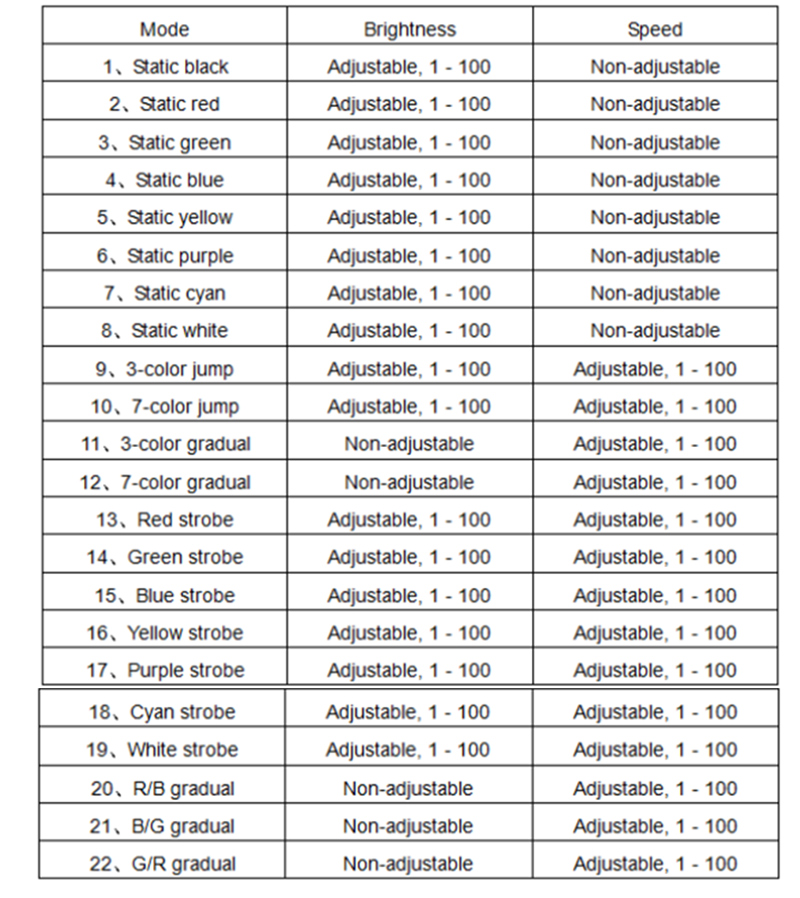
③. A total of 22 modes are available for selection, 8 static modes (black, red, green, blue, yellow, purple, cyan, white), 2 transition modes (tri-color, seven-color), 2 gradient modes (Three colors, seven colors), 7 strobe modes (red, green, blue, yellow, purple, cyan, white) and 3 gradients (red-blue, blue-green, red-green).
4.Current size setting
On the main page of the display (built-in mode & DMX mode), press and hold the "Menu" key for 3 seconds to enter the menu and enter "current setting". Press the "Δ" key or "▽" key to select the required current size (350mA/500mA/700mA), and press the "Menu" key to confirm.
Typical applicationt
Precautions
1. Connect the load line first, and then the power line; make sure there is no short circuit between the input and output connecting lines before powering on, and then press the switch.
2. The controller power supply voltage range is AC110 to 220V.