


| Availability | In Stock |
|---|---|
| Condition | Brand New |
Features
● Active microwave motion detectors with HF system 10.525GHz,
motion can be detected through plastic, glass, and thin non-metal materials.
● Built-in motion sensor and daylight sensor.
● Powered by low voltage 9-24VDC, output RF 2.4G signal.
● Matched with the RF LED controller or RF dimmable LED driver to use.
● Detection area, hold the time or stand-by time delay, and daylight threshold can be set via knob potentiometer.
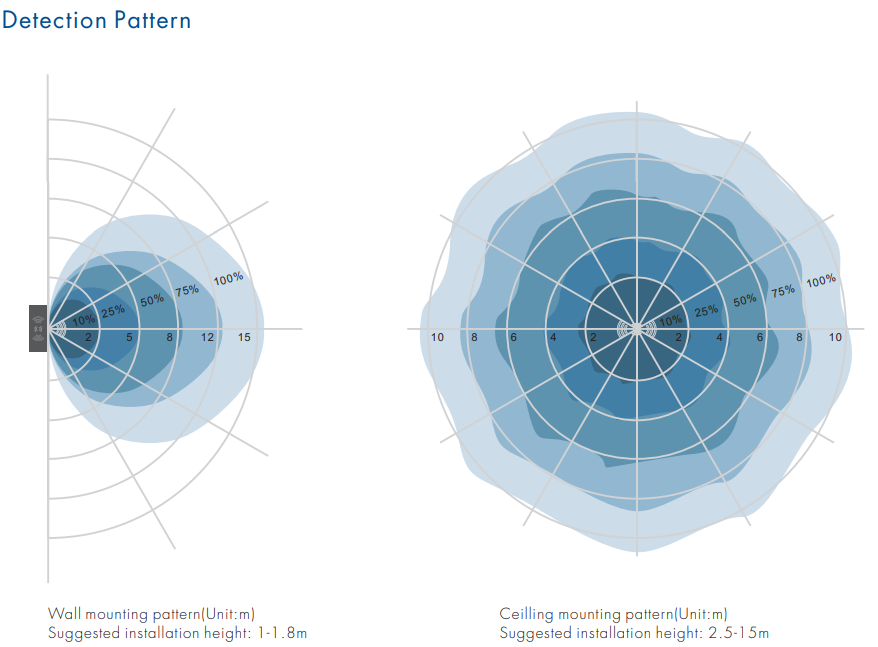
● Wide detection area, range up to 20m in diameter.
● Support higher mounting height 15m Max.
Technical Parameters
Working voltage: 9-24VDC
Output signal: RF 2.4GHz
HF system: 10.525GHz
Power consumption: < 0.5W(Standby), <1W(Operation)
Detection zone: Max.(DxH) 20 x 15m
Detection sensitivity: 10%/25%/50%/75%/100%
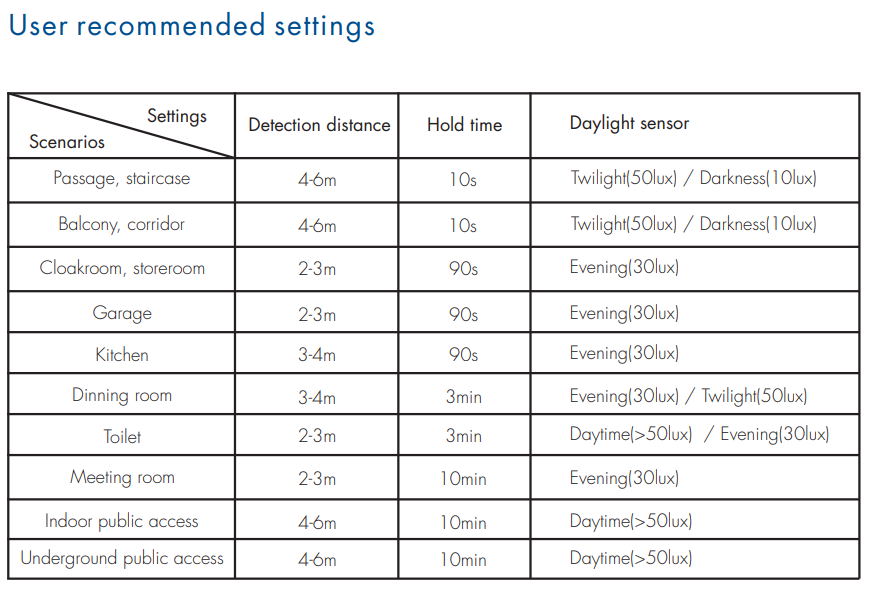
Hold time: 10s/30s/90s/3min/10min/20min/30min
Stand-by time: 10s/30s/90s/3min/10min/20min/30min
Daylight sensor: 10lux/30lux/50lux/100lux/150lux/200lux/Disable
Mounting height: 15m Max.
Motion detection: 0.5-3m/s
ER3 
Standards and Certifications


Functions
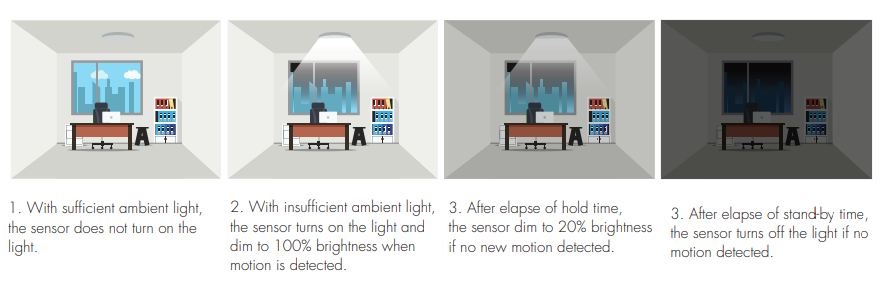
This sensor is a motion RF switch, which turns on the light upon detection of motion, and turns off after a pre-selected hold time when there is no movement.
Match Remote Control (two-match ways
The microwave motion sensor RF switch must be matched with one or multiple RF LED controller or RF dimmable LED driver, including single color, dual color, RGB, RGBW, RGB+CCT or switch light type, turn on or turn off light by motion detection. End-user can choose a suitable match/delete ways. Two options are offered for selection:
Use the controller’s Match key
Match:
Short press match key on the controller firstly,
immediately press the match key on the sensor.
The LED indicator on the controller fast flash
a few times means the match is successful.
Delete:
Press and hold the match key on the controller for 5s to delete all match, The LED indicator fast flash a few times means match were deleted.
Use Power Restart
Match:
Switch off the power of the RF controller or LED driver, then switch on power again, immediately short press the match key on the sensor.
The light blinks 3 times means the match is successful.
.Delete:
Switch off the power of the RF controller or LED driver,
then switch on power again,
immediately long-press the match key on the sensor 2s.
The light blinks 5 times means the match is deleted.
Application notice
1. The sensor is designed for indoor use only.
The rain or wind blowing may trigger the microwave sensor even if without human motion when outdoor use.
2. The sensor should be installed by a professional electrician. please turn off the power before installing, wiring
and changing the setting of the knob.
3. The distance between any two sensors should be at least 3m to avoid interference with each other.
4. When the microwave sensor is installed in a metal lighting fixture or space with a large reflector, for example, a warehouse with a metal roof, the microwave signal will be reflected and cause the lights permanently illuminated even if without a motion signal. Please reduce the detection area to solve the problems.
5. Make sure the sensor not close to or be blocked by high-density materials, such as metal, glass, concrete walls, etc.
The materials will reduce or block the microwave signals and cause a false trigger.
6. The sensor installed in the plastic and glass lampshade will reduce the sensitivity.
For every 3mm increase in thickness, the sensitivity will be reduced by 20%.
7. The light sensitivity threshold is in a sunny environment, with no shadow and ambient light diffuse reflection.
Ambient lux level could be different in a different environment, weather, climate, time-of-delay, and season.
8. Make sure there are no fans, DC motor, or other vibrating objects in the installation area. The movement will trigger the sensor as well.