| Availability | In Stock |
|---|---|
| Condition | Brand New |
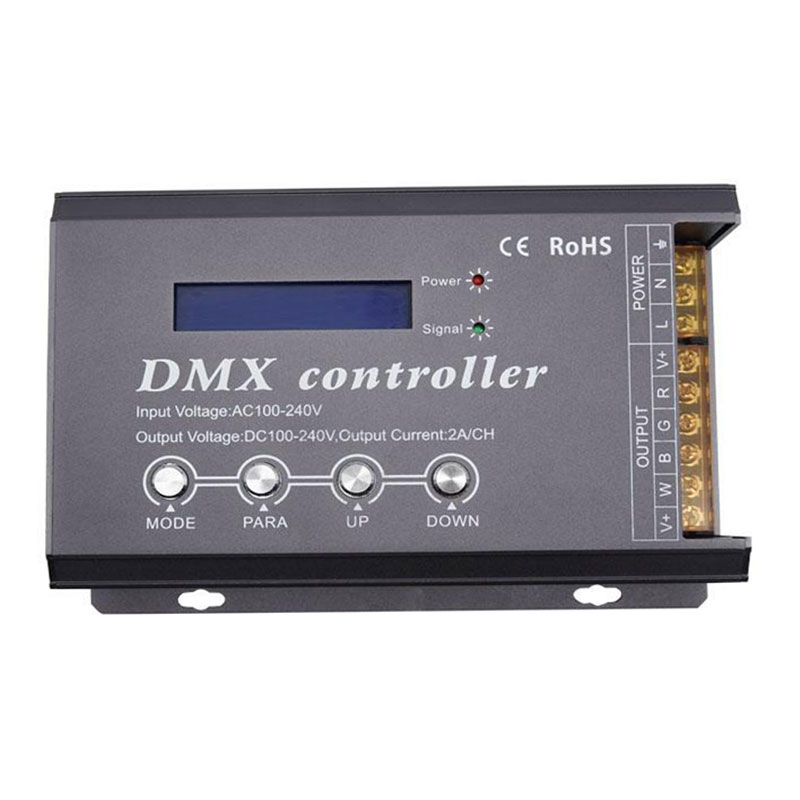
The high-voltage DMX controller with LCD display is an LCD LCD digital interface display, used to control the RGB-W color change of five-wire four-circuit (common anode) LED lamps, a variety of 34 change modes, and DMX512 is optional Multifunctional controller controlled by international standard protocol. The controller can work as stand-alone, self-online, and receive standard DMX512 console control signals. According to the actual needs of customers, the lighting effects such as jump, amplitude, and strobe can be realized.
DMX300C is out of production and is now replaced by DMX300D. Designed as an aluminum shell, DMX300D is good for heat dissipation of the product, and the protection function is added to make the product more reliable.
The functions of DMX300C and DMX300D are the same.

Standards and Certifications


Technical Parameters
Working temperature: -20-60℃
Power supply voltage: AC 100~240V 50 / 60HZ
Output voltage: DC 100~240V
Output connection mode: terminal 5 wires 4 loops
Dimensions: L205 * W103 * H40 mm
Packing size: L225 * W120 * H55m
Static strength: <2W
Maximum output current: 4 * 2A, each has short-circuit protection function, more than 20% fuse protection.
Dimming frequency: 980Hz
Maximum output power: 880W (input voltage 110V), 1760W (input voltage 220V)
Interface Description:
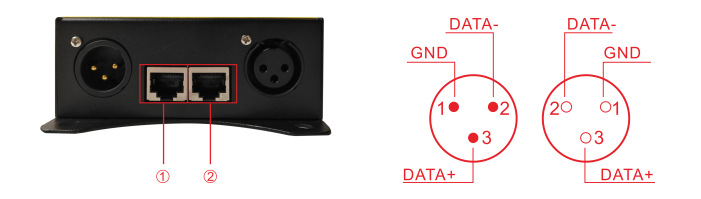
DMX512 signal input and output: ①input②output
power: power indicator, always bright red, indicating that the controller's working voltage is normal
signal: signal indicator light, green, when there is button operation or external DMX control, the indicator light flashes
R warns the R channel fault light. When the red indicator light is on, it indicates that the R channel load is faulty (short circuit or overload)
G warning G channel fault light. When the red indicator light is on, it means that the G channel load is faulty (short circuit or overload), and the power needs to be turned off to remove the fault. After the fault is removed, the power is turned on again. The red indicator light is off, indicating that the R channel is normal.
B warning G channel fault light. When the red indicator light is on, it means that the B channel load is faulty (short circuit or overload), and the power needs to be turned off to remove the fault. After the fault is removed, the power supply is turned on again. The red indicator light is off, indicating that the B channel is normal. .
W warns G channel fault light. When the red indicator light is on, it means that the W channel load is faulty (short circuit or overload), and the power needs to be turned off to remove the fault. After the fault is removed, the power supply is turned on again. The red indicator light is off, indicating that the W channel is normal .
Overprotection note:
The peak value of each output current of the controller is 2A. When the load exceeds 20% of the maximum current, it will damage the electronic devices and reduce the use time of the controller. When the controller cannot work normally due to exceeding, please increase the load, check the fuse, if the fuse is burned out, replace the fuse, and then power on after troubleshooting.
Using Instructions :
5.1 Connect the load line and then the power line; make sure that there is no short circuit between the connecting lines before powering on.The controller has 4 function setting keys MODE, PARA, UP, DOWN.
5.2 Press MODE key to select one by one or press UP, DOWN key to select up and down:
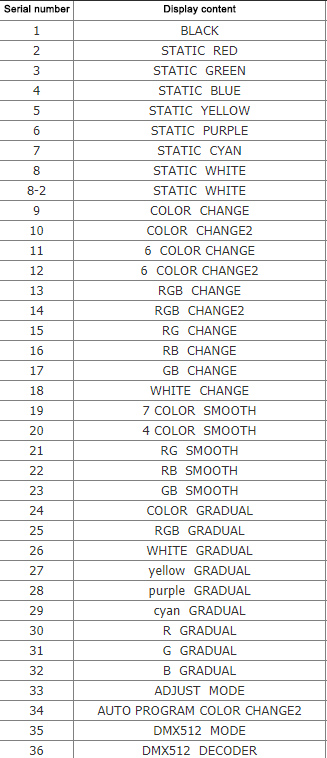
5.3 Adjust in the order of PARA: (1-8 are static, no adjustment function)
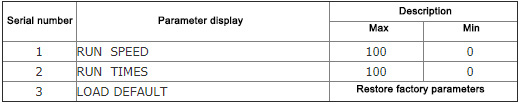
5.4 UP: Increase parameter key/preset parameter.
5.5 DOWN: preset parameter key/preset parameter.
5.6 AUTO PROGRAM mode is to run part or all of the 7-32 patterns in a repeated cycle. You can set whether to participate in the repeated cycle operation in the RUN TIMES (running times).
5.7 RUN TIMES: Compile the running times of the pattern in 34 AUTO PROGRAM mode. If the running times is 0, the pattern will be skipped, that is, the pattern will not be run.
5.8 Pre-parameters: Various programs have independent factory preset parameters, which are stored separately in the controller, and LOAD DEFAULT (preset parameters) can restore the factory parameters of the program. If in AUTO PROGRAM mode, use LOAD DEFAULT (pre-parameter) to restore the parameters of all programs to the factory parameters.
5.9 33 ADJUST MODE is manual dimming, which can adjust the brightness of RGB 0-256 levels respectively.
5.10 35 DMX512 MODE is to control all patterns (first address) and speed (second address).
5.11 36 DMX512 DECODER is a DMX decoder, which fully accepts external DMX512 signals to work. Occupy four addresses, R (one address), G (second address), B (third address), W (fourth address) need to set the address (PARA key to enter).
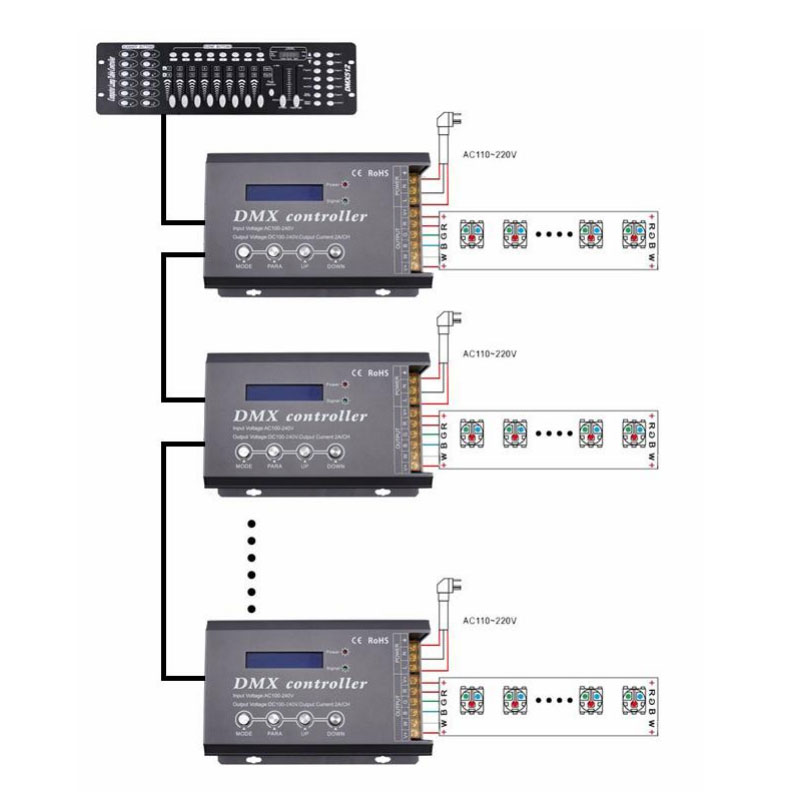
6. Typical Application:
Without DMX function
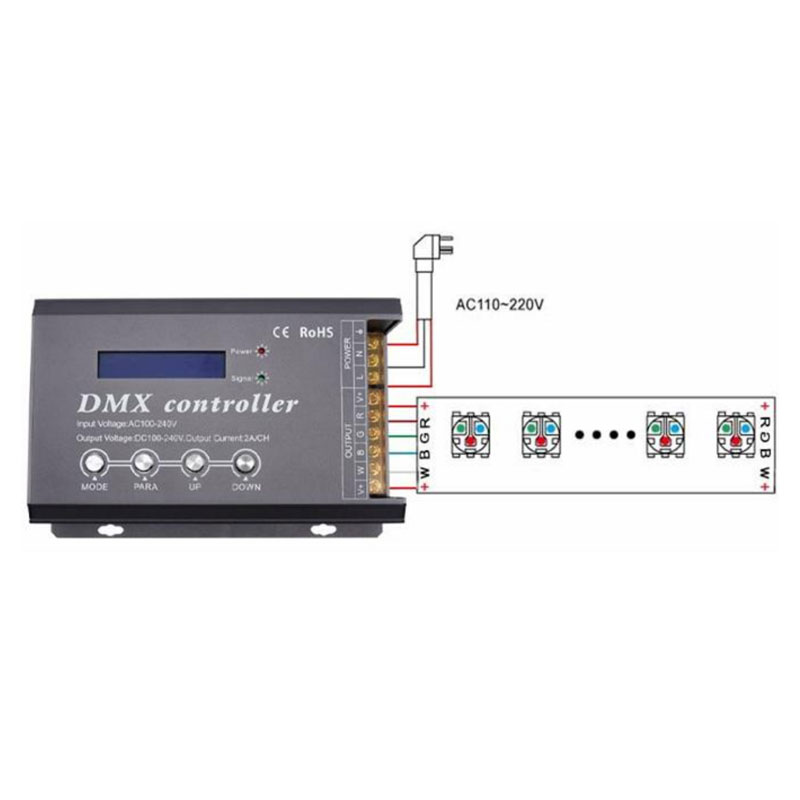
With DMX function: