| Availability | In Stock |
|---|---|
| Condition | Brand New |
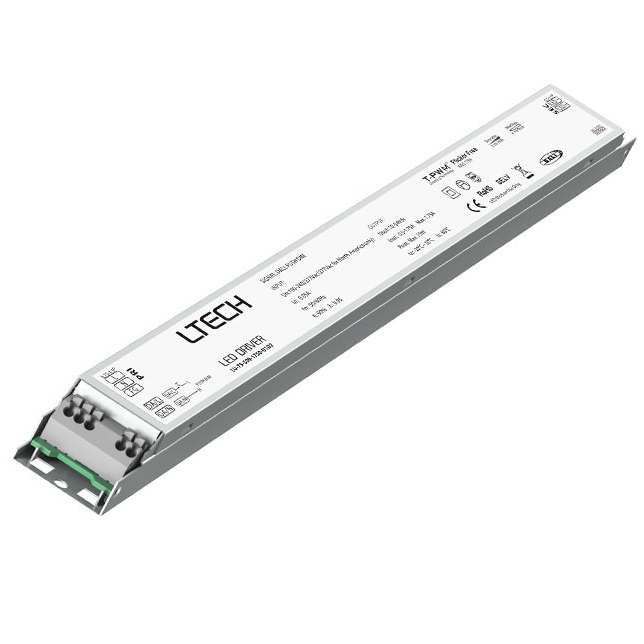
Intelligent LED Driver (Constant Current & Programmable)
The output programming is adjustable and the output voltage is
automatically adapted. With soft-on and fade-in dimming function enhancing visual comfort.
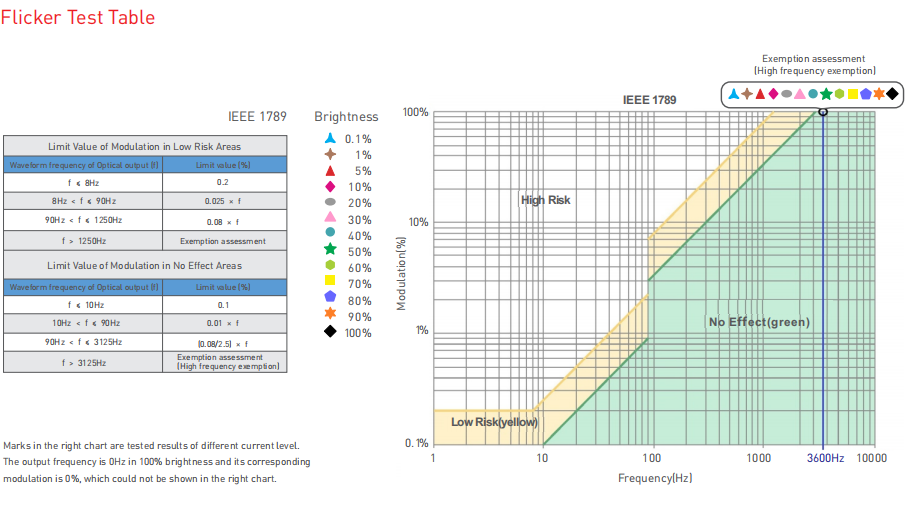
T-PWM™ dimming technology allows continuous and flicker-free images under high-speed shooting.
0-100% flicker-free dimming with high frequency exemption level.
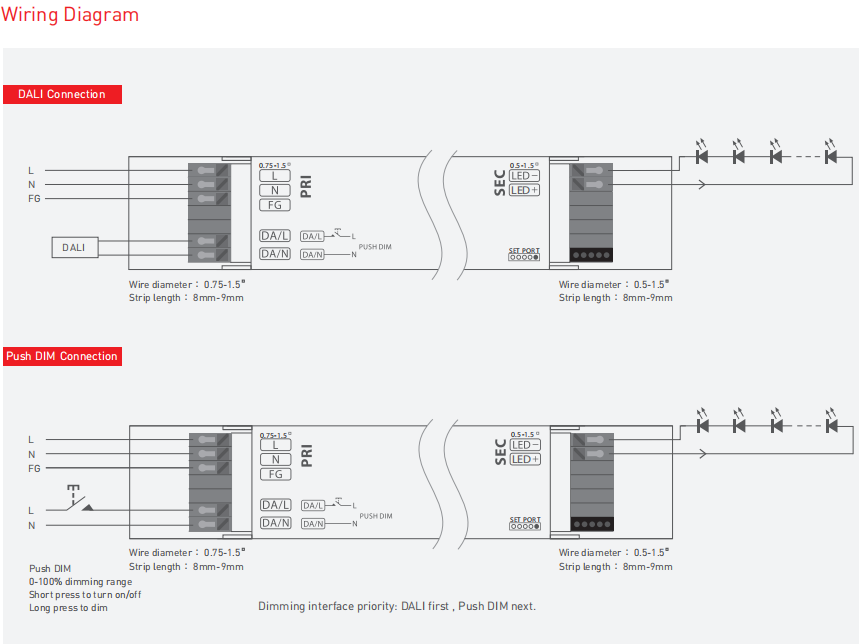
Dimming interface: DALI-2, Push DIM.
Dimming from 0~100%, down to 0.1%.
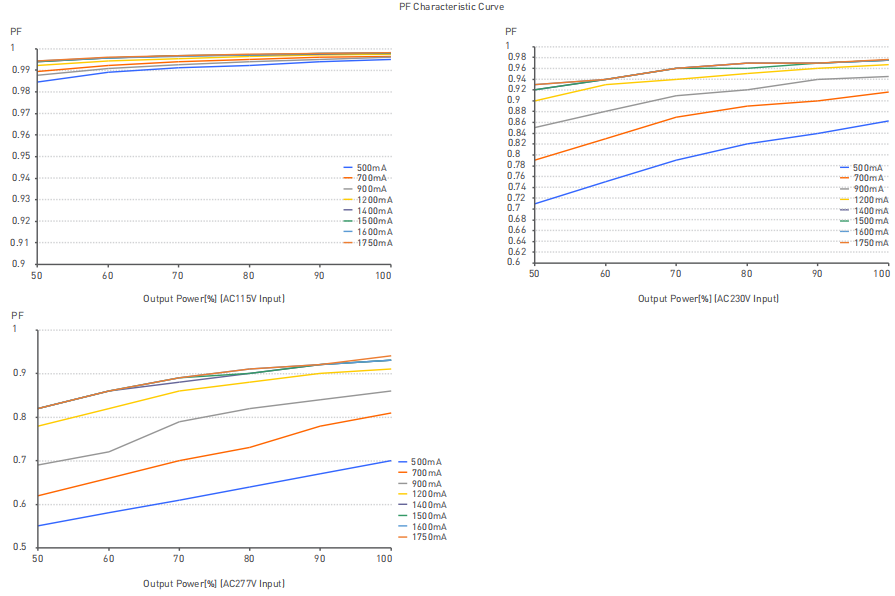
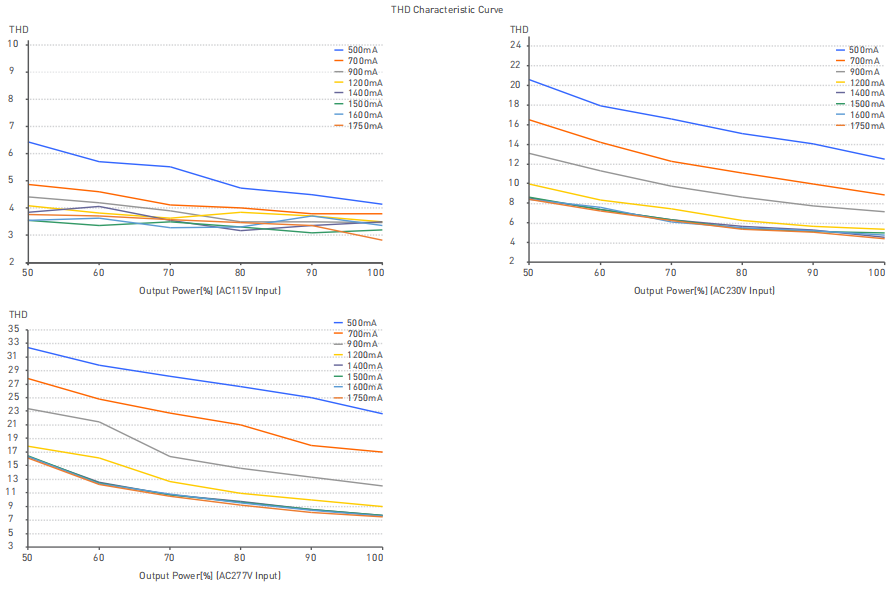
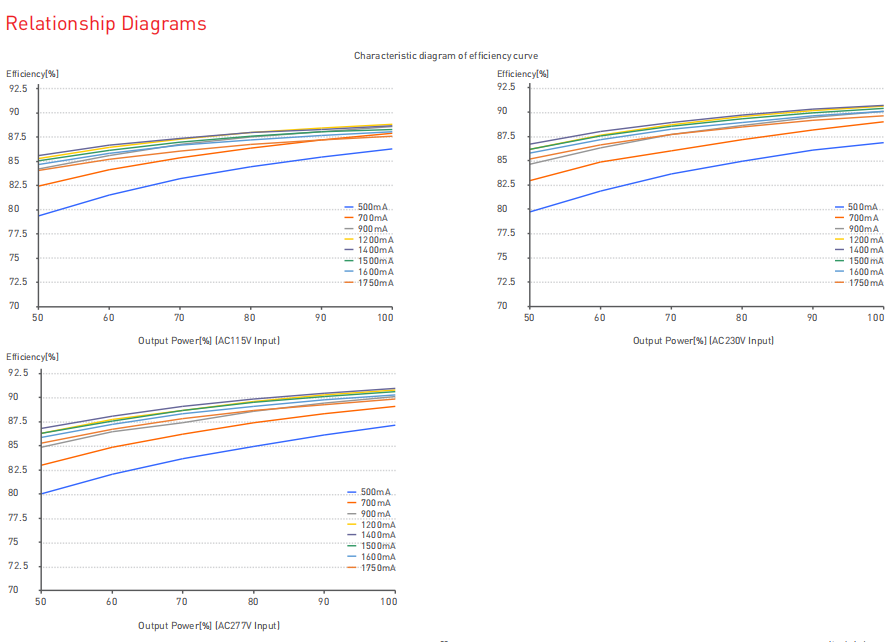
Energy-efficient driver: Effeciency 89%, PF>0.9, THD<10%.
Comply with the EU’s ErP Directive, stand-by power consumption <0.5W.
Innovative thermal management technology protects the power life
intelligently.
Overheat, over voltage, overload, short circuit protection and
automatic recovery.
DALI bus standard: IEC62386-101,102, 207.
Suitable for indoor light applications ofⅠ/Ⅱ/Ⅲ type.
Up to 50,000-hour life time.
5-year warranty (Rubycon capacitor).
Specification
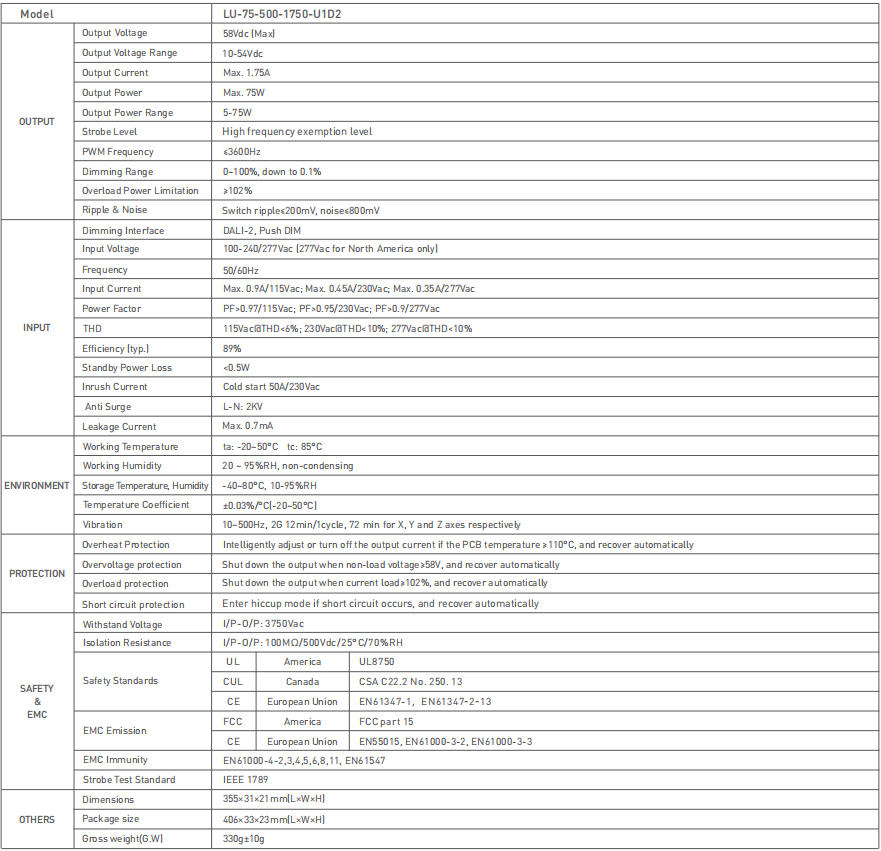
Output Voltage: 58Vdc (Max)
Output Current: Max. 1.75A
Output Power: Max. 75W
Strobe Level: High frequency exemption level
Dimming Range: 0~100%, dimming depth 1%
Dimming Interface: DALI-2, Push DIM
Input Voltage: 100-240/277Vac (277Vac for North America only)
Input Current: Max. 0.9A/115Vac; Max. 0.45A/230Vac; Max. 0.35A/277Vac
Standby power: <0.5W
Working temperature: ta: -30~60°C
Storage temperature: ta: -20~50°C tc: 85°C
Working Humidity: 20 ~ 95%RH, non-condensing
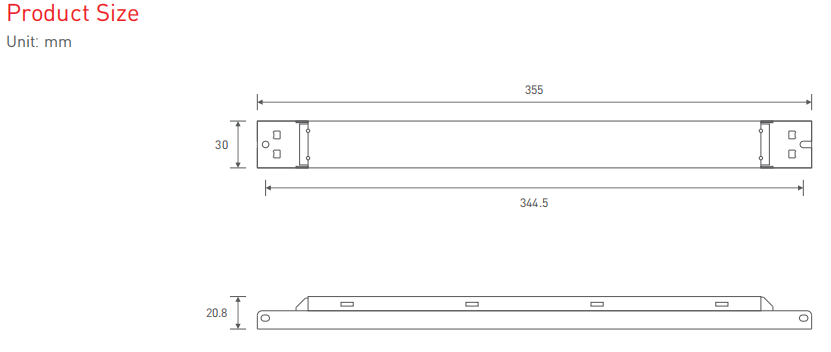
Dimension: 355×31×21mm(L×W×H)
LU-75-500-1750-U1D2 
Operating Instructions for the LT-ISET editor
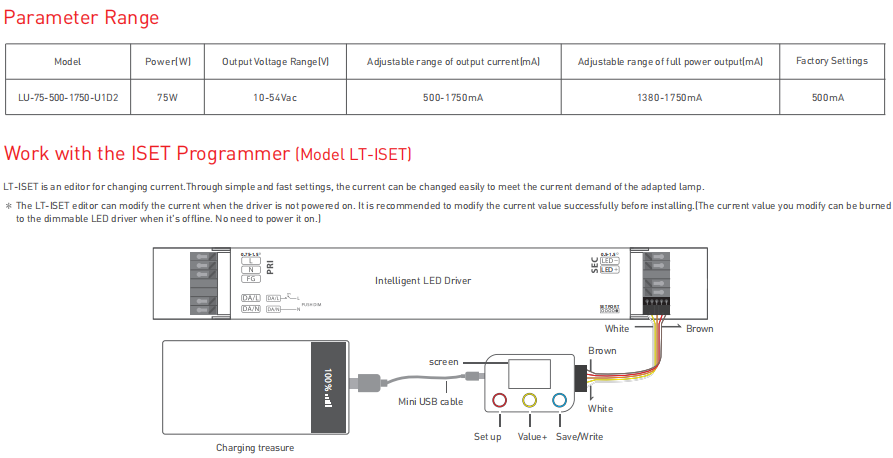
1. Insert the wires of the ISET editor into the driver whose current needs to changed in the correct direction (as shown above). After connecting the driver successfully, use the Mini USB cable to
connect the editor and power it on.
2. Press the red "Setting" button on the left, the first digit of the current value on the screen is selected. The digit flashes to indicate that it has been selected. After selecting the digit, press the yellow
"+" button in the middle to select and modify the value. (The range of the first digit is from 0 to 2 and the range of other digits is from 0 to 9). When the numeric value reaches the preset one, press the red "Setting" button again to select the next digit to modify its value, and so on.
3. When the current value reaches the preset value, press the blue button on the right to save the current value. Press the blue button again to write. When you hear a short beep of the editor, the current value will be set up successfully. If you hear a long beep of the editor, it means that the current value exceeds the current range of the driver and the setting fails.
Attentions
Products shall be installed by qualified professionals.
LTECH products are non-waterproof (special models excepted). Please avoid the sun and rain. When installed outdoors, please ensure it is mounted in a water proof enclosure.
Good heat dissipation will extend the working life of products. Please ensure good ventilation.
Please check if the working voltage used complies with the parameter requirements of products.
The diameter of wire used must be able to load the light fixtures you connect and ensure the firm wiring.
Before you power on products, please make sure all the wiring is correct in case of incorrect connection that causes damage to light fixtures.
If a fault occurs, please do not attempt to fix products by yourself. If you have any question, please contact your suppliers.
This manual is subject to changes without further notice. Product functions depend on the goods. Please feel free to contact our official distributors if you have any question.
Warranty Agreement
Warranty periods from the date of delivery 5 years.
Free repair or replacement services for quality problems are provided within warranty periods
Warranty exclusions below:
Beyond warranty periods.
Any artificial damage caused by high voltage, overload, or improper operations.
Products with severe physical damage.
Damage caused by natural disasters and force majeure.
Warranty labels and barcodes have been damaged.
No any contract signed by LTECH.
1. Repair or replacement provided is the only remedy for customers. LTECH is not liable for any incidental or consequential damage unless it is within the law.
2. LTECH has the right to amend or adjust the terms of this warranty, and release in written form shall prevail