| Select Input Voltage: | 110V±20% (US, CA) (Base), 220V±20% (EU, UK, AU) (Base) |
|---|---|
| Select Plug Type: | US (Base), UK (Base), EU (Base), AU (Base) |
| Availability | In Stock |
| Condition | Brand New |
Synchronous Control DMX512 Decoder RF Remote Control High Voltage 110V 220V RGB LED Strip Lights for sale.
The DMX decoder adopts advanced computer control chips to receive the internationally widely used DMX 512 standard digital signal into PWM signal to drive LED light strips.
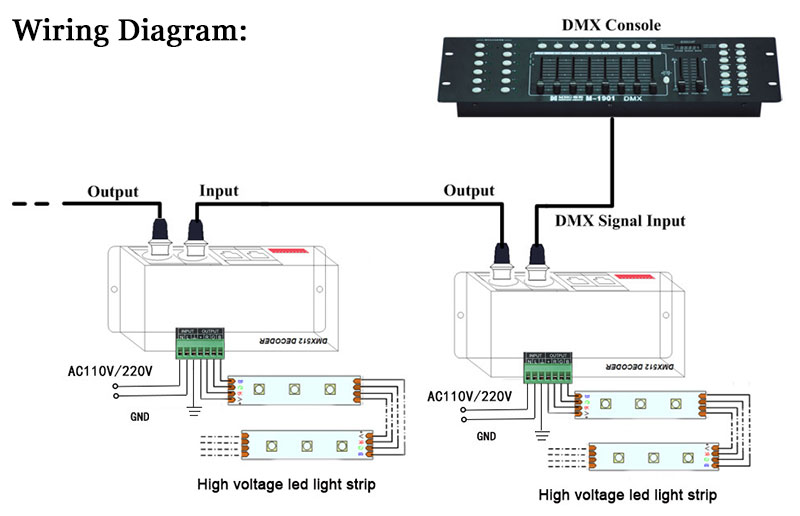
It can be connected to the DMX console, and the LED decoder can be increased to constantly expand the output channels to achieve more dimming or various light change effects.
When the LED strip DMX decoder is not connected to the DMX lighting console, the machine can be used as a synchronous controller, which can synchronize the control of multiple decoders and LED strips. (The main controller uses an RF remote to control, the sub-controller doesn't need a remote.)
Standards and Certifications


Working temperature: -20℃~60℃
Voltage: AC110V/220V
Output current: 2.5A/CH
Output power: 110V - <825W, 220V - <1650W
Controller size: L164 x W66 x H 40mm
Channel: 3CH
DMX512 standard: DMX512/1990
Remote control distance: 10-20m
Instructions for Use
I. Decoder address setting Each decoder occupies 3 addresses and adopts coding switch to set address. Binary value coding switch of coding switch 1-9 is to set DMx512 starting address code, bit 1 is the lowest bit and bit 9 is the highest bit, and a total of 511 address codes can be set. The DMX 512 start address code = the sum of the bit value of coding switch 1-9, turn the coding switch down (ON to set "1") to get the bit value of this bit; turn the coding switch up (to set "0"), then the bit value of this bit is 0. When coding switch FUN = OFF (set "0". The DMX512 signal can only be received when the code switch FUN = OFF (set to "0").
The following table allows you to select the position of the code puller and to select the channel by means of the dip switches.
| Number of bits | 1 | 2 | 3 | 4 | 5 | 6 | 7 | 8 | 9 | 10 |
| Number of weights | 1 | 2 | 4 | 8 | 16 | 32 | 64 | 128 | 256 | FUN |
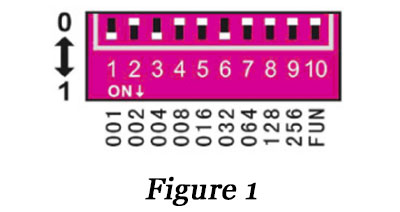
Example 1: As in Figure 1, the DMX512 start address code is set to 37, and the 6th, 3rd and 1st positions of the code switch are set to "1", and the rest positions are "0", at this time, the sum of the bit values of the 1st and 9th positions of the code switch is 32 + 4 + 1, which is the DMX512 start address code 37. The next two channels are 35 and 39 respectively.
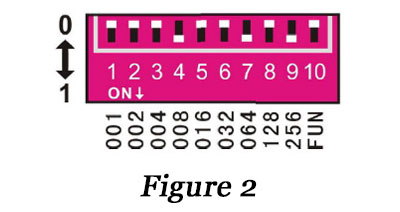
Example 2: As in Figure 2, to set the DMX512 start address code to 328, set the position 9, 7 and 4 of the coding switch to "1" and the rest to "0", then the sum of the bit values of coding switch 1 and 9 is 256 + 64 + 8, which is the DMX512 start address code 328. And the next two channels are 329 and 330 respectively.
1. Test function:
The 10th bit of the dip switch is "FUN", which is the function key. FUN = OFF is the DMX512 decoder function, accepting DMX512 signal.
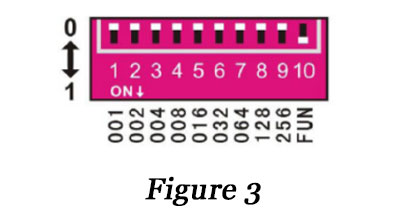
FUN = ON is the decoder test function as shown in Figure 3 (1 channel to red light, 2 channels to green light, 3 channels to blue light).
1-9 switch OFF: black
Switch l = ON: red
Switch 2 = ON: green
Switch 3 = ON: blue
Switch 4 = ON: yellow
Switch 5 = ON: Purple
Switch 6 = ON: Cyan
Switch 7 = ON: White
Switch 8 = ON: Seven-color jumping (8-speed selection)
Switch 9 = ON: full-color gradient (8-speed selection)
2. Jumping and fading effect speed selection:
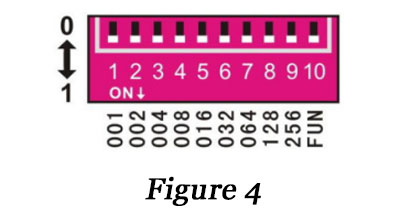
In the decoder test function, switch 8 = ON is the seven-color jumping effect, switch 9 = ON is the full-color fading effect, each effect has 8-speed
Degree selection.
1-7 switch = OFF: 0 speed
Switch 1 = ON: 1 speed
Switch 2 = ON: 2 speeds
Switch 3 = ON: 3 speeds
Switch 4 = ON: 4th speed
Switch 5 = ON: 5th speed
Switch 6 = ON: 6 speed
Switch 7 = ON: 7-speed (slowest)
As in Figure 4 when multiple switches are ON at the same time, the switch with the larger value prevails. When all dip switches in the legend = ON, the decoder is testing the fading effect of the function, and the change speed is 7 (slowest speed).
In addition, when the signal indicator (green light) flashes slowly, it is the built-in effect change of the decoder, and when the DMX512 controller is enabled, the signal indicator becomes fast flashing.
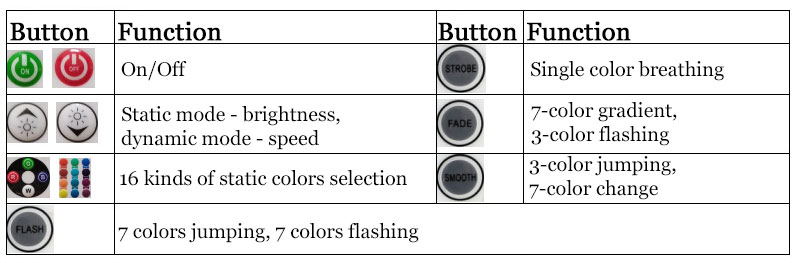
Remote control key functions: