


| Availability | In Stock |
|---|---|
| Condition | Brand New |
ZigBee 3.0 Constant Voltage RGB LED Controller for color changing RGB led strips and lights, Tuya APP control /Philips HUE control / Alexa, Google, Amazon ECHO Voice control /DC power socket input.
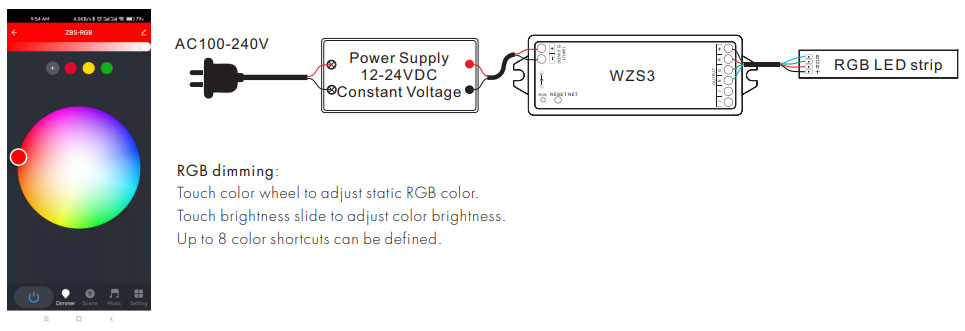
● Used for controlling RGB LED strip lights.
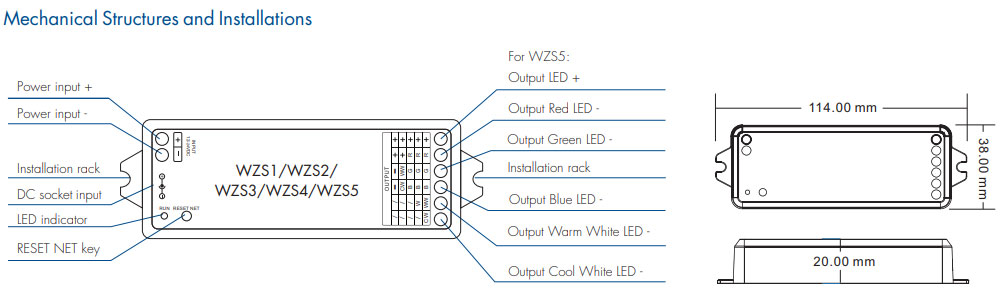
● DC power socket input and 3-channel constant voltage output.
● Tuya APP cloud control, support color and brightness adjustment, delay turn on/off, timer run, scene edit, music play, sleep wake-up, and biorhythms function.
● Philips HUE APP control by connecting with Philips HUE bridge.
● Voice control, support Alexa, Google, Amazon ECHO, and TmallGenie smart speaker.
● Can relay and route to each other, up to 15 hops.
● Match with Zigbee 3.0 remote or scene panel control optional.
WZS3 Manual Download 
Standards and Certifications


Product Specification
| Model: | WZS3 |
| Input voltage: | 12-24VDC |
| Input current: | 12.5A |
| Output voltage: | 12-24VDC |
| Output current: |
3CH,4A/CH |
| Output power: | 3x(48-96)W |
| Input signal: | Zigbee 3.0 |
| PWM frequency: | 2KHz |
| Dimming range: | 0 -100% |
| Control distance: | 30m (Barrier-free space) |
| Operation temperature: | Ta: -30℃ ~ +55℃ |
| Case temperature (Max.): | Ta: +85℃ |
| IP rating: | IP20 |
| Warranty: | 5 years |
Available Zigbee 3.0 remote and scene panel: TS4(WZS) 4 Scene Panel, PK4(WZS) 4 Scene Panel, PK8(WZS) 8 Scene Panel.
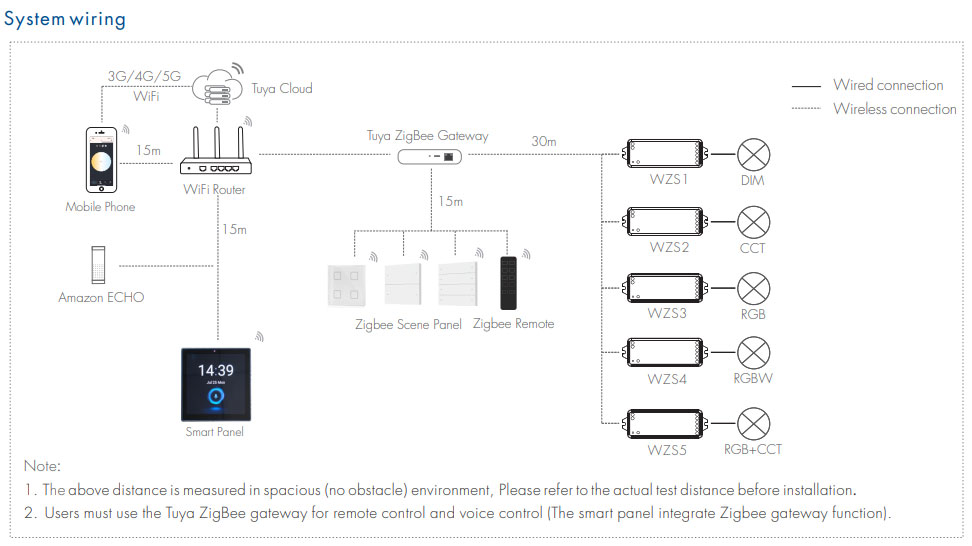
Connect the remote, scene panel, and LED controllers through the Zigbee gateway on Tuya APP first.
There are 8 scenes in the Tuya APP, which can be set to lighting scenes or linkage scenes.
The lighting scene is used for the overall control of multiple lamps, like the light adjustment of the entire room.
Linkage scene is used for linkage control of different equipment, such as lamps, and curtains on and off together.
After a successful scene setting, you can use the remote and scene panel to control these LED controllers directly.
Use of Smart Panel
● Connect the smart panel to the WiFi network and open the Tuya APP to scan the QR code to the binding.
● On the Tuya APP, under the smart panel, search and add one or more light devices.
● After adding light devices, users can set scenes in the Tuya APP, and these scenes will be automatically synced to the smart panel.
● After setting successfully, users can control lights by touching the color slide and recalling the scene on the smart panel screen directly.