| Select Control Type: | Zigbee 3.0 Version PB-12A-H(WZS) (Base), WiFi Tuya Version PB-12A-H(WT) (Base) |
|---|---|
| Availability | In Stock |
| Condition | Brand New |
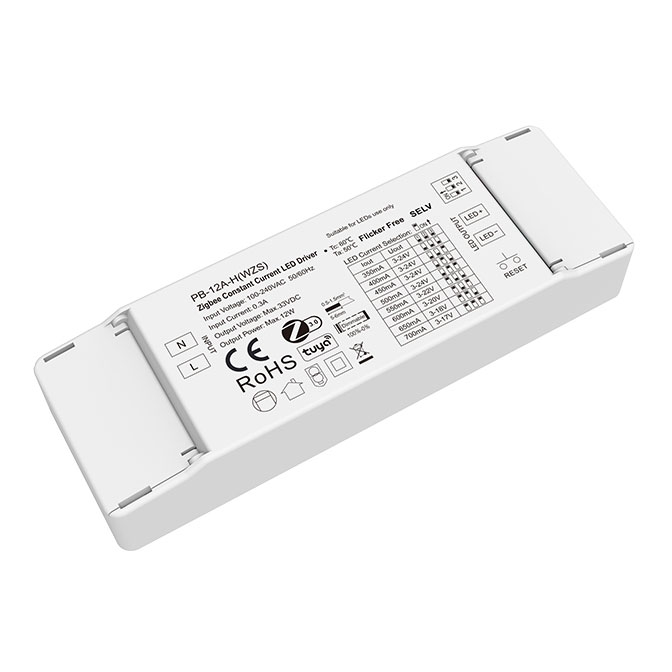
This Intelligent Dimmable Constant Current LED Driver integrates with a Zigbee 3.0 or WiFi network, to dim LED lights through a smart device - a smartphone, a smart speaker, a remote control, or a smart home lighting center.
The use of the Zigbee protocol ensures low-power, reliable wireless communication between the LED lights and the controlling device, offering a convenient and versatile solution for modern lighting.
Suitable for retrofit upgrades & new luminaire designs for downlights, spotlights, and other decorative lighting applications in offices, hotels, warehouses, retails, etc.
Features
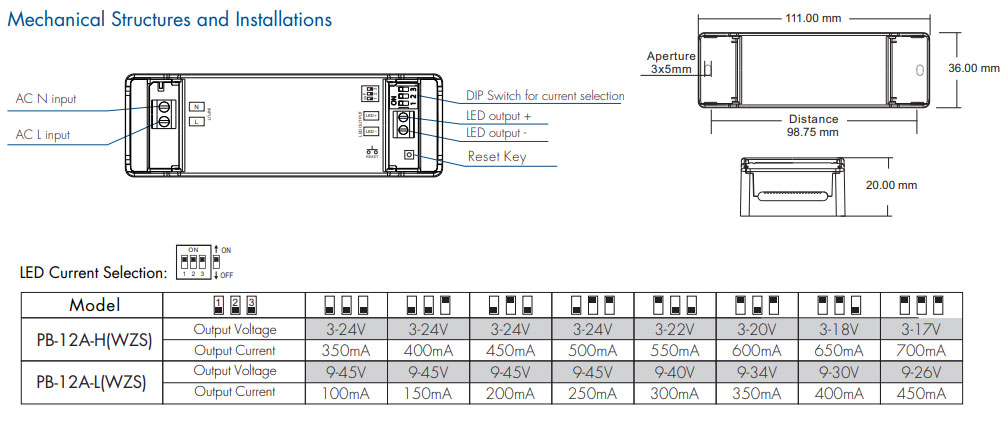
● 1 channel constant current output, configurable current via DIP switch.
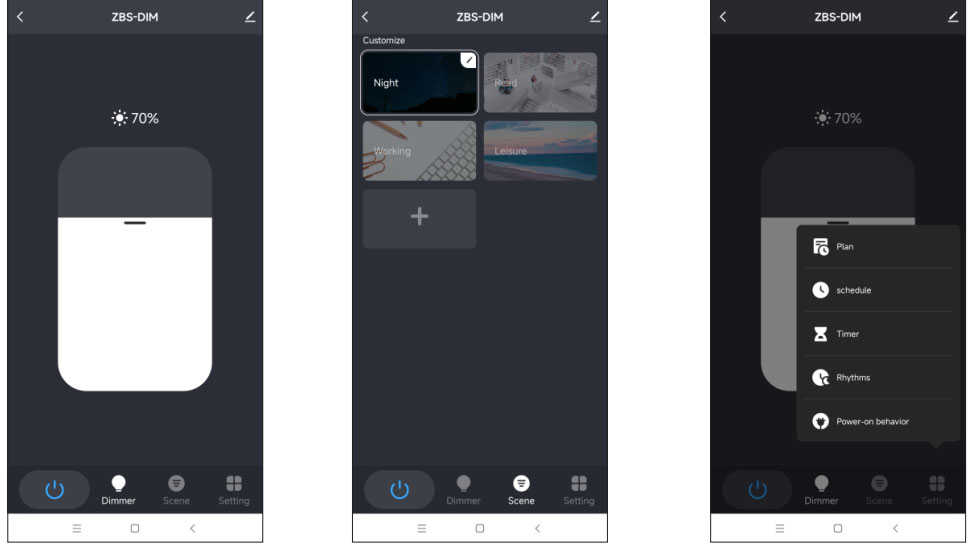
● Tuya APP control, support brightness adjustment, delay turn on/off, timer run, scene edit, sleep wake-up, and biorhythms functions.
● Support Philips HUE APP control by connecting with the Philips HUE bridge.
● Support Alexa, Google, Amazon ECHO, and TmallGenie smart speakers to achieve voice control.
● Available to match with Zigbee 3.0 remote or scene panel control.
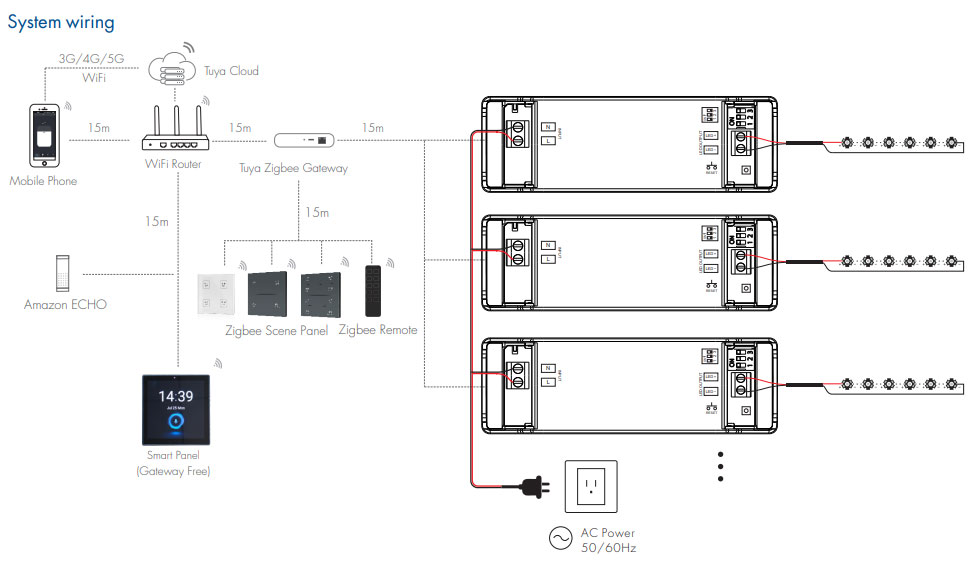
● Can relay and route to each other, up to 15 hops.
● RESET button for clearing network connection.
● Universal AC input / Full range.
● Flicker - Free.
● Synchronize on multiple LED drivers.
● Over-heat / Over-load / Short circuit protection, recover automatically.
● Full protective plastic case.
● Suitable for indoor LED lighting applications.
● 5 Year, 50,000 hours warranty.
Zigbee PB-12A-H(WZS) Manual Download 
WiFi PB-12A-H(WT) Manual Download
Product Specification
| Model: | PB-12A-H(WZS) |
| Output Voltage: | 3-24VDC |
| Output Current: | 350~700mA |
| Output Power: | Max.12W |
|
Max Output Voltage:
|
33VDC
|
| Dimming Range: | 0~100%, dimming depth 0.5% |
| PWM Frequency: | 4000Hz |
| Current Accuracy: | ±5% |
| Input Voltage Range: | 100~240VAC |
| Frequency Range: | 50/60Hz |
| Efficiency: | >79% / 230VAC |
| Alternating Current: | 0.3A/115VAC, 0.15A/230VAC |
| No Load Power: | <2W |
| Woking Temperature: | -20℃~50℃ |
Note:
1. The above distance is measured in a spacious (no obstacle) environment, Please refer to the actual test distance before installation.
2. Please check if the WiFi router net is in the 2.4G band, the 5G band is not available, and do not hide your router network.
3. Please keep the distance between the LED driver and router close, and check the WiFi signals.
4. Users must use the Tuya ZigBee gateway to realize remote control and voice control (The smart panel integrates the Zigbee gateway function).
App Operating Instructions
1. Network pairing
● Download the Tuya APP and register an account, search and add the Tuya Zigbee gateway device.
● Quickly press the "RESET NET" button five times or repeat power on and off five times to clear the previous network connection, and enter pairing mode with the output light breathes blinking.
● Under the gateway, search and add a new device. If the network connection is successful, you can find ZBS-DIM devices in Tuya APP.
2. Lighting control settings
After pairing the light device, click the device and change brightness by touching the brightness slide.