| Availability | In Stock |
|---|---|
| Condition | Brand New |
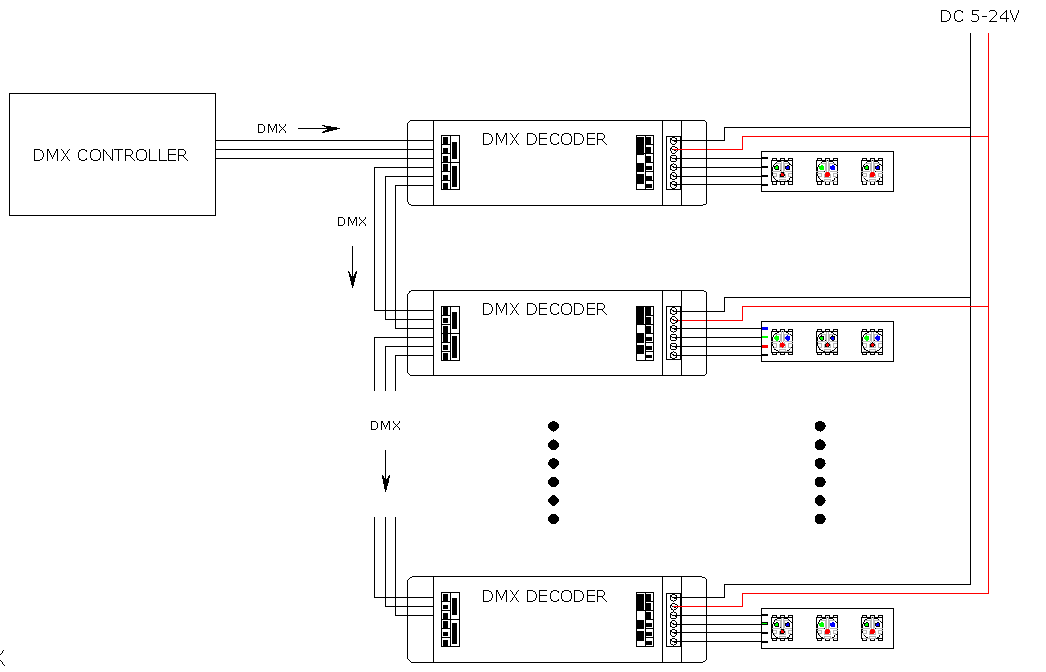
The DMX decoder adopts the advanced micro control unit, it receives standard DMX-512 digital control signal that is widely used in the and transform it into PWM signal to drive LED; the port of DMX signal has lightning protection measures, while the load output has over-current protection circuit; You could connect the DMX decoder with DMX digital console to achieve dimming or various changes in procedures. Not connected with DMX console, you can choose select the built-in 21 kinds of default patterns through the wireless remote control.
Standards and Certifications


Technical Parameters
Working temperature:: -20-60℃
Input voltage:: DC5-24V
Output: 3 channels
Connection mode: common anode
Standby current:<0.7W
Output current:<=5A (each channel)
Standby power consumption:5V<25W,12V<60W,24V<120W (each channel)
External dimension:L165×W39.5×H30.3mm
Specifications Download 
Remote Control External Dimension

Power & RGB Interface
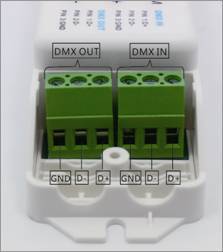
DMX IN&DMX out Interface
POWER: input interface of power, VCC should be connected with positive of power, GND connected
with negative of power, the range of supply voltage is DC5-24V.
OUT PUT:load output interface,V+ should be connected with the positive of light, R, G, B connected with negative,correspond to the three channels.
DMX IN: input interface of DMX signal, D+ should be connected with positive of signal, D- connected with negative of signal, Gnd connected with ground.
DMX OUT:output interface of DMX signal, D+ should be connected with positive of signal, D- connected with negative of signal, Gnd connected with ground.
Instructions for use
The DMX decoder has three buttons
 sed to switch to built-in mode, brightness, speed or DMX address
 It is used to change the style of the built-in mode forward, brightness plus, speed plus, and DMX address plus.
 Used to change the style of the built-in mode backward, brightness minus, speed plus, and DMX address minus.
Menu
The DMX decoder menu includes built-in mode, brightness adjustment, speed adjustment, DMX address setting, press the mode key to switch to different menus, they correspond to the abbreviations M, B, S, D in the upper left corner of the screen.
Under the M menu, press the plus or minus key to switch to different built-in modes, a total of 21 built-in modes.
Under menu B, press the plus or minus key to change the brightness level, a total of 100 levels, * indicates that the current mode brightness is not adjustable.
Under the S menu, press the plus and minus keys to change the speed level, a total of 100 levels, * indicates that the current mode speed is not adjustable.
Under the D menu, press the plus and minus keys to adjust the DMX address, a total of 510 addresses can be adjusted.
B, S, and D menus will automatically switch to the M menu if there is no operation for a long time.
After accessing the DMX signal, the decoder will automatically switch to the D menu when it detects the DMX signal. At this time, the DMX address can be set, but it cannot enter the built-in mode operation. After the DMX signal is removed, it will automatically return to the built-in mode.
DMX address code setting
Each DMX decoder occupies 3 DMX addresses. Use the menu to set the address. Press the mode button to switch the menu to the DMX address setting. The upper left corner of the menu displays D. Press the plus and minus keys to adjust the address to the address to be decoded; Specify 510 addresses (actually 512 addresses).
Examples:
If the DMX start address code is set to 37, you can press the plus and minus keys to adjust D to 37. At this time, the addresses occupied by the DMX decoder are 37, 38, and 39 addresses.
If you want to set the DMX start address code to 38, you can press the plus and minus keys to adjust D to 38. At this time, the addresses occupied by the DMX decoder are 38, 39, and 40.
The Built-in Mode
The DMX decoder contains 21 built-in modes, each of which has different lighting effects. Press the mode key to switch the menu to the built-in mode. The upper left corner of the menu displays M, and press the plus and minus keys to switch to a different built-in mode; for example, the menu display M 06 is currently the sixth built-in mode.
The built-in mode way as below
|
Item |
Function |
Remark |
|
1 |
Static red |
Brightness is adjustable,speed is unadjustable |
|
2 |
Static green |
|
|
3 |
Static blue |
|
|
4 |
Static yellow |
|
|
5 |
Static purple |
|
|
6 |
Static cyan |
|
|
7 |
Static white |
|
|
8 |
red light flashing |
Brightness and speed are adjustable |
|
9 |
Green light flashing |
|
|
10 |
Blue light flashing |
|
|
11 |
R/G/B Three-color jumpy changing |
|
|
12 |
Yellow light flashing |
|
|
13 |
Purple light flashing |
|
|
14 |
Cyan light flashing |
|
|
15 |
White light flashing |
|
|
16 |
Seven-color jumpy change |
|
|
17 |
B/R gradual changing |
Speed is adjustable,brightness is unadjustable
|
|
18 |
B/G gradual changing |
|
|
19 |
R/G gradual changing |
|
|
20 |
Three color gradual changing |
|
|
21 |
Seven color gradual changing |
|
|
0 |
OFF |
Typical applications