

| Availability | In Stock |
|---|---|
| Condition | Brand New |
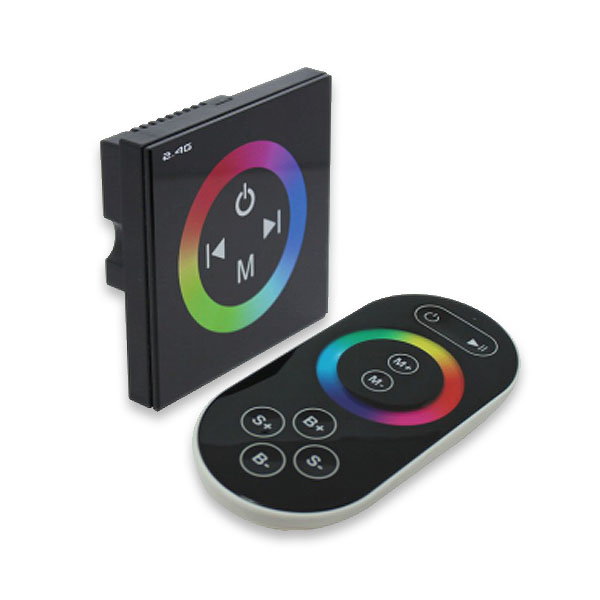
The DMX touch glass panel with 2.4G remote control is a new high-end LED controller developed by our company. It uses a glass panel design, which is beautiful and stylish. The use of high-precision capacitive touch control chip increases the sensitivity of touch and reduces false triggering. This product has a 2.4G remote control function, a DMX signal control interface, a dazzling built-in mode selection and a colour ring. It is a full-featured high-end touch controller, which is used to control various lamps with LED as the light source. For example point light source, soft light strip, wall washer, panel light, etc.; it has the advantages of convenient wiring and simple use; according to the actual needs of customers, it can achieve light changes such as jump, gradual change, strobe and so on.
Standards and Certifications


Technical Parameters
Controller
Working Temperature: -20-60℃
Power Supply Voltage: DC 12 to 24V
Output: 3 channel
Connect Way: common anode
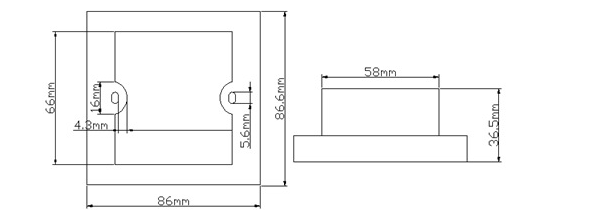
External Dimension: L86ΧW86ΧH41.8mm
Packing Size: L115ΧW110ΧH56mm
Net Weight: 227g
Gross Weight: 291g
Static Power Consumption: <1W
Output Current: < 4A(each channel)
Output Power: 12V:< 144W, 24V:< 288W
Remote control
Working Temperature: -20-60℃
Power Supply Mode: AAA*3
Power Supply Voltage: 1.5V*3
Transmitting Frequency: 2.4Ghz
Standby Power Consumption: 0.015mW
Standby Current: 60uA
Working Current: 200uA
Transmitting Current: 10mA
Remote Distance: about 30 meters
Standby Time: six month
Weight: 94g
Specifications Download 
External Dimension
Controller housing size
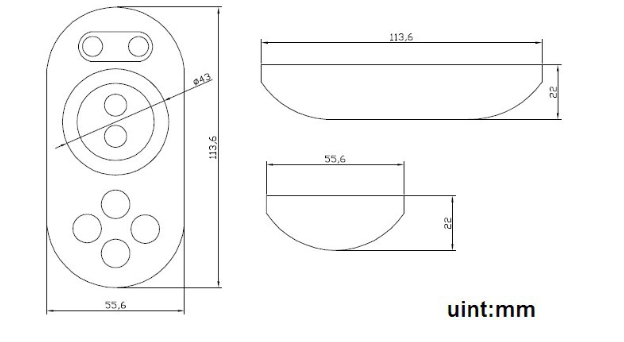
Remote control housing size
Interface instruction
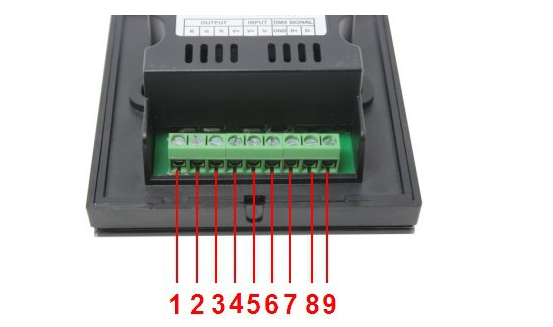
“5”, “6”: power input pin, input voltage range is 12-24V, ”6”connect the power of cathode, “5” connect the
power of anode;
“1”, “2”, “3”, “4”: power output pin, output voltage is 12-24V, output each channel maximum current is
4A, ”4” is the common anode, “3” is red light interface, “2” is green light interface, “1” is blue light interface.
“7”, “8’”, “9”: DMX signal input interface, “7” is signal ground, “8” is signal +, “9” is signal -.
Controller Instructions
1. When there is DMX signal
When there is a DMX signal, the controller is controlled by the DMX signal, the touch button is invalid, and the brightness of the R, G, B three-way light bar changes with the change of the DMX signal (the address can be written through the DMX editor);
2. When there is no DMX signal
A. Description of touch remote control
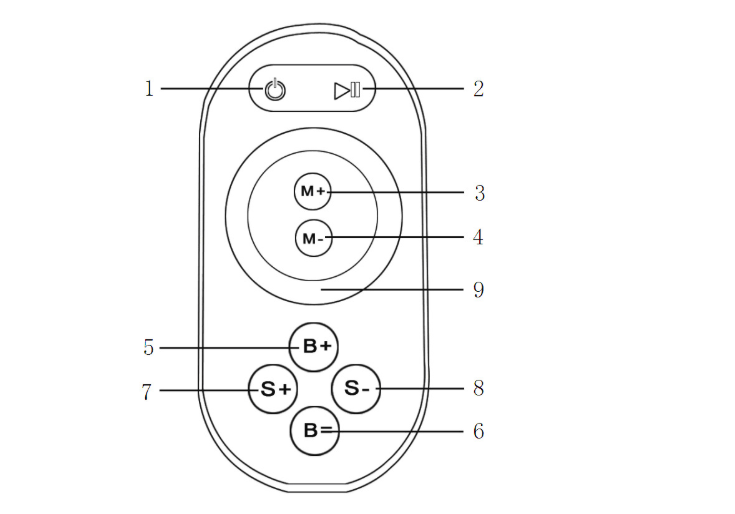
1. Switch key 2. Pause key
3. Mode + 4, Mode-
5. Brightness + 6, Brightness-
7, Speed + 8, Speed-
9. Color ring key
There are 64 touch buttons (points) on the touch remote control panel. The functions of each button are as follows:
1. Switch key, in any state, the controller output can be turned on or off;
2. Pause key, in dynamic mode, can stop the controller in the current state;
3. Mode plus selection key;
4. Mode minus selection key;
5. Output brightness control key, each time you press the brightness level plus 1, a total of 25 levels;
6. Output brightness control key, each time the brightness level is reduced by 1, there are 25 levels in total;
7. Output speed control key, each time you press the speed level plus 1, a total of 100 levels;
8. Output speed control key, each time the speed level is reduced by 1, the total is 100 levels;
9. Colour wheel touch keys, static mode selection keys, up to 55 touchpoints. In any mode, the colour circle can be switched to the static colour touched on the colour circle in any mode.
Stop using the remote control for about 15-20s, the remote control will automatically enter the standby state to extend battery life. At this time, the colour ring cannot be used. You must press the button to wake up the remote control and enter the working state.
Immediately after power-on, press and hold the key of the 3S touch panel and any button of the remote control, the load light will flash 3 times when the code is successfully matched.
When there is no DMX signal, the controller can accept the touch key control. The operation instructions are as follows:
 Color wheel touch keys, static mode selection keys, up to 64 touch points
 In any state, the controller output can be turned on or off
 : It is a sample color function key, which can select different sample color changes, a total of 11 change modes. When the controller is turned on, long press the key for more than 3 seconds to turn the buzzer output on or off
 : Static brightness plus, 25 levels, dynamic speed plus, 100 levels
 : Static brightness reduction, 25 levels, dynamic speed reduction, 100 levels
The dynamic mode is shown in the table below
|
Mode Number |
Features |
Remarks |
|
1 |
Static red |
Adjustable brightness, not adjustable speed |
|
2 |
Static green |
|
|
3 |
Static blue |
|
|
4 |
Static yellow |
|
|
5 |
Static purple |
|
|
6 |
Static cyan |
|
|
7 |
Static white |
|
|
8 |
Three-color jump |
Adjustable speed, brightness is not adjustable |
|
9 |
Seven colors jump |
Adjustable speed, brightness is not adjustable |
|
10 |
Three-color gradient |
Adjustable speed, brightness is not adjustable |
|
11 |
Seven-color gradient |
Adjustable speed, brightness is not adjustable |
Typical Application
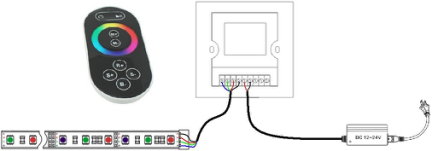
1. Without DMX signal typical application
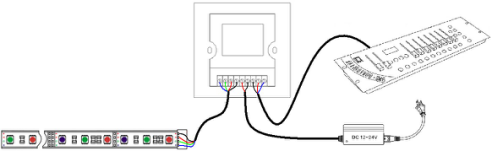
2. With DMX signal typical application
Installation method
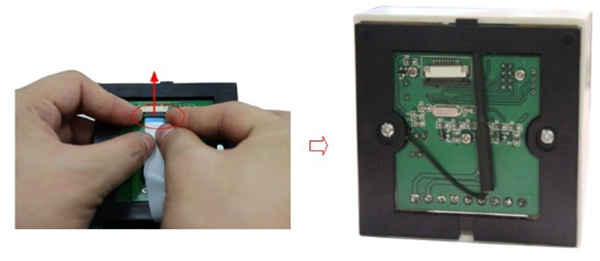
1. Open the touch panel
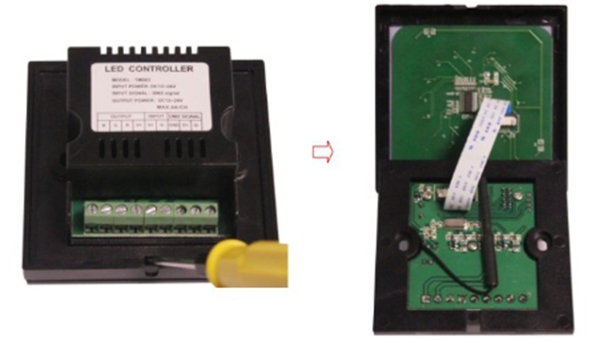
Push outward with both hands at the red circle mark in the figure below, you can pull out the cable, and push up to fix the cable, and connect the circuit according to the typical application circuit.
After connecting the wire, install the touch controller in the wall cassette, and then screw it to fix it on the wall.
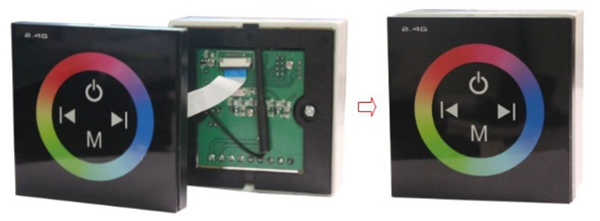
3. Cover the touch panel
Optimistic about the direction of the panel, cover the panel. As shown below:
Precautions
1. Connect the load line first, and then connect the power line; make sure there is no short circuit between the input and output connection lines before powering on.
2. The power supply voltage range of the controller is DC12~24V. Exceeding the voltage range may damage the controller.