

| Availability | In Stock |
|---|---|
| Condition | Brand New |
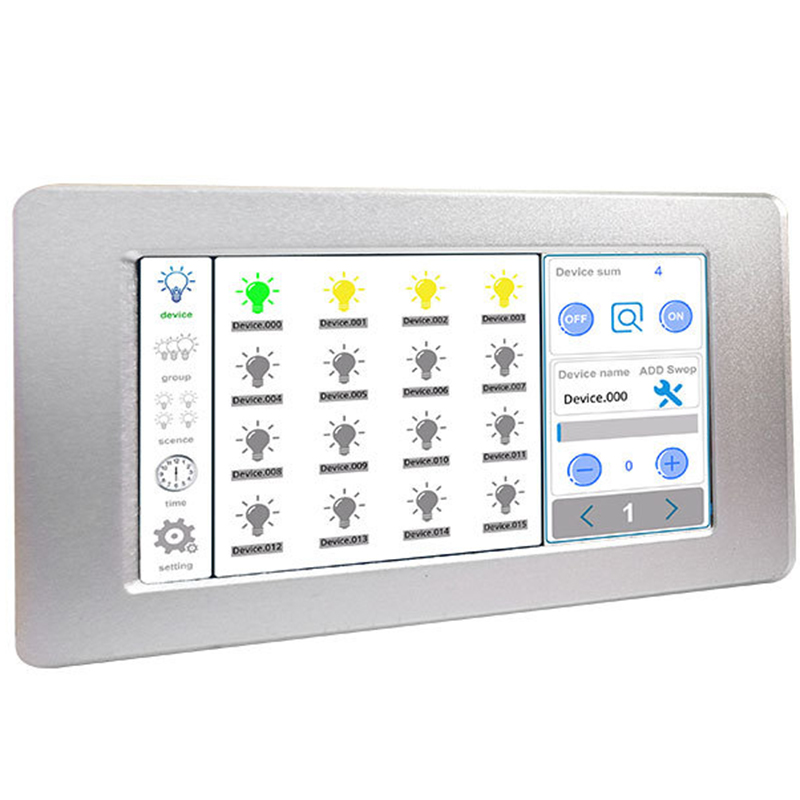
DALI 2 Channel Touch Panel Host can be connected with two DALI signals, control up to 128 devices, can set the device grouping and scene, and support the timer function. The user can control the dimming of individual lamps and lanterns through the controller and can adjust the dimming into groups. The scene mode can be set arbitrarily and the timer can be used to call the scene function. This controller is suitable for lighting control needs of homes, hotels, and large meeting places.
The touch screen master is a light controller based on an intelligent system. The touch screen uses the current popular capacitive touch technology, the software is simple to operate, and the user-defined settings are easy, which can achieve convenient and fast diversified lighting control effects.


Technical Parameters
Working Temperature: -20 to 60℃
Power Supply Voltage: DC12V, 1A
Output: 2 DALI bus signals, up to 128 DALI single dimmers
Connection Method: DALI signal cable
Packing Size: 245*165*60mm
Dimensions: 210mm*127mm*45mm
Net Weight: 722g
Gross Weight: 960g
Maximum Power Consumption: 12W
Specifications Download 
Dimensions

Interface description

1. Power input port (DC12V); 2. DALI bus interface No. 1; 3. DALI bus interface No. 2;
Function introduction
System function area introduction

The system has three major areas, as follows:
1. System menu (reference number 1 shown in Figure 1): contains five function buttons of device, group, scene, timer, and setting.
2. Content panel (label 2 shown in Figure 1): display device information (number of devices, device name), group information (group name, group picture), scene information (scene name, scene picture), timer information, Setting information (brightness adjustment, a restart of this machine, this machine Data restore to factory state, all the following equipment including this machine restore factory state, screen time, lock screen password setting).
3.Attribute panel (reference number 3 shown in Fig. 1): display device attribute, group attribute, scene attribute information.
Software function introduction
Device control: select a terminal device to control, such as controlling the brightness of the light.
Group control: select a group to add or remove devices, and control the brightness of the devices in the group as a whole. When performing group control, the brightness of the devices in the group will become the same.
Scenecontrol: select a scene to add or remove the device, the brightness of the scene device can be different, more flexible than the group control, the scene can be applied to the timer.
Time: select a timer to set (time time, scene name), after the timer starts, the corresponding scene will be executed at the set time. All timers can be turned on or off at the same time, or a timer can be turned on or off individually.
Setting : brightness adjustment; restart the machine, click to restart immediately, no prompt; the data of the machine will be restored to the factory state (a password will be required, which can be the default password (686890) or a user-defined password); The machine is restored to the factory state (a password will be required, which can be the default password (686890) or a user-defined password); screen time (in seconds); lock screen password setting.

Installation diagram
