

| Select Kit: | Controller (Base), Controller + RF remote + Panel, Controller + RF remote, Controller + Panel Control |
|---|---|
| Select Light Color : | CCT Tunable White (Base), Single Color (Base) |
| Availability | In Stock |
| Condition | Brand New |
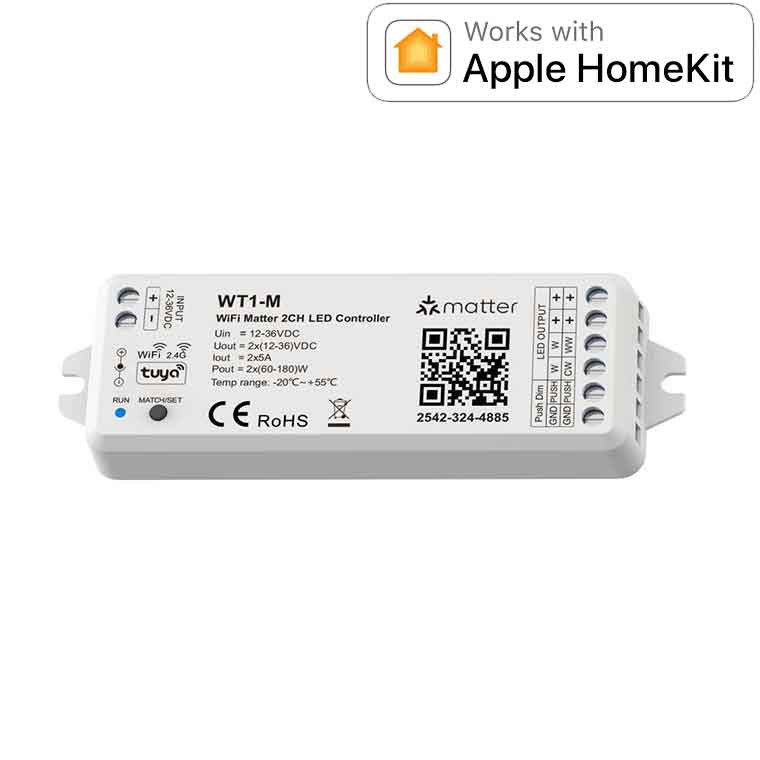
WiFi 2CH constant output LED controller support matter, suitable for DIM, CCT light strips.
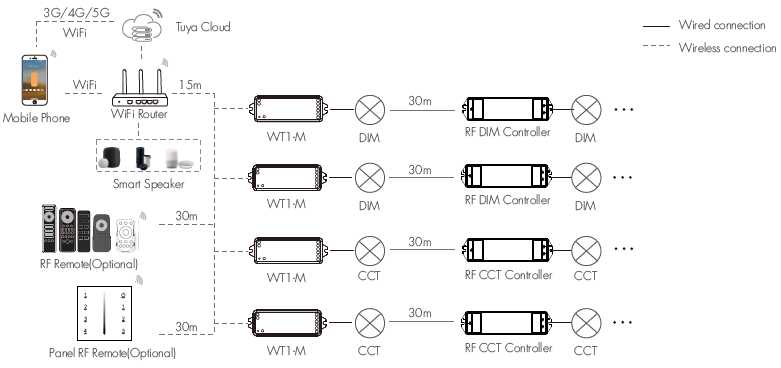
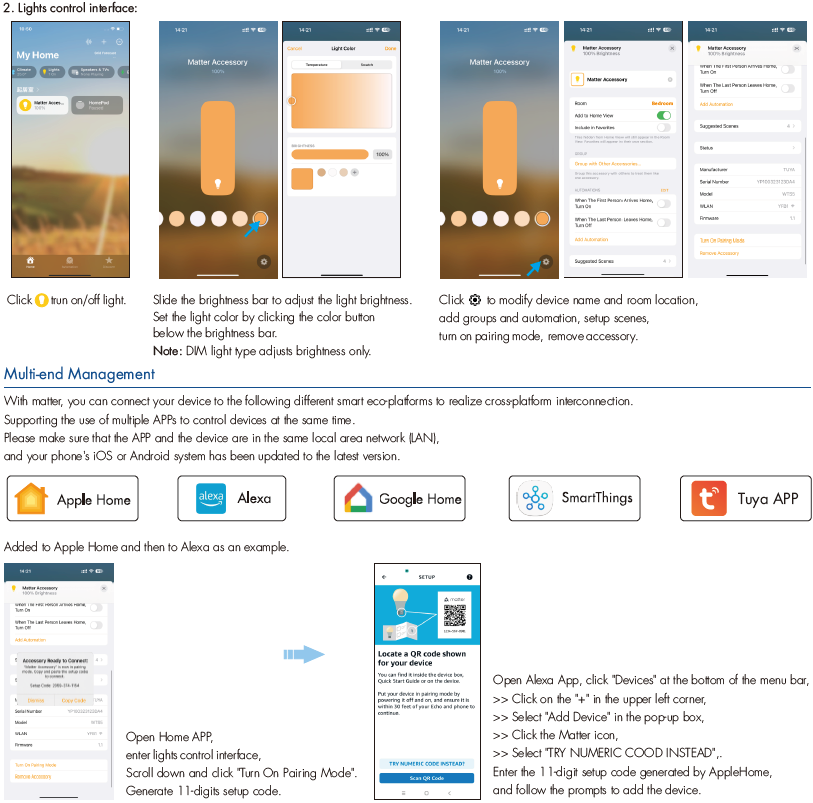
● Support multi-end management, Tuya APP, Apple Home, Amazon Alexa, Google Home, Samsung Smart Things platform interconnection.
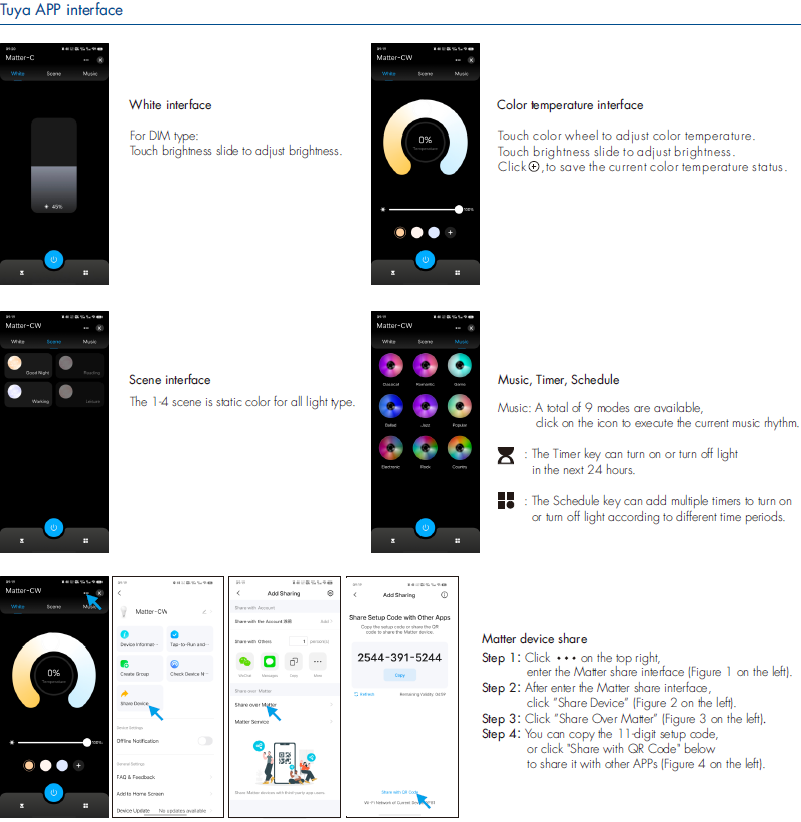
● APP remote control, support on/of light, color temperature and brightness adjustment,
scene setting, delay turn on/off light, timer run,etc.
● Voice control, support Siri, Amazon Alexa, Google Assistant,Tmall Genie and Xiaodu voice assistant,
but Tmall Genie and Xiaodu voice assistant only support Tuya APP.
● Connect with external push switch to achieve on/off, brightness and color temperature adjustment.
● Match with RF 2.4G single zone or multiple zone remote control.
● Each WT1-M controller can also work as WiFi matter-RF converter,
then use APP to control one or more RF LED controller or RF LED dimming driver synchronously.
Technical parameters
Input and Output
Input voltage: 12-36VDC
Output voltage: 2 x (12-36)VDC
Output current: 2CH, 5A/CH
Output power: 2 x (60-180)W
Output type: Constant voltage
Environment
Operation temperature: Ta: -20 OC ~ +55OC
Case temperature (Max.): Tc: +85OC
Dimming data
Input signal: WiFi + RF 2.4GHz + Push Dim
Control distance: 30m(Barrier-free space)
Dimming gray scale: 4096 (2^12)levels
Dimming range: 0 -100%
Dimming curve: Logarithmic
PWM Frequency: 2000Hz (default)
Package
Size: L120 x W43 x H35mm
Gross weight: 0.076kg
Safety and EMC
EMC standard (EMC): ETSI EN 301 489-1 V2.2.3
ETSI EN 301 489-17 V3.2.4
Radio Equipment(RED): ETSI EN 300 328 V2.2.2
Certification: CE, EMC, RED
Warranty and Protection
Warranty: 5 years
Protection: Reverse polarity,
Over-heat,
Short circuit
Note:
1. A smart speaker needs to be connected when using the AppleHome, Amazon Alexa, Google Home, Samsung SmartThings platform.
The smart speaker as a smart home hub is the connection center for multiple smart home devices (Matter-enabled smart home hardware products).
2. The above distance is measured in spacious (no obstacle) environment, please refer to the actual test distance before installation.
3. Please check if the WiFi router net in 2.4G band, the 5G band is not available, and do not hide your router network.
4. Please keep the distance between WT1-M devices and router close, and check the WiFi signals.

Note:
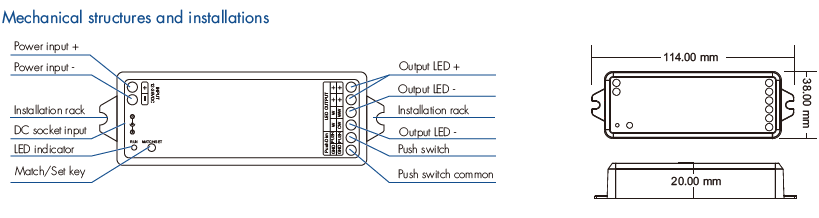
1. User can connect constant voltage power supply or power adapter as power input.
2. Press and hold Match/Set key for 2s, switch 2 kinds light type in sequence.
3. Switch off the power, then switch on power, repeat again.
Immediately short press match key 3 times, the light on/off time will change between 3s and 0.5s.
4. For CCT light, continuous power off and on will change 3 levels color temperature (WW, NW and CW) in sequence.
Tuya APP network connection
Please download the corresponding Tuya/Smart life APP according to your region.
Push twice Match/Set key fastly, or when press and hold Match/Set key for 8 or 10s to set 2 kinds light type:
Clear previous network connection, enter WiFi Smart config mode, the purple LED indicator flash fastly,
the output LED will flash 10 times.
Press and hold Match/Set key for 2s:
Switch 5 kinds light type in sequence, notice this operation does not automatically clear previous network connection.
Press and hold Match/Set key for 5s:
Clear previous network connection, enter AP config mode, the purple LED indicator flash slowly.
If WiFi Smart config failed, please try AP config.
Repeat power on and off for 5 consecutive times, also clear previous network connection, enter WiFi Smart config mode, the output LED will flash 10 times.
If Tuya APP network connection succeed, the RUN LED indicator will stop flash purple, and turn corresponding light type color (White: DIM, Yellow: CCT),
and in Tuya APP, you can find Matter-C device or Matter-CW device.
Note:
Users can also scan the QR code on the product shell or manually enter the 11-digit setup code to connect the device