| Availability | In Stock |
|---|---|
| Condition | Brand New |
Summarization
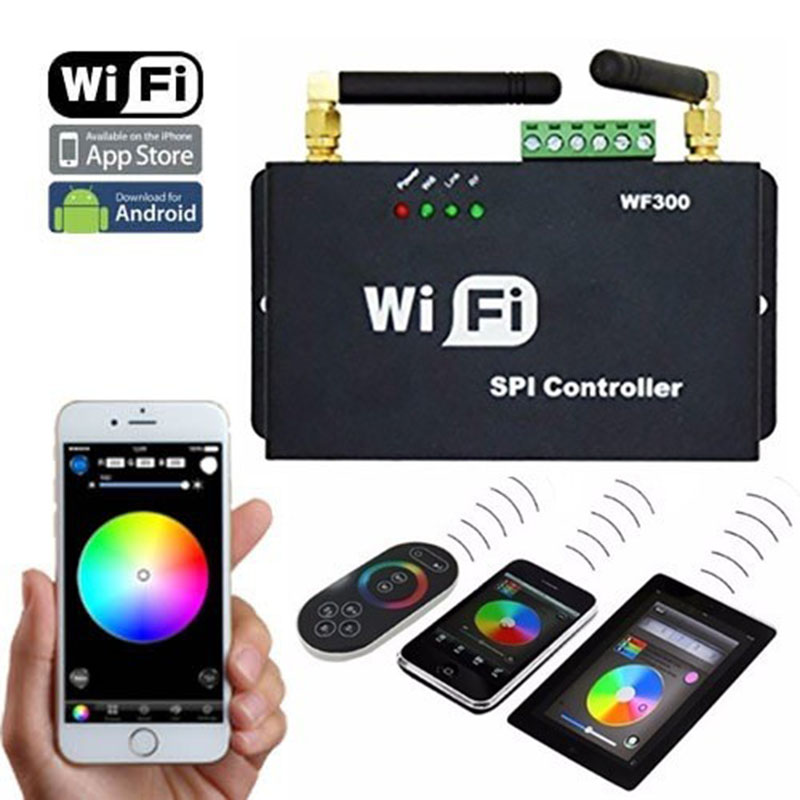
LED-WiFi controller is following the traditional with infrared, RF technology controller foundation, it is birth of market and customer's demand, it is one type controller which integration the newest wifi technical in the market. It makes the LED control more convenience, more hommization. We can use an Android system or IOS system mobile phone to install control software, then it can control LED, this is the wishes of every customer.
Use WiFi technology can make our control range more wider, can get rid of narrow space constraint, in building can control more than 50m, in outdoor can control more than 100m.
In the condition of not use the mobile software, also can use the remote control to control, very convenience, bring many choices for you.


Technical Parameters
Remote control technical parameters
Working Temperature: -20-60℃
Power Supply: AAA*3
Power Supply Voltage: 1.5V*3
Standby Power Consumption: 0.015mW
Standby Current: 3uA
Working Current: 200uA
Emitting Current: 10mA
Remote Control distance: about 30 meters
Standby Time: 6 months
Software Technical Parameters
Name: Magic Color
Operating Platform: IOS version supports IOS system, the device must have WiFi function
Language: English
Category: Communication
Free, green, no plugins
Controller technical parameters
Working Voltage: DC5-24V
Output Control: control SPI signal output
Connection Method: SPI signal line (DATA, CLK)
Dimensions: L107*W65*H30 (mm)
Receiving sensitivity: 802.11b DSSS (-5dBm), 802.11b CCK (-10dBm), 802.11g OFDM (-15dBm)
Specifications Download 
Package list
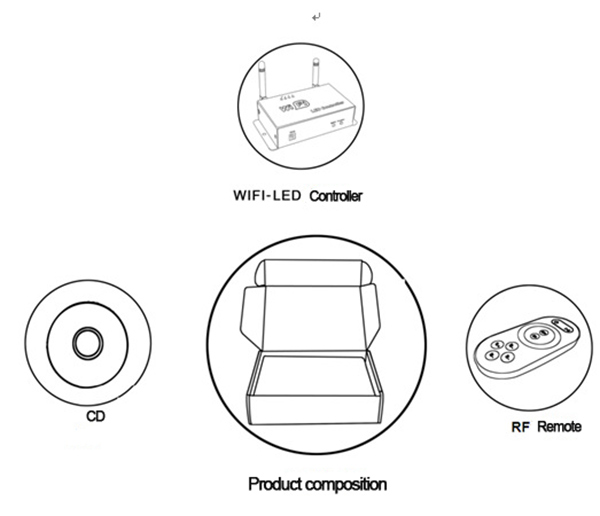
1*WIFI-LED controller
1*CD
1*RF remote controller
LED-WiFi controller function description
|
Indicator Light |
Menu |
|
Power |
Power indicator, steady light means normal power supply
|
|
WiFi |
Always on when idle, flashes when wifi data is in, and turns off when wifi ssid is configured
|
|
Link |
If there is wifi data, it will start to flash, and if there is no wifi data, it will go out. |
|
RF |
If there is wireless remote control data or key operation, it will flash and idle off |
2. Set SSID number
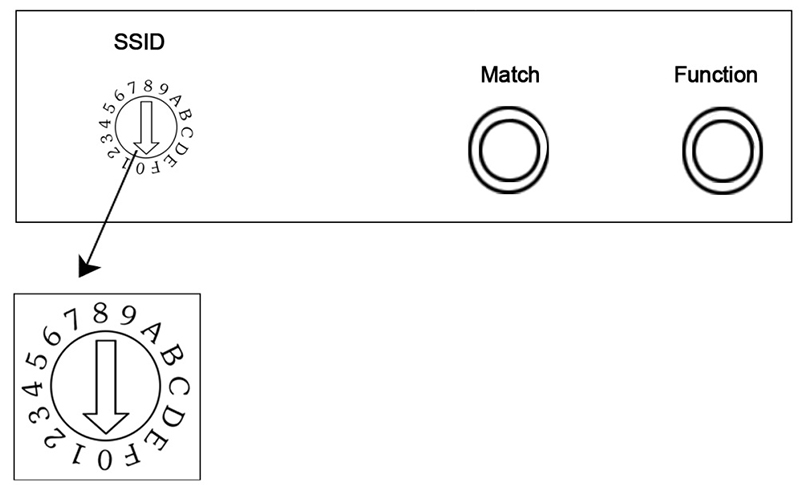
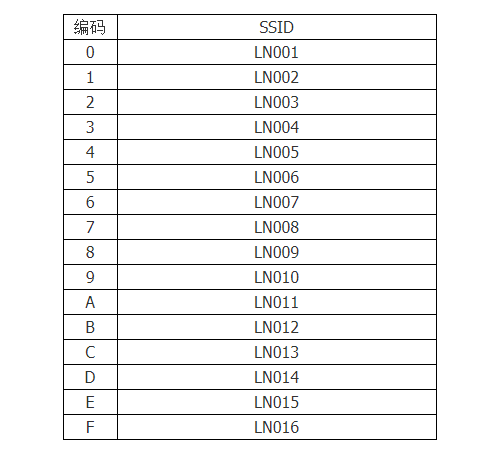
The coding switch we selected is used to set the ssid number of the LED-WiFi controller. The corresponding table is shown in the figure. There are 16 numbers from 0 to 15, so our ssid number is fixed at LN001 to LN016. That is to say, with our products, 16 isolated LANs can be set in the same small area. Once the DIP switch is toggled and changed, the Ssid number will be modified immediately, so you should pay attention to your mobile phone need to search for the connection again.
3. Connect LED and power supply port
The LED light bar is connected to the corresponding interface according to the model.
4. Match key function
When using the controller and the remote control for the first time, the remote control cannot be remotely controlled due to the mismatch between the controller address and the remote control address. In this case, use this key to match the two addresses.
How to use: First, press the "Match" button of the controller and press any button on the remote control for more than 2 seconds. Release the "Match" button, and the match is complete.
5. Function key function
The "Function" key is a composite key with functions of switching and mode switching.
Function description: long press (above 3S): switch;
Short press (within 1S): mode switch.
6. Function description of remote control
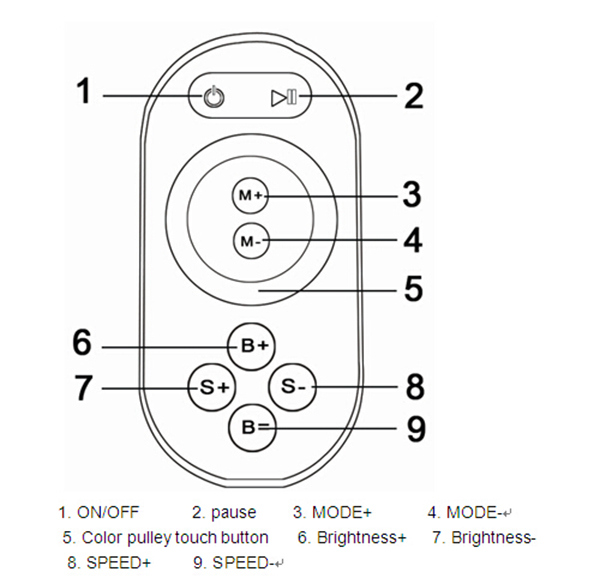
There are 64 touch buttons (points) on the touch remote control panel. The functions of each button are as follows:
1. Switch key, in any state, the controller output can be turned on or off;
2. Pause key, in dynamic mode, can stop the controller in the current state;
3. The key has two functions:
① Mode plus selection key, that is, when the current control mode is the pulley mode (color), if you need to realize the mode (color) in the controller, you can press this key.
② Mode switching key, that is, when the current control is a mode, the mode (color) specified in the M+ key mode table can be switched.
4. This key has two functions:
① Mode minus selection key, that is, when the current control mode is pulley mode (color), if you need to realize the mode (color) in the controller, you can press this key.
② Mode switching key, that is, when the current control is a mode, the mode (color) specified in the M-key mode table can be switched.
5. Color wheel touch keys, static mode selection keys, up to 55 touch points.
This key has two functions:
①Puller static color selection key, that is, when the current control mode is the M key mode (color), if you need to achieve a static color on the pulley, you can press this key.
②Pulley color switching key: it can be switched from 55 static colors (the color shown by the pulley).
6. Output brightness control key, the brightness level is increased by 1 every time, there are 32 levels in total;
7. Output brightness control key, each time the brightness level is reduced by 1, there are 32 levels in total;
8. Output speed control key, each time you press the speed level plus 1, a total of 99 levels;
9. Output speed control key, the speed level is reduced by 1 each time it is pressed, a total of 99 levels;
Power management: Stop using the remote control for more than 20s, the remote control will automatically enter the standby state (not touchable state) to extend the battery life; the remote control will return to normal working state (touchable state) after a little shaking.
Note: This remote control can only change the mode, brightness, speed, if you want to change the controller's IC model, IC support points, RGB order, you need to change it by connecting WIFI through your mobile phone
Detailed hardware installation
1. Install ANT
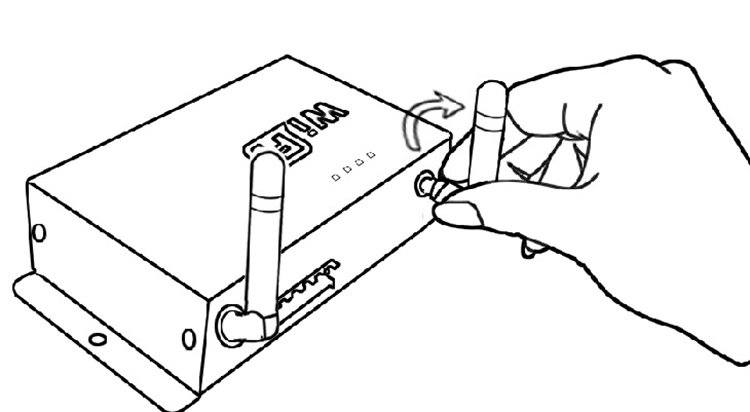
ANT installation diagram: Install the WiFi antenna clockwise, and remove the antenna counterclockwise.
2. Power supply and LED equipment
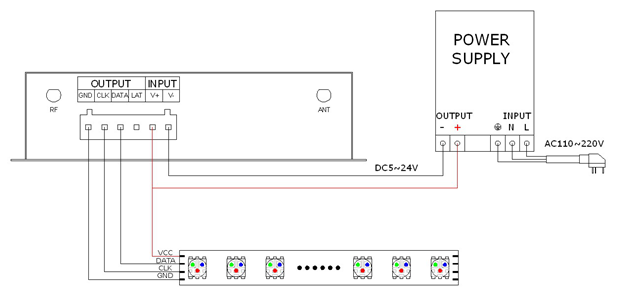
The interface structure belongs to a drawer type. The power supply and the LED device interface are together. The four interfaces on the left (GND, CLK, DATA, LAT) are connected to the LED device, the fifth interface is connected to the positive power supply V+, and the sixth interface is connected to the negative power supply V-. The controller currently supports 10 types of SPI light bars on the market, as shown in the following table:
|
Code |
Model |
Signal Line |
|
1 |
LPD6803 |
DATA, CLK |
|
2 |
TM1803 |
DATA |
|
3 |
UCS1903 |
DATA |
|
4 |
WS2811 |
DATA |
|
5 |
TM1812 |
DATA |
|
6 |
TM1809 |
DATA |
|
7 |
WS2801 |
DATA, CLK |
|
8 |
TLS3001 |
DATA |
|
9 |
TLS3008 |
DATA |
|
10 |
P9813 |
DATA, CLK |
You can connect the WIFI through your mobile phone to set the light bar model, maximum points and RGB order, then connect to the controller,
3. Connect single signal line strip condition
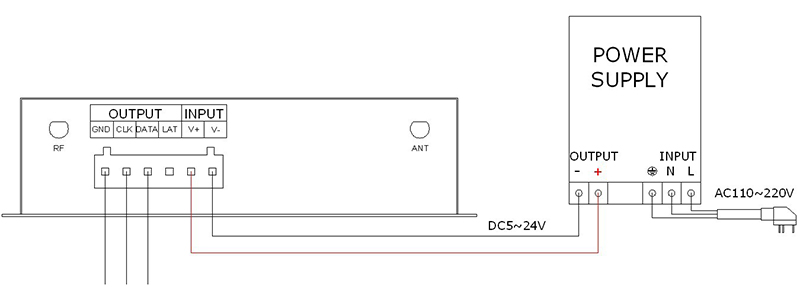
In the above figure, if the light bar has two signal wires, you need to connect the ground wire, clock wire, and data wire to the controller GNG, CLK, and DATA; if it is a signal wire light bar, connect its ground wire and data The line can be connected to the controller GND and DATA.
Note: If the voltage of the VCC terminal of the light bar is the same as the input voltage of the controller, you can directly connect it to the controller V+; if not, you need to connect another power supply.