


| Upgrade version | WF311 (Base) |
|---|---|
| Availability | In Stock |
| Condition | Brand New |
The WF310 controller (now is upgraded to the WF311 controller) is another self-developed Wifi controller after our WF100 and WF400 controllers. The WF310 does not need to switch wireless networks when used, which is convenient for users to access the Internet. You can choose an encrypted network or an open network. With the WiFiManager network management software WF310, the network configuration is more convenient, and you can choose the wireless network independently. You can choose the EasyDmx mobile phone control software developed by our company or the widely used Art-Net protocol software in the industry to make it compatible with WF310. Through the use of WIFI technology, it provides more comfortable, safe, and convenient intelligent lighting control than traditional lighting control, which optimizes people's lighting and brings a new and comfortable lighting environment to users.
WF311 Manual Download 
WF310 Manual Download
Technical Parameters


1. Software technical parameters
controlling software:
Name: Easy Dmx
Operating Platform: ios system (iphone, ipad), Android devices must have WiFi function
Language: English
Category: Communication
Others: free, no plugins
2. Configuration software
Name: WifiManager
Operating Platform: Win 7/Windows Vista/Win2003/WinXP/Win2000
Language: English
Type: Communication
Others: free, no plugins
3. Controller technical parameters
Working Voltage: DC12V
Working Temperature: -20-60℃
Working Power Consumption: about 1.5W
Output: DMX512 signal (Address 1-36)
Communication Protocol: Art-net, DMX512
Waterproof Rating: IP65
Net Weight: 312g
Gross Weight: 725g
Dimensions: L146*W73*H38 (mm)
Packing size: L252*W185*H60 (mm)
Software Download: https://www.superlightingled.com/PDF/Madmapper 5.1 Install.zip
https://www.superlightingled.com/PDF/madrix-5.0.zip
https://www.superlightingled.com/PDF/MadrixWygInstall.exe
https://www.superlightingled.com/PDF/2021-LedEdit_setup.rar
https://www.superlightingled.com/PDF/ArtnetSettingTools.exe
Madrix Offline Program Recording Software Download
https://www.superlightingled.com/PDF/CaptureArtnetTools%20V1.49.1-EN.rar
Instructions for use
The correct use of the controller mainly includes the following steps:
Step 1: Controller interface setting
Understand the function of each interface of the controller, and its basic usage and wiring. Refer to the controller interface description.
Step 2: Configure the controller
The various parameters of the controller are configured through the WiFiManager, including parameters such as name, location, wireless network, communication protocol, etc. If the controller parameter settings are incorrect, the user may be unable to control, and the controller can be used normally only under the correct configuration. For detailed configuration method, please refer to the instruction of WiFiManager.
Step 3: Install the controller
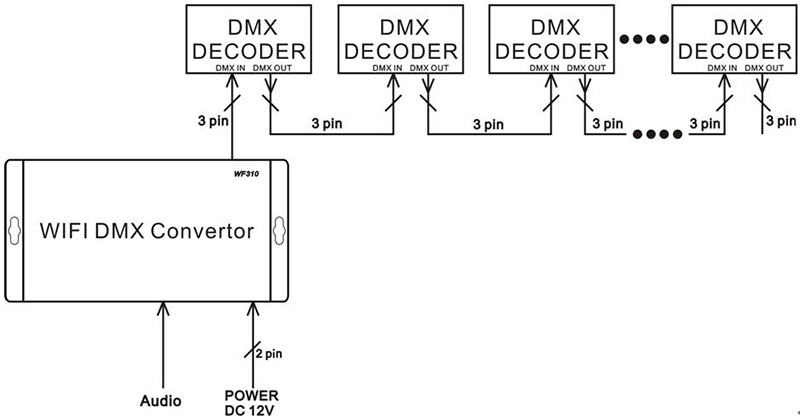
Understand the specific wiring method and installation requirements of the controller. Refer to the controller hardware installation instructions.
Step 4: Mobile phone control
The control method of the controller through the mobile phone software PocketDMX is briefly described. For detailed operation instructions, please refer to Easy Dmx instruction manual.
Controller interface description
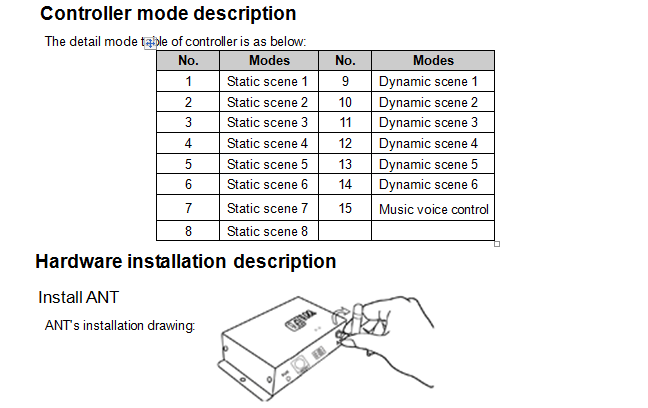
FUN: Button (short press for 1 second): controller mode switching (supported only under EasyDmx protocol, Led flashes), the mode includes 8 static scenes, 6 dynamic scenes and voice control in total 15 modes; (often press 5 seconds): Black field switching.
DMX OUT: Dmx signal output.
ANT: WiFi antenna.
Art-Net protocol software instructions
1 Overview
Art-Net protocol software can also be used in conjunction with the controller. The software can edit 512-channel Dmx signals, and can edit its dynamic and static scenes through related software.
2. Matters needing attention
When using the Art-Net protocol software to control the controller, you must first turn on the controller for a few minutes and then open the software (used to search for IP), then the user can search for the LeynewDevice-WF310 device.
Notice
1. Please don't install controller in a seal off, high magnetic field or high pressure area;
2. In order to reduce the risk of fire disaster and device damage caused by short circuit, please make sure correct connection;.
3. Please do install controller in a well-ventilated area to insure appropriate temperature.
4. Installation position of controller should be as near as possible to the router so as to ensure controller normal working;
5. Check out whether the supply voltage and power is in the range of controller required or not.
6. Before power on, please inspect the line is correct connection, and test it whether there is a short circuit;
7. Any problem, please do not open the shell of controller.
8. This manual is only applicable to this model of controller, if there is an update without notice.