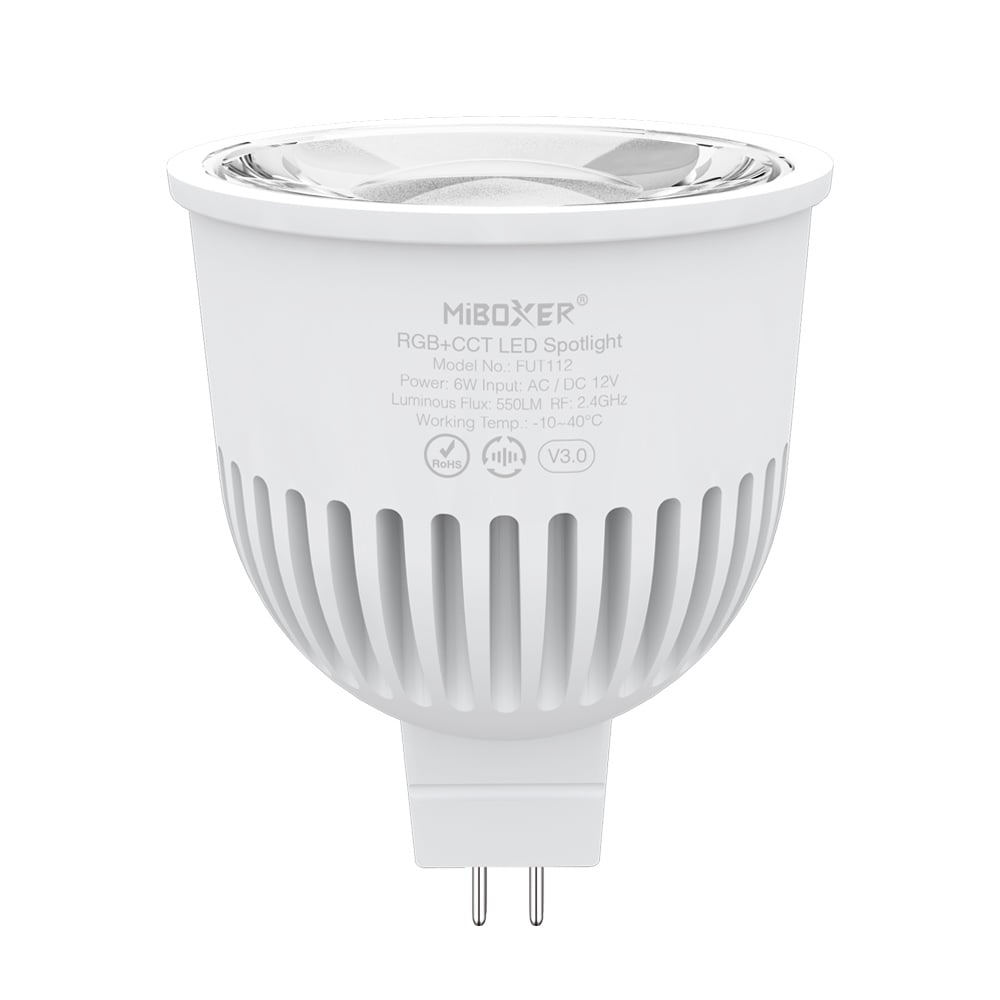
The FUT112 is a 6W MR16 smart LED spotlight that combines vibrant RGB color mixing with a tunable white (CCT) range from 2700K warm white to 6500K cool white. Operating on a low-voltage 12V AC or DC circuit, it's a versatile choice for accent, landscape, and track lighting. It uses 2.4GHz RF wireless technology for reliable control over color, brightness, and dynamic modes.
This bulb is designed for integration into a larger smart lighting system. It can be controlled by a variety of handheld and wall-mounted remotes. For smartphone app control, third-party voice control (like Alexa or Google Assistant), and remote access, it must be paired with a 2.4GHz WiFi gateway.
Key Features
- 4096 level smooth dimming, mini brightness 0.1%
- Compatible with 12 remotes, the remote can control various lights at the same time
- Auto transmission: transmit the signal to another one and extend control distance
- Auto synchronization: various lights sychronize dynamic modes ( all lights should keep same dynamic modes)
- Support DND mode and usually used for power failure area to save power
- Need 2.4G gateway if using “TUYA SMART” APP, need zigbee gateway if working with zigbee system.
- Support Alexa,Google Assistant,Yandex Alice,Tmall genie,Bai Du, Xiao Mi ( need to connect with 2.4G gateway)
Why Choose This Model
The FUT112 features advanced signal auto-transmission and mode synchronization. Each bulb acts as a signal repeater, re-transmitting commands to other bulbs within 30 meters (98 ft). This creates a mesh network, allowing for theoretically limitless control distance as long as bulbs are spaced within 30m of each other. When set to the same dynamic mode, multiple bulbs will synchronize their patterns perfectly, even if powered on at different times.
For advanced users and commercial installations, this spotlight is also DMX512 controllable when used with a DMX512 LED transmitter, allowing it to be integrated into professional stage and architectural lighting systems.
Specifications
| Product Name | 6W MR16 RGB+CCT LED Spotlight |
|---|
| Model No. | FUT112 |
|---|
| Input Voltage | AC/ DC 12V |
|---|
| Power | 6W |
|---|
| CRI | >80 |
|---|
| Color temperature | 2700K~6500K |
|---|
| Luminous Flux | 550LM |
|---|
| Luminous efficiency | 100LM/W |
|---|
| Beam Angle | 30° |
|---|
| Protocol | 2.4GHz RF |
|---|
| Control Distance | 30M |
|---|
| IP Rate | IP20 |
|---|
| Working Temperature | -10~40℃ |
|---|
| Dimming Level | 4096 |
|---|
| Dimming Range | 0.1~100% |
|---|
| Dimming Curve | logarithm |
|---|
| EMC Standard (EMC) | ETSI EN301 489-1 v 2.2.3 (2019-11)
ETSI EN 301 489-3 v 2.3.2 (2023-01) |
|---|
| Safety Standard (LVD) | EN IEC 60598-1:2021+A11:2022
EN 60598-2-2:2012
EN IEC 62031:2020+A11:2021
EN 62493:2015+A1:2022 |
|---|
| Radio Equipment (RED) | ETSI EN 300 440 V2.2.1 |
|---|
| Certification | CE, EMC, LVD, RED |
|---|
Wiring & Installation
- Ensure Power is Off: Before installation, turn off the power at the circuit breaker to prevent electrical shock.
- Verify Voltage: Confirm your power source provides 12V AC or DC. This bulb will be damaged by higher voltages. You will need a compatible 12V LED power supply if you don't already have one.
- Install the Bulb: Insert the FUT112 bulb into a standard MR16 socket. Ensure the two pins are correctly seated.
- Restore Power: Turn the power back on at the circuit breaker. The bulb is now ready for pairing with a controller.
Setup & Operation
This bulb must be linked to a compatible remote or transmitter before use. The instructions below use a generic remote as an example; button names may vary slightly between models.
Linking & Unlinking with a 2.4G Remote
- To Link:
- Install the bulb and switch off its power. Wait 10 seconds, then switch it back on.
- Within 3 seconds of the light turning on, press the 'I' button of your desired zone on the remote 3 times.
- The bulb will blink slowly 3 times to indicate successful linking. If it does not blink, repeat the steps.
- To Unlink:
- Switch off the bulb's power. Wait 10 seconds, then switch it back on.
- Within 3 seconds of the light turning on, press the 'I' button of the linked zone 5 times.
- The bulb will blink quickly 10 times to indicate it has been successfully unlinked.
Linking & Unlinking with a DMX512 Transmitter
- To Link:
- Choose a zone on the DMX transmitter (e.g., CH12 for zone 12).
- Switch off the bulb's power. Wait 10 seconds, then switch it back on.
- Within 3 seconds of the light turning on, press the 'SET' button on the transmitter 3 times.
- The bulb will blink slowly 3 times to indicate successful linking.
- To Unlink:
- Switch off the bulb's power. Wait 10 seconds, then switch it back on.
- Within 3 seconds of the light turning on, press the 'SET' button on the transmitter 5 times.
- The bulb will blink quickly 10 times to indicate successful unlinking.
"Do Not Disturb" Mode
This mode prevents the light from turning on after a power failure. It is useful in areas with frequent power outages.
- Activate Mode: Using a linked remote, press the 'OFF' button 3 times, then immediately press the 'ON' button 3 times. The bulb will flash 4 times quickly to confirm activation.
- Deactivate Mode: Using a linked remote, press the 'ON' button 3 times, then immediately press the 'OFF' button 3 times. The bulb will flash 4 times slowly to confirm deactivation.
Selecting Dynamic Mode Tables
- Select Table 1 (Default): While the light is in a static color mode, quickly press the 'S+' button 5 times. The blue light will flash 3 times slowly to confirm.
- Select Table 2: While the light is in a static color mode, quickly press the 'S-' button 5 times. The yellow light will flash 3 times slowly to confirm.
Typical Applications
- Landscape and garden accent lighting
- Recessed ceiling fixtures
- Track lighting systems
- Retail product displays
- Restaurant and hotel mood lighting
- Architectural highlighting
Frequently Asked Questions
What voltage does the FUT112 bulb require?
This bulb requires a 12V AC or DC power supply. Connecting it to a higher voltage, such as standard 120V AC, will permanently damage it.
What do I need to control this bulb?
You need a compatible 2.4G RF remote controller, such as the, or a for smartphone app and voice control.
Can I control multiple FUT112 bulbs with one remote?
Yes, you can link multiple bulbs to a single zone on a remote. They will respond to commands together and synchronize their dynamic modes automatically.
What is the control range?
The direct range from a remote to a bulb is 30 meters (approx. 98 feet). However, each bulb re-transmits the signal to other bulbs within 30m, creating a mesh network that can extend the control distance indefinitely.
Can I use this bulb with a DMX controller?
Yes, but it requires a. You link the bulb to a zone on the transmitter, which then translates DMX signals into 2.4G RF commands.
What is 'Do Not Disturb' mode for?
This feature prevents the bulb from turning on automatically after a power outage. When activated, the bulb will remain off when power is restored, saving energy and avoiding disruption.
Is a power supply included?
No, a 12V power supply is not included and must be purchased separately.
Precautions
- Verify that the power supply voltage is 12V AC/DC before connecting.
- Do not connect wires while the power is on. Ensure connections are correct and there are no short circuits before powering up.
- Do not use the light in areas with large metal surfaces or strong nearby electromagnetic waves, as this can severely affect the remote control distance.
- This product should not be dismantled by non-professional users.
- Please check the connection of both the cathode and anode; incorrect wiring will damage the light.