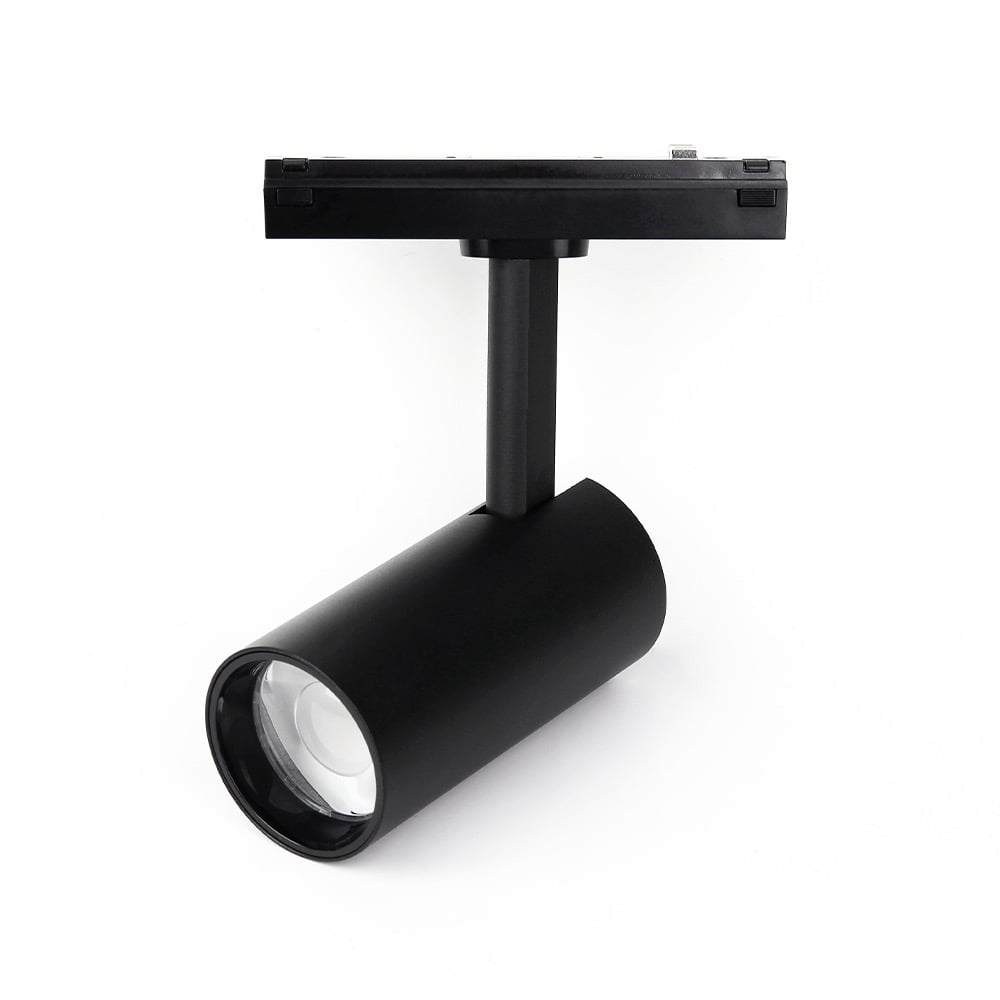
This 6W RGB+CCT spotlight is designed for our 48V magnetic track lighting system. It offers a full spectrum of colors and an adjustable white light range from 2700K warm white to 6500K cool white, making it ideal for creating dynamic accent lighting in residential and commercial spaces.
Control is managed via 2.4G RF, allowing for wireless dimming and color changes from up to 30 meters away. For control, you will need a compatible MiBoxer remote controller. To enable smartphone app and voice control with Alexa or Google Assistant, add a 2.4G WiFi gateway to your setup.
Key Features
- Dual output mode (RGB+CCT and CCT) for selection
- 4096 smooth dimming level, mini brightness is 0.1%
- Control multi lights at the same time
- Signal auto transmitting: transmit signal to each lights and unlimited control distance
- Automatic synchronization: In the same dynamic mode, multiple lights can be automatically synchronized.
- Have DND function, usually used in power failure area to save power
- User need to select correct gateway if controlled via Tuya Smart APP, there are 2 different gateways ( 2.4G RF and Zigbee)
- Support Alexa,Google Assistant,Yandex Alice,Tmall genie,Bai Du, Xiao Mi ( need to connect with 2.4G gateway)
Why Choose This Model
Achieve superior lighting quality with a high Color Rendering Index (CRI) of over 90, ensuring that colors appear vibrant and true to life. The spotlight also features advanced 4096-level logarithmic dimming, providing exceptionally smooth brightness control from 100% down to a subtle 0.1% without any flicker.
For larger installations, the signal auto-transmission and auto-synchronization features are invaluable. Each light acts as a repeater, extending the control range indefinitely by passing the signal to the next light within 30 meters. This also ensures that all lights in the same group running a dynamic mode stay perfectly in sync, creating a seamless and professional lighting effect.
Specifications
| Model No. | LZ5-06B |
|---|
| Power | 6W |
|---|
| Type | RGB+CCT |
|---|
| Communication Protocol | Zigbee 3.0 + 2.4G |
|---|
| Input Voltage | DC48V |
|---|
| Working Temp. | ~10~40°C |
|---|
| CRI | >80 |
|---|
| Light Efficiency(LM/W) | 72 |
|---|
| Luminous Flux(LM) | 420 |
|---|
| Color Temp. | 2700K~6500K |
|---|
| Beam Angle | 30° |
|---|
| Zigbee Control Distance | 100m (Open aera) |
|---|
| 2.4G RF Control Distance | 30m |
|---|
Wiring & Installation
- Turn Off Power: Before beginning installation, ensure the main power supply is switched off at the circuit breaker.
- Install the Track Rail: Mount the 26-style magnetic track rail to your desired surface. This spotlight is compatible with the 26-style magnetic track system.
- Connect the Power Driver: Wire a compatible 48V DC power supply to the magnetic track rail. Ensure the polarity is correct.
- Insert the Spotlight: Simply place the magnetic base of the spotlight into the track rail. The magnets will hold it securely in place and make the electrical connection.
- Restore Power: Turn the main power back on. The spotlight should now be ready for linking to a remote control.
Setup & Operation
Linking & Unlinking with a 2.4G RF Remote
This light must be linked to a remote control before use. The following instructions use the C5 remote as an example, but the process is similar for other compatible RF remotes.
To Link:
- Turn the light off for at least 10 seconds, then turn it back on.
- Within 3 seconds of the light turning on, press the "|" (ON) button for your desired zone 3 times.
- The light will flash 3 times slowly to indicate a successful link. If it does not flash, repeat the steps.
To Unlink:
- Turn the light off for at least 10 seconds, then turn it back on.
- Within 3 seconds of the light turning on, press the "|" (ON) button for the linked zone 5 times.
- The light will flash 10 times quickly to indicate it has been successfully unlinked.
Selecting a Dynamic Mode Table
The light has two tables of dynamic color-changing modes. Table 1 is the default.
- Select Dynamic Mode Table 1: While the light is in a static color mode, quickly press the "S+" button 5 times. The light will flash blue 3 times slowly to confirm.
- Select Dynamic Mode Table 2: While the light is in a static color mode, quickly press the "S-" button 5 times. The light will flash yellow 3 times slowly to confirm.
Linking & Unlinking with a DMX512 Transmitter
This light can be controlled via DMX by linking it to a DMX512 transmitter.
To Link:
- Choose a zone for the light on the DMX transmitter (e.g., CH12 for zone 12).
- Turn the light off for at least 10 seconds, then turn it back on.
- Within 3 seconds of the light turning on, press the "SET" button on the transmitter 3 times.
- The light will flash 3 times slowly to indicate a successful link.
To Unlink:
- Turn the light off for at least 10 seconds, then turn it back on.
- Within 3 seconds of the light turning on, press the "SET" button on the transmitter 5 times.
- The light will flash 10 times quickly to indicate it has been successfully unlinked.
Do Not Disturb (DND) Mode Setting
DND mode determines the light's behavior after a power failure. The factory default is ON.
- Turn DND Mode ON: Within 3 seconds, short press the master "OFF" button 3 times, then short press the master "ON" button 3 times. The light will flash 4 times quickly to confirm. In this mode, the light will return to its last state (on or off) when power is restored.
- Turn DND Mode OFF: Within 3 seconds, short press the master "ON" button 3 times, then short press the master "OFF" button 3 times. The light will flash 4 times slowly to confirm. In this mode, the light will always turn ON when power is restored.
Works With
The spec sheet lists these companion products:
Typical Applications
- Retail product displays
- Art gallery and museum lighting
- Modern residential kitchens and living rooms
- Restaurant and cafe accent lighting
- Hotel lobby and guest room lighting
- Home office task lighting
Frequently Asked Questions
What do I need to get this light working?
You need a 48V magnetic track rail, a compatible 48V DC power supply, and a MiBoxer 2.4G RF remote control. For app and voice control, you will also need a 2.4G WiFi gateway like the WL-BOX1.
Is this spotlight compatible with any magnetic track system?
It is specifically designed for the 26-style magnetic track system. Compatibility with other track types is not guaranteed.
How many lights can I control with one remote?
You can control a virtually unlimited number of lights. The signal auto-transmits from one light to the next (up to 30m apart), creating a mesh network that extends the control range.
What is the difference between the two dynamic mode tables?
The two tables offer different sets of pre-programmed color-changing effects. Table 1 is the default, and Table 2 provides alternative patterns. You can switch between them using a key sequence on your remote.
Can I control this light with DMX?
Yes, you can control it using a DMX system by linking it to a MiBoxer DMX512 Transmitter (model FUTD01).
What is DND (Do Not Disturb) mode?
DND mode determines the light's behavior after a power outage. When ON (default), the light returns to its last state (on or off). When OFF, the light will always turn on when power is restored.
What is the CRI of this light?
This spotlight has a high Color Rendering Index (CRI) of over 90, which means it renders colors very accurately and naturally.
Can I use this light outdoors?
No, this light has an IP20 rating, which means it is designed for indoor use in dry locations only.
Precautions
- Ensure the input voltage is 48V DC. Incorrect voltage will damage the light.
- Always turn off the main power supply before installation or wiring.
- Before powering on, verify that all connections are secure and there are no short circuits.
- Do not use the light near large metal objects or strong magnetic fields, as this can interfere with the RF signal.
- Do not attempt to disassemble or modify the light.
- The light source is not user-replaceable.