
Go to Top
SuperLightingLED
SUPERLIGHTINGLED CO., LTD
Web: www.superlightingled.com
Email: [email protected]
Date: 2026-11-02 | ID: 7354

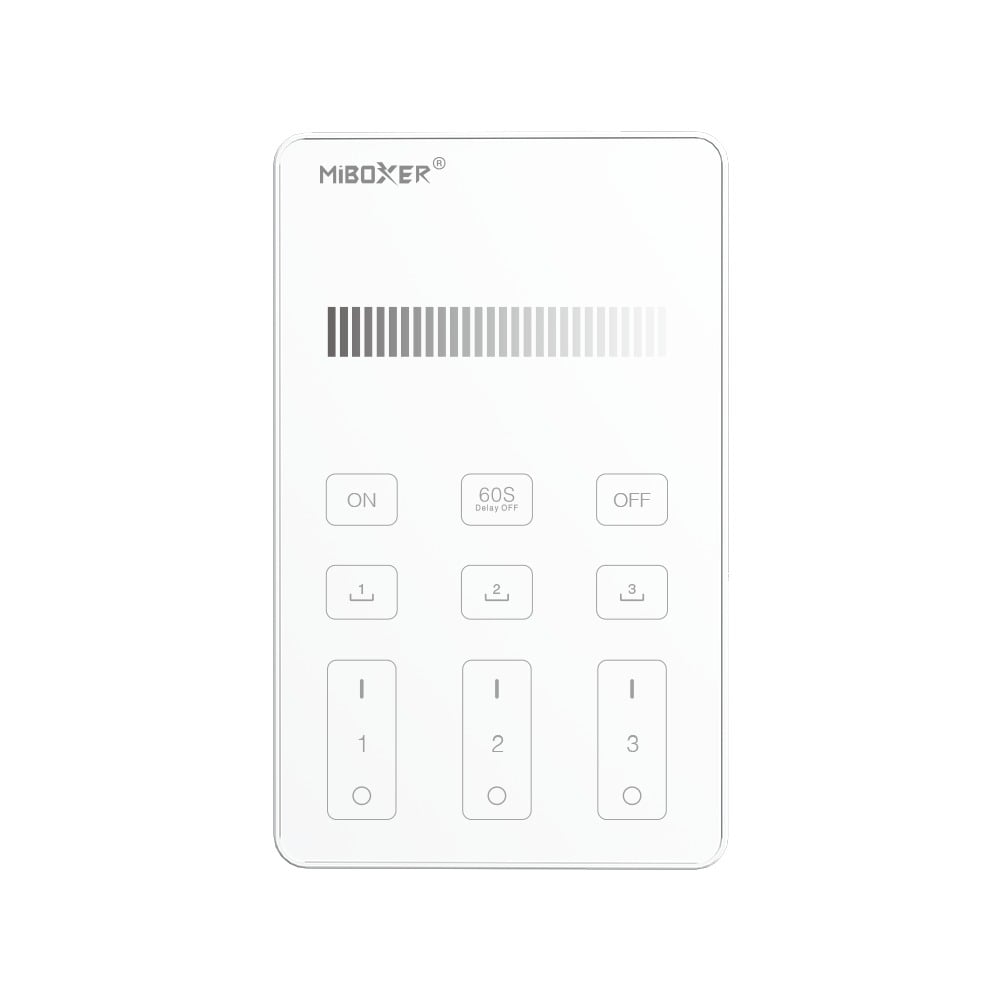
U1 3-Zone Touch Glass RF Wall Panel Remote Control Dimmer 2.4GHz

MODEL: U1
Price based on selections below:
$21.98
AvailabilityIn Stock
ConditionBrand New
Technical Specifications
The U1 is a wall-mounted 3-zone wireless RF touch panel remote dedicated to single-color brightness dimming across 2.4GHz wireless lighting systems. Built with a scratch-resistant matte touch glass panel, capacitive IC, and audible button feedback, it provides precise 1% to 100% dimming, 3 recallable scene memories, 60-second delay-off switching, and multi-device control across three distinct zones. It transmits wireless commands to compatible receivers such as the SR5-P 5-in-1 waterproof 2.4GHz RF LED controller receiver and the HZ5 30A 12-48V Zigbee and 2.4GHz RF 5-in-1 LED controller, or to DALI networks using the DL-RF 2.4G to DALI signal converter for DT6 and DT8 systems.

Key Features

3-Zone Independent Dimming

Manage brightness across 3 separate lighting zones individually or synchronize all zones simultaneously with master ON/OFF controls.

2.4GHz RF Wireless Transmission

Utilizes 2.4GHz wireless frequency with GFSK modulation and 6dBm transmitting power, delivering responsive control over distances up to 30 meters (100 feet).

Matte Glass Touch Interface

Engineered with high-precision capacitive touch IC and scratch-resistant matte glass that resists fingerprints while providing optional audible touch feedback.

Scene Saving and Delay-Off

Save up to 3 custom brightness presets via long-press on scene keys, with a dedicated 60-second delay-off function for convenient room exits.

Product Specifications

ParameterDetails
ModelU1
Working Voltage3V (2*AAA Battery)
Standby Power Consumption20μA
Radio Frequency2.4GHz (GFSK Modulation)
Transmitting Power6dBm
Control Distance30m (100ft)
Working Temperature14°F~104°F (-10°C~40°C)
Dimensions117.8 x 72.8 x 42 mm
CertificationsCE, EMC, LVD, RED

Application Scenarios

Commercial Office Dimming Multi-zone panel control for administrative areas, meeting spaces, and task lighting linked to compatible 2.4GHz RF dimming receivers.
Residential Living and Dining Spaces Clean wall-mounted control without in-wall control wiring, allowing rapid recall of saved dimming levels across 3 individual room zones.
Retail and Display Lighting Accurate 1% to 100% linear brightness adjustments for architectural coves and showcases paired with the 48V single-color dimming COB LED strip operated via HZ5 2.4GHz RF receiver.

Operation and Pairing Guide

  1. Install 2 AAA batteries into the battery compartment on the rear of the panel, observing correct polarity.
  2. To link a receiver or light: Switch off power to the light, wait 10 seconds, then switch it back on. Within 3 seconds of the light turning on, short press the desired Zone ON ('I') button 3 times. The light will blink 3 times slowly to confirm successful linking.
  3. To unlink a receiver or light: Switch off power to the light, wait 10 seconds, then switch it back on. Within 3 seconds of the light turning on, short press the corresponding Zone ON ('I') button 5 times. The light will blink 10 times quickly to confirm unlinking.
  4. Adjust light levels by sliding your finger across the dimming slider from 1% to 100%.
  5. To save a brightness scene, set the desired brightness level and long press scene button 1, 2, or 3 for 3 seconds until the linked light flashes once slowly.
  6. To toggle the button touch feedback sound on or off, long press Master ON for 5 seconds (to turn sound ON) or Master OFF for 5 seconds (to turn sound OFF).
⚠ Precautions
  • Handle the glass panel with care during installation to avoid cracking or physical damage.
  • Do not install in humid or high-temperature environments. If unused for long periods, remove the batteries.
  • Avoid mounting directly against metallic surfaces or near strong magnetic interference, which can reduce RF range.

Frequently Asked Questions

Q: What type of lighting can the U1 panel control?

A:The U1 is a dedicated brightness dimming remote. It controls single-color LED lights, strip controllers, and dimming drivers compatible with the 2.4GHz RF protocol.

Q: Does the U1 panel connect directly to LED strip lights?

A:No. The U1 is an RF transmitter panel. It communicates wirelessly over 2.4GHz to compatible LED controllers or receivers such as the SR5-P or HZ5, which then drive the LED strips.

Q: How many scenes can be stored on the U1?

A:The panel has 3 dedicated scene buttons allowing you to store and recall up to 3 custom brightness settings.

Q: How is the U1 panel powered?

A:It is powered by 2 AAA batteries (3V DC) with a low 20μA standby current, requiring no hardwired line-voltage connection.

Q: Can the touch confirmation sound be muted?

A:Yes. Long pressing the Master OFF button for 5 seconds turns off the confirmation sound. Long pressing Master ON for 5 seconds turns it back on.

Product documentation

Product documentation (PDF)

© 2026 SuperLightingLED. All specifications are subject to change without notice.