

| Availability | In Stock |
|---|---|
| Condition | Brand New |
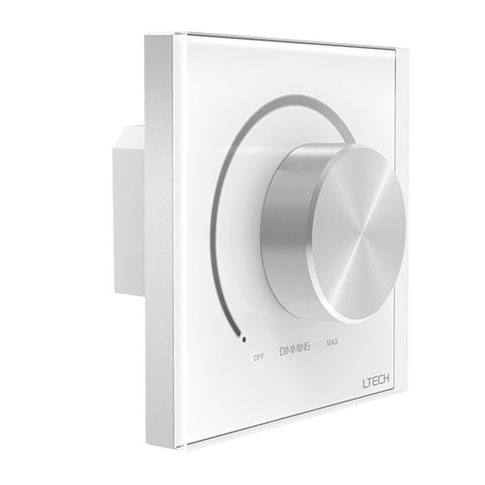
Experience intuitive, tactile lighting control with the L-Tech E6-DA1 DALI Rotary Dimmer Knob Panel. Designed for professional DALI lighting systems, this dimmer switch with knob provides smooth, precise brightness adjustments and a satisfying click-to-off function. As a fully compliant DALI Master Controller, it eliminates the complexity of separate power supplies by drawing power directly from the DALI bus, ensuring a clean and simple installation. The E6-DA1 is the ideal choice for architects, designers, and homeowners seeking a reliable and elegant interface for their advanced lighting setups. Its versatile addressing system allows it to command individual fixtures, pre-set groups, or an entire network with ease, making it a powerful yet user-friendly hub for any DALI-enabled space.


Effortlessly adjust brightness by spinning the knob and switch lights off with a distinct click, providing superior tactile feedback.
Simplifies installation by drawing power directly from the DALI bus, requiring no separate power wiring for the panel itself.
Onboard rotary dials allow for easy setup of Unicast (0-63), Group (0-15), or Broadcast control modes without complex software.
Adheres to the latest DALI standard (IEC62386), guaranteeing seamless compatibility with certified DALI drivers and devices.
Features a standard 86x86mm form factor, ensuring it fits perfectly into European-style electrical wall boxes for a professional finish.
| Parameter | Details |
|---|---|
| Product Name | DALI knob panel |
| Model | E6-DA1 |
| Power Supply | DALI power |
| Output Signal | DALI |
| DALI Standard | IEC62386 |
| Control Modes | Unicast, Group, Broadcast |
| Dimming Style | Spin (Rotary Knob) |
| Static Current | 6mA@16V |
| Standby Current | 4mA@16V |
| Working Temperature | -20℃~55℃ |
| Dimensions | L86 × W86 × H50 (mm) |
| Package Size | L106 × W106 × H60 (mm) |
| Gross Weight | 235g |

PDFE6-DA1
Q: Does this DALI knob panel need its own power supply?
A:No, it is powered directly by the DALI bus, which greatly simplifies wiring and installation. Your DALI bus itself will require a DALI power supply.
Q: Can I control a single light fixture with this panel?
A:Yes. By setting the panel to Unicast mode using the dials on the back, you can assign it to control any single DALI address from 0 to 63.
Q: How do I control a group of lights, like all the downlights in my kitchen?
A:Set the panel to Group mode (X dial to 7) and use the Y dial to select one of the 16 available group addresses (0-15) that your lights are programmed to.
Q: What is the difference between this rotary dimmer and a DALI push-button switch?
A:This panel's rotary knob provides smooth, continuous dimming for fine-tuned brightness control, whereas a push-button switch typically offers stepped dimming or simple on/off functionality.
Q: Is this E6-DA1 controller compatible with DALI drivers from other brands?
A:Yes, it fully complies with the DALI standard IEC62386, ensuring broad compatibility with other certified DALI drivers, ballasts, and devices.
Q: How do I turn the lights completely off?
A:Simply rotate the knob fully counter-clockwise. You will feel and hear a distinct "click" as the switch engages, turning the connected DALI lights off.
Q: What kind of wall box is required for installation?
A:The E6-DA1 is designed to fit into a standard 86-style square wall box, common in Europe and other regions.