| Availability | In Stock |
|---|---|
| Condition | Brand New |
The TM204 RGBW control panel with display has been discontinued, and we currently have no replacement available.
If a standard controller with display is acceptable, please consider our V4-K model.
If a wall-mounted panel is required, we only offer non-display versions such as this T4 model.
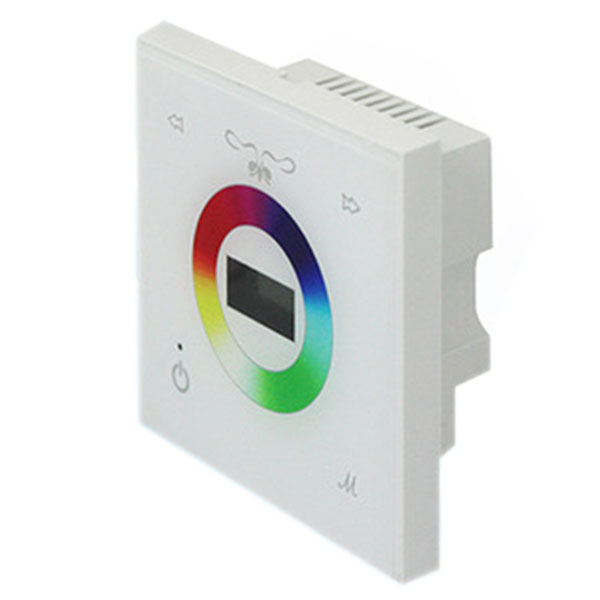
TM204 controller is a multi-function LED controller, which is safe, reliable, simple, and beautiful with touch control technology. The user can touch the color ring to adjust the color of the light. The controller can monitor the current power, circuit board temperature monitoring, display the current time, and set the timing scene, including timing shutdown, timing change mode, etc. The controller also has built-in 18 default lighting modes for users to choose from.


Technical Parameters
Working Temperature: 0-60℃
Power Supply Voltage: DC12V-24V
Output: 4 circuits
Connection Method: common anode
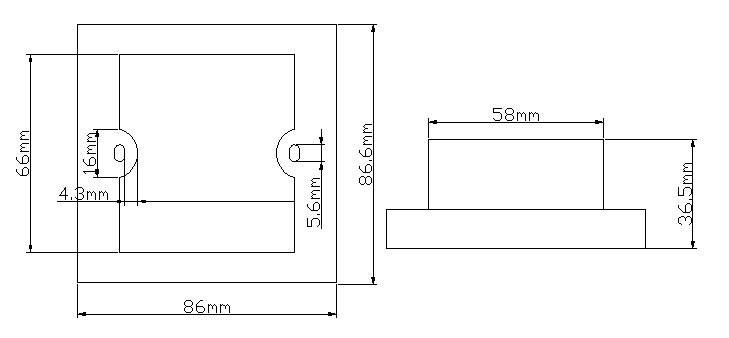
Controller Size: L86×W86×H36.5mm
Packing Bag Size: L110×W110×H56mm
Net Weight: 300g
Gross Weight: 430g
Static Power Consumption: <0.7W
Output Current: <=5A (each circuit)
Output Power: 12V<60W, 24V<120W (each circuit)
Specifications Download 
External Dimension
Interface description
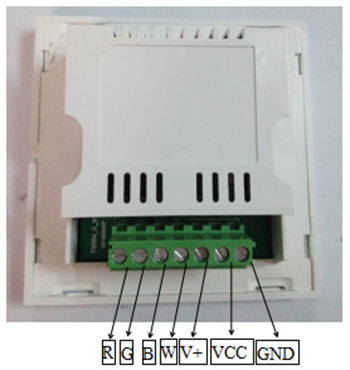
GND: negative power supply.
VCC: positive power supply.
V+: the positive pole of the load lamp, common to all loads.
R: Red load lamp negative.
G: The negative pole of the green load light.
B: Blue load lamp negative.
W: White load lamp negative.
Instructions for use
1. Buttons: TM204 controller has four touch buttons: switch, M mode button, plus button, minus button
① Press the key to open and close the controller.
②M key is used for menu switching, press M key to switch to built-in mode, brightness, speed, power, temperature, time setting, timing, timing scene.
③ Press the plus key to select the built-in mode, plus brightness, acceleration, time setting bit move right, timing time setting bit move right, timing scene selection.
④ Press the minus key to select the built-in mode, brightness reduction, deceleration, time setting, timing time setting, timing scene selection.
2. Menu: TM204 controller menu includes built-in mode, brightness adjustment, speed adjustment, temperature, power, time, time setting, timing scene, press the mode key to switch to different menus, built-in mode, brightness adjustment, speed adjustment, temperature, The power and timing scenarios correspond to the English abbreviations M, B, S, T, P, and SCN in the upper left corner of the screen, respectively.
① Under the M menu, press the plus or minus key to switch to different built-in modes, a total of 19 built-in modes.
② Under menu B, press the plus and minus keys to change the brightness level, a total of 100 levels, after pressing the value unchanged, the current mode brightness is not adjustable.
③ Under the S menu, press the plus and minus keys to change the speed level, a total of 100 levels, after pressing the value unchanged, the current mode speed is not adjustable.
④ Under the T menu, the current indoor temperature is displayed.
⑤ Under the P menu, the current output power is displayed.
⑥ Under the time menu, display the current time, press the plus key to enter the time setting mode and move the time setting bit to the right, press the minus key to set the time, when the cursor is completely removed, the time setting is successful, note that the cursor is not completely removed, the set time will be Failure.
⑦The timer time is displayed under the timer menu. Press the plus key to enter the time setting mode and move the time setting bit to the right. Press the minus key to set the timer time. When the cursor is completely removed, the timer time is set successfully. Similarly, the cursor is not completely removed. Time will expire.
⑧SCN menu, set the scene to be changed when the timing time expires, press the plus or minus key to select the scene, the scene includes one of the switch-on or built-in mode.
3. Color circle: Touch the color circle to adjust the lamp to the corresponding color.
4. Built-in mode: TM204 device contains 19 built-in modes, each mode has different lighting effects. Press the menu key to switch the menu to the built-in mode Mod, press the plus or minus key to switch to a different built-in mode; for example, the menu display M6 is currently the sixth built-in mode cyan.
The built-in modes are as follows:
|
Mode Number |
Feautres |
Remark |
|
1 |
static red |
Adjustable brightness, not adjustable speed |
|
2 |
static green |
|
|
3 |
static blue |
|
|
4 |
static yellow |
|
|
5 |
static purple |
|
|
6 |
static cyan |
|
|
7 |
static white |
|
|
8 |
Red, green and blue transition |
Adjustable brightness and speed |
|
9 |
Yellow flashing |
|
|
10 |
Purple flashing |
|
|
11 |
Cyan flashing |
|
|
12 |
White flashes |
|
|
13 |
Seven colors jump |
|
|
14 |
Blue red gradient |
|
|
15 |
Blue-green gradient |
|
|
16 |
Red green gradient |
|
|
17 |
Three-color gradient |
Adjustable speed, brightness is not adjustable |
|
18 |
Seven-color gradient |
|
|
0 |
OFF |
|
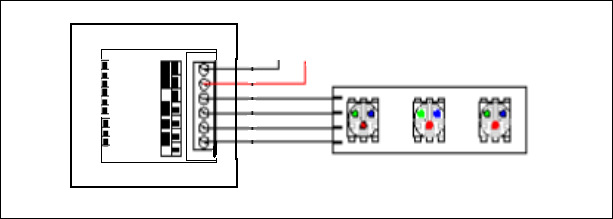
Typical Application