Go to Top
SuperLightingLED
SUPERLIGHTINGLED CO., LTD
Web: www.superlightingled.com
Email: [email protected]
Date: 2026-10-09 | ID: 3509

EDT1 DALI Dimming Touch Panel

MODEL: EDT1
Price based on selections below:
$46.99
AvailabilityIn Stock
ConditionBrand New
Technical Specifications

Experience sophisticated control over your professional lighting with the Ltech EDT1 DALI Dimming Touch Panel. This elegant wall-mounted controller serves as the central user interface for any modern DALI lighting system, offering intuitive, responsive control over brightness and ambiance. Designed for both commercial and high-end residential applications, the EDT1 simplifies complex lighting schemes into a user-friendly touch panel. It provides precise dimming, individual control over four lighting zones, and one-touch recall for four custom scenes. Because it's powered directly by the DALI bus, installation is streamlined, with no need for an external power supply. For a deeper understanding of the technology, explore our guide on What Is DALI Dimming.
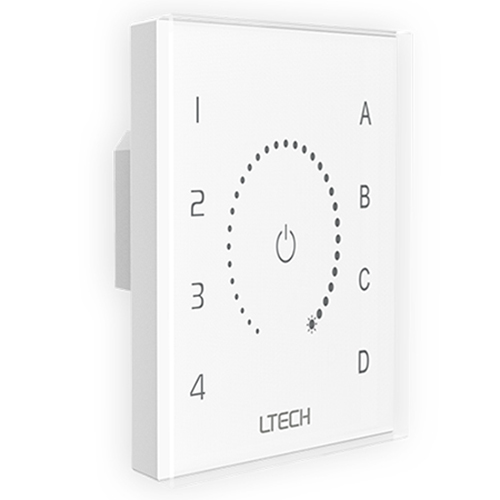
Front view of the Ltech EDT1 DALI Dimming Touch Panel.
EDT1 DALI Dimming Touch Panel - photo 1
Angled view of the sleek, modern EDT1 DALI touch panel.
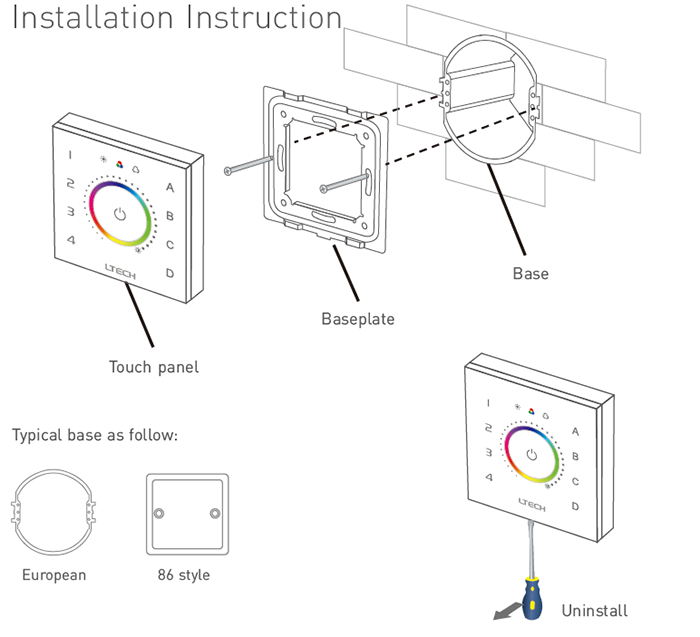
Installation diagram showing how to mount the EDT1 panel into a wall box.
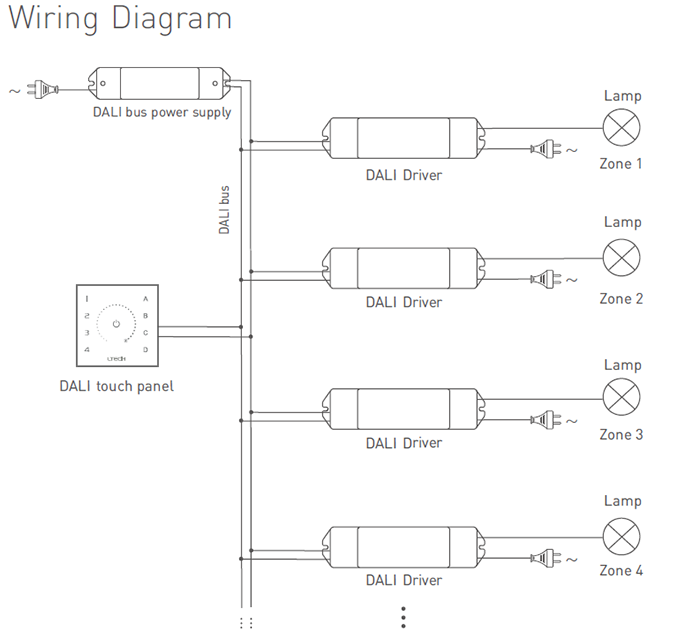
Wiring diagram for connecting the EDT1 to a DALI bus system.
Rear view showing the rotary switches for DALI address configuration.

Key Features

DALI Standard Compliance

Fully compliant with DALI standard protocols IEC62386-102, 207, and 209, ensuring seamless interoperability with a wide range of DALI devices.

Intuitive Touch Interface

Features a high-sensitivity glass touch panel with a central dimming circle and haptic vibration feedback for a responsive and tactile user experience.

4-Zone & 4-Scene Control

Independently manage up to four zones of lighting and save/recall four custom lighting scenes with dedicated one-touch buttons.

Flexible Control Modes

Supports unicast, group, and broadcast addressing, providing versatile control options for simple or complex lighting installations.

DALI Bus Powered

Draws power directly from the DALI bus (<6mA), eliminating the need for an additional power supply and simplifying the wiring process.

Easy Address Configuration

Set DALI addresses for unicast, group, and scene modes quickly and easily using the rotary switches on the back of the panel.
Technical Highlights

  • Directly powered by the DALI bus, eliminating the need for an external power supply and simplifying wiring.
  • Features built-in touch vibration for tactile feedback, confirming user inputs.
  • Supports unicast, group, and broadcast modes for maximum control flexibility in any DALI installation.
  • Compliant with DALI standards IEC62386-102, 207, and 209 for seamless interoperability with other DALI devices.
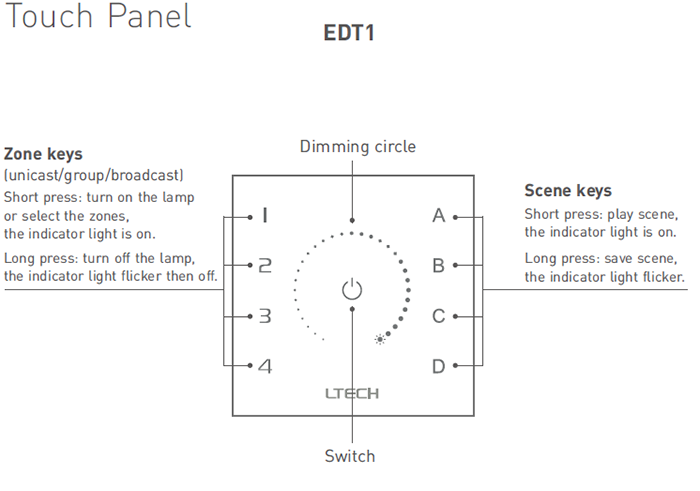
Layout of the EDT1 touch interface, highlighting the dimming circle, zone keys, and scene keys.

Product Specifications

ParameterDetails
ModelEDT1
Power SupplyDALI Power
Power Consumption< 6mA@16V
Control SignalDALI
DALI StandardIEC62386-102, 207, 209
Control FunctionSingle Color Dimming
Working Temperature-30°C to 55°C
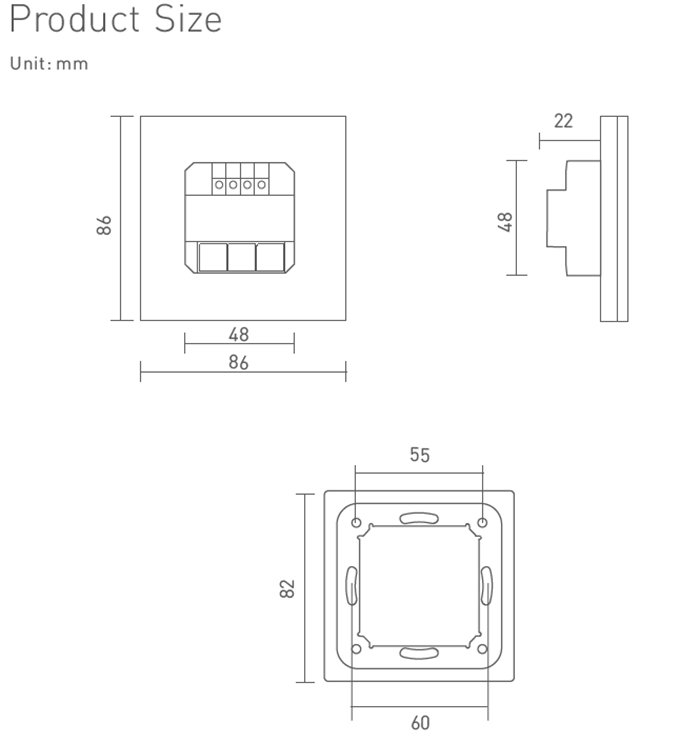
Dimensions (L×W×H)86 × 86 × 37 mm
Package Size (L×W×H)113 × 112 × 50 mm
Gross Weight240g
Detailed product dimensions for the EDT1 touch panel.

Application Scenarios

Commercial & Office Spaces Perfect for modern offices, conference rooms, and lobbies. The EDT1 provides staff with simple, elegant control over layered lighting designs, allowing for easy adjustment of task lighting, ambient light, and presentation scenes.
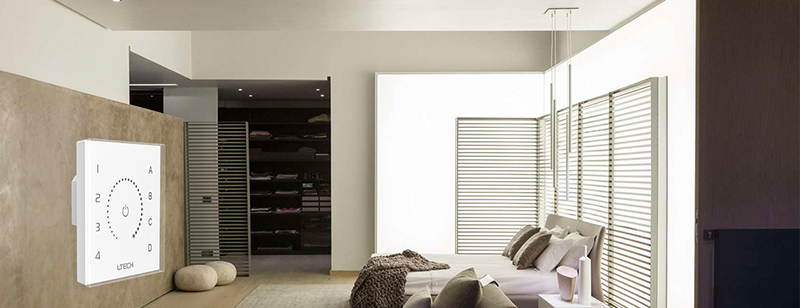
High-End Residential Projects Integrate the EDT1 into smart homes for sophisticated control of lighting in living rooms, home theaters, and kitchens. Homeowners can create the perfect mood for any occasion, from bright and functional to warm and relaxed, all from a single panel.
Hospitality and Retail Environments Enhance the guest experience in hotels, restaurants, and boutiques. The EDT1 allows for effortless changes in ambiance to match the time of day, highlight merchandise, or create an inviting atmosphere for diners.

Installation & Configuration Guide

  1. Step 1: Mounting. Ensure power is off. Install the panel base into a standard European 86-style wall box. Secure the baseplate to the base, then snap the touch panel onto the baseplate.
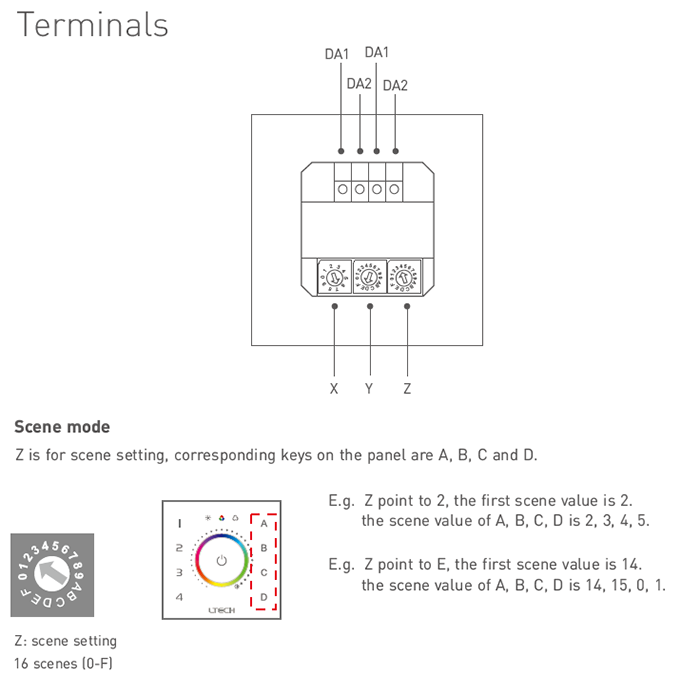
  2. Step 2: Wiring. Connect the two DALI bus wires to the DA1 and DA2 terminals on the back of the panel. DALI is not polarity sensitive.
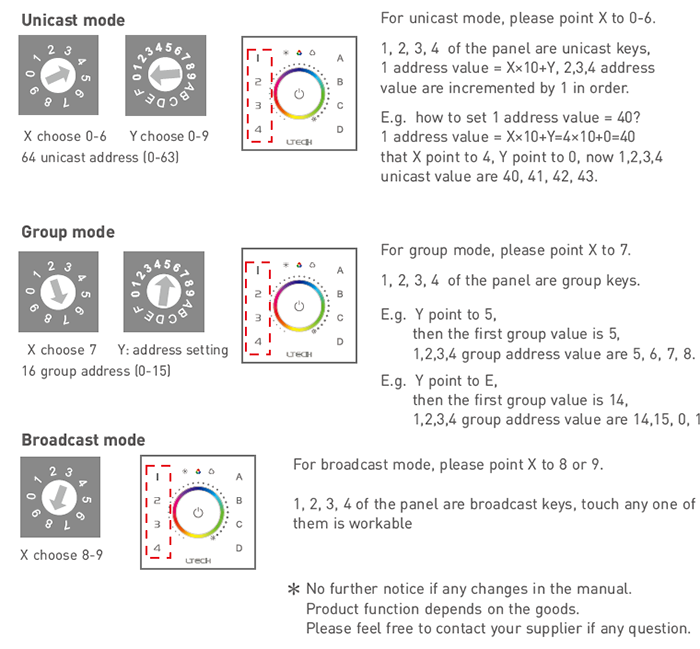
  3. Step 3: Address Setting. Use a small screwdriver to turn the rotary switches (X, Y, Z) on the back to set the desired control mode. Refer to the datasheet in the Downloads section for detailed address tables.
  4. - Unicast Mode: Point X to 0-6 and Y to 0-9 to assign a starting address from 0-63. The four zone keys will control four sequential addresses.
  5. - Group Mode: Point X to 7 and Y to 0-F to assign a starting group from 0-15. The zone keys will control four sequential groups.
  6. - Broadcast Mode: Point X to 8 or 9. All zone keys will control all devices on the bus.
  7. - Scene Setting: Point Z to 0-F to assign a starting scene value. The four scene keys (A,B,C,D) will control four sequential scenes.
  8. Step 4: Operation. Restore power to the DALI bus. Use the zone keys to select lights (short press ON, long press OFF), the scene keys to play/save scenes (short press PLAY, long press SAVE), and the central circle to adjust brightness.
⚠ Precautions
  • This panel is powered by the DALI bus. Ensure a DALI-compliant power supply is active on the bus.
  • This EDT1 model is for single color dimming only. For color temperature (CCT) or RGB control, please see the EDT2 or EDT3 models.
  • Always disconnect power before installation or wiring.

What's in the Box

  • ✓1 x EDT1 DALI Dimming Touch Panel
  • ✓1 x User Manual

⇩ Downloads & Documents

PDFEDT1

Frequently Asked Questions

Q: Does this touch panel require a separate power supply?

A:No, the EDT1 is powered directly by the DALI bus, which simplifies installation and reduces wiring complexity. Just ensure your DALI bus has a dedicated DALI power supply.

Q: What is the difference between the EDT1, EDT2, and EDT3 models?

A:The EDT1 is designed for single color dimming control. The EDT2 model is for controlling tunable white (CCT) fixtures, and the EDT3 is for controlling RGB/RGBW color-changing fixtures.

Q: How many lights can this DALI touch panel control?

A:A standard DALI bus supports up to 64 individual addresses (devices). The EDT1 can control these devices individually (unicast), in groups, or all at once (broadcast).

Q: Is this panel compatible with any LED strip light?

A:This panel is compatible with any lighting fixture or LED strip connected to a DALI Driver. It sends DALI commands to the driver, which then controls the light.

Q: How do I set the panel to control a specific group of lights?

A:On the back of the panel, set the 'X' rotary switch to '7' for group mode. Then, use the 'Y' switch to select the starting group address (0-15). The four zone buttons will then control four sequential groups.

Q: What is a DALI lighting system?

A:DALI (Digital Addressable Lighting Interface) is a professional, two-way communication protocol for lighting control. It allows for precise, individual control of each light fixture in a network, enabling advanced scenes, automation, and energy management.


© 2026 SuperLightingLED. All specifications are subject to change without notice.