

| Availability | In Stock |
|---|---|
| Condition | Brand New |
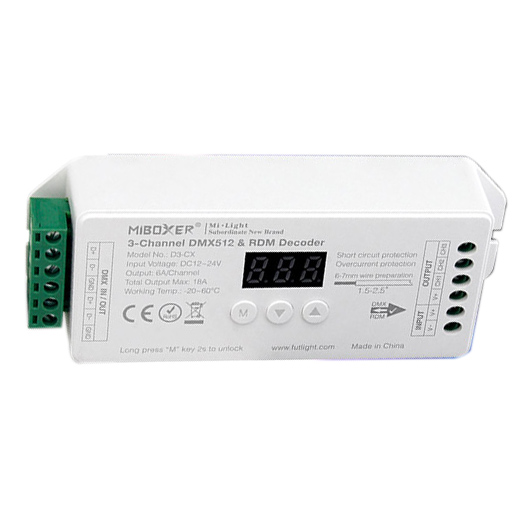
The MiBoxer D3-CX is a professional-grade 3-channel constant voltage DMX512 decoder designed for precise and reliable lighting systems. It's the perfect solution for driving 3-channel fixtures like RGB LED strips, allowing for seamless color mixing and dynamic effects. Fully compliant with standard DMX512 protocols, the D3-CX also incorporates advanced RDM (Remote Device Management) functionality. This enables two-way communication for easy remote configuration, addressing, and status monitoring, significantly simplifying complex installations. With a robust output of 6A per channel, this decoder dmx512 can handle substantial lengths of 12V or 24V LED lighting, making it an ideal choice for architectural, stage, and high-end residential projects that demand flawless dmx512 light control.


Perfectly suited for controlling standard RGB LED strips, or alternatively, a CCT strip plus a single color strip, or three independent single-color zones.
Ensures compatibility with all standard DMX master controllers and allows for bi-directional communication for easy remote setup and management.
Delivers up to 6A per channel (18A total), providing ample power for long runs of LED strips without needing multiple decoders.
Operates on DC12V to 24V, making it compatible with the most common constant voltage LED lighting products on the market.
Features a clear digital display and physical buttons for fast, manual setting of the DMX start address directly on the device.


| Parameter | Details |
|---|---|
| Product Model | D3-CX |
| Input Voltage | DC12V~24V |
| Input Signal | DMX512, RDM |
| DMX Socket | Green Terminal Block |
| Output Type | Constant Voltage (PWM) |
| Output Channels | 3 Channels |
| Output Current | 6A / Channel |
| Total Output Current | Max 18A |
| Output Power (Max) | 216W @ 12V / 432W @ 24V |
| Working Temperature | -20~60℃ |
| Protections | Short Circuit, Overload |


Q: What is the main difference between the D3-CX and other models like the D2-CX or D4-CX?
A:The primary difference is the number of output channels. The D3-CX has three channels, making it perfectly optimized for standard RGB LED strips. The D2-CX is for 2-channel (like CCT) and the D4-CX is for 4-channel (like RGBW) strips.
Q: What is RDM and why is it useful?
A:RDM stands for Remote Device Management. It allows two-way communication over DMX lines, enabling you to discover, address, and monitor the decoder remotely from an RDM-compatible controller, which greatly simplifies setup.
Q: Can I use this decoder for three separate single-color LED strips?
A:Yes, absolutely. You can connect one single-color strip to each of the three channels and control their brightness independently using three consecutive DMX addresses.
Q: What kind of DMX controller do I need?
A:You can use any standard DMX512 master controller, from simple wall panels to complex lighting consoles. For remote configuration, you will need a DMX master that also supports the RDM protocol.
Q: How do I set the DMX address without an RDM controller?
A:You can easily set the DMX start address manually using the built-in digital display and push buttons on the unit. The included dmx512 decoder manual provides detailed instructions.
Q: What type of power supply is required?
A:You need a constant voltage DC12V or DC24V power supply. The wattage rating must be sufficient to power the total load of all connected LED strips.