

| Availability | In Stock |
|---|---|
| Condition | Brand New |
Discontinued and replaced by DMX300D. Please click to see the upgraded version.
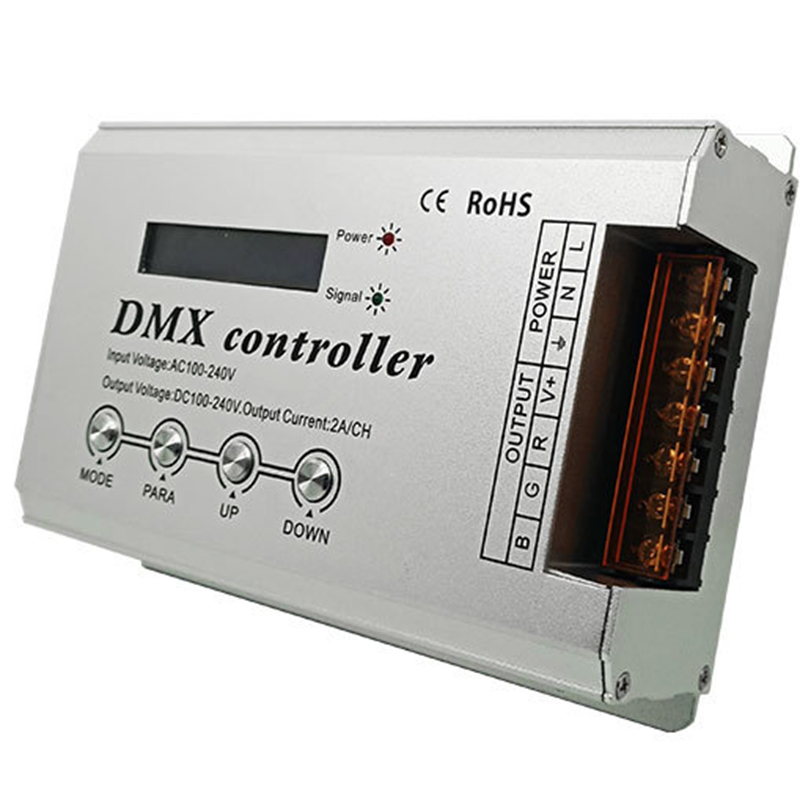
High-voltage DMX controller with LCD display is an LCD digital interface display, used to control the RGB color change of four-wire three-loop (common anode) LED lamps, up to 34 change mode options, and can also accept DMX512 international standard protocol control Multi-function controller. The controller can be operated in a stand-alone mode, self-connected, and works by receiving standard DMX512 console control signals. According to the actual needs of customers, light changes such as jumping, gradual change, and strobe can be achieved.


Working temperature: -20-60C
Power supply voltage: AC 100V < 240V 50/60HZ
Output voltage: DC 100V, <240V
Output connect way: common anode 4 line 3 channels
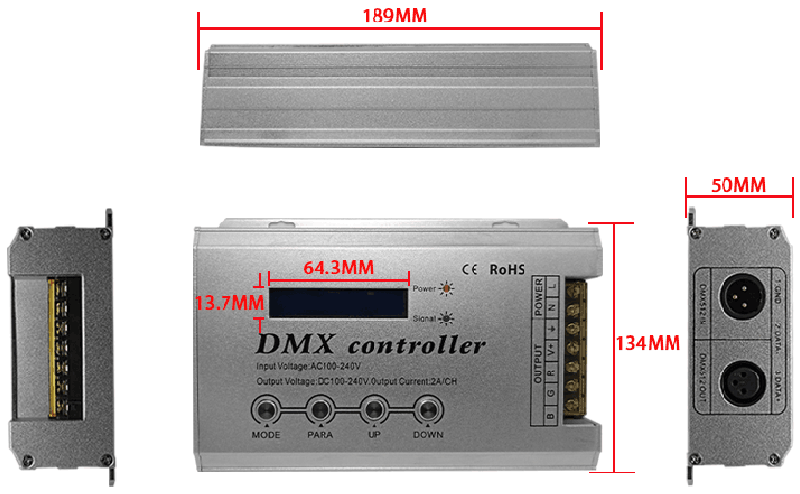
External dimension: L203 x W134 x H50 mm
Package size: L310 x W170 x H60 mm
Net weight: 0.77kg
Gross weight: 1.3kg
Static power consumption: <3.96W
Maximum output current: 3*2A
Dimming frequence: 800Hz
Maximum output power: 660W(input voltage 110V), 1320Winput voltage 220V
Technical Details
LED DMX Module
Strip DMX Module
Light DMX Module
LCD Display
DMX 512 Controller
External dimension
Interface description
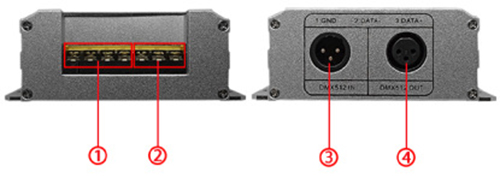
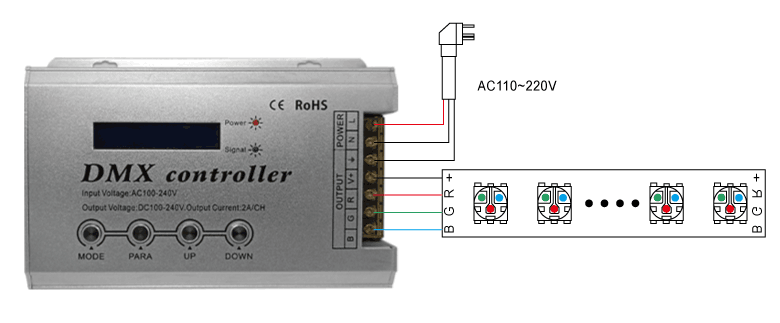
load output interface: load output, 2 power interface: input AC100 ~ 240V; a detailed description of the interface is shown in the figure below
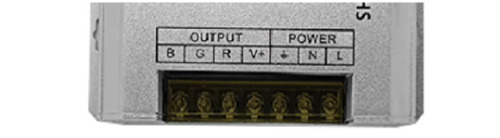
+ —— Load common positive terminal
R-load red output
G-load green output
B-load blue output
L——Power input live wire
N——Power input neutral
——Power input ground
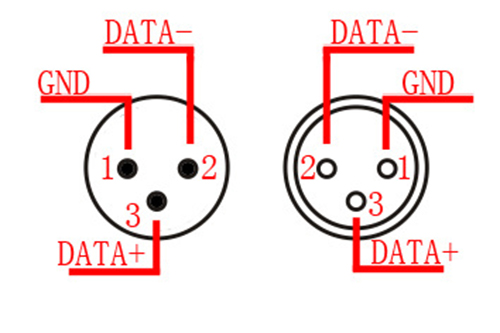
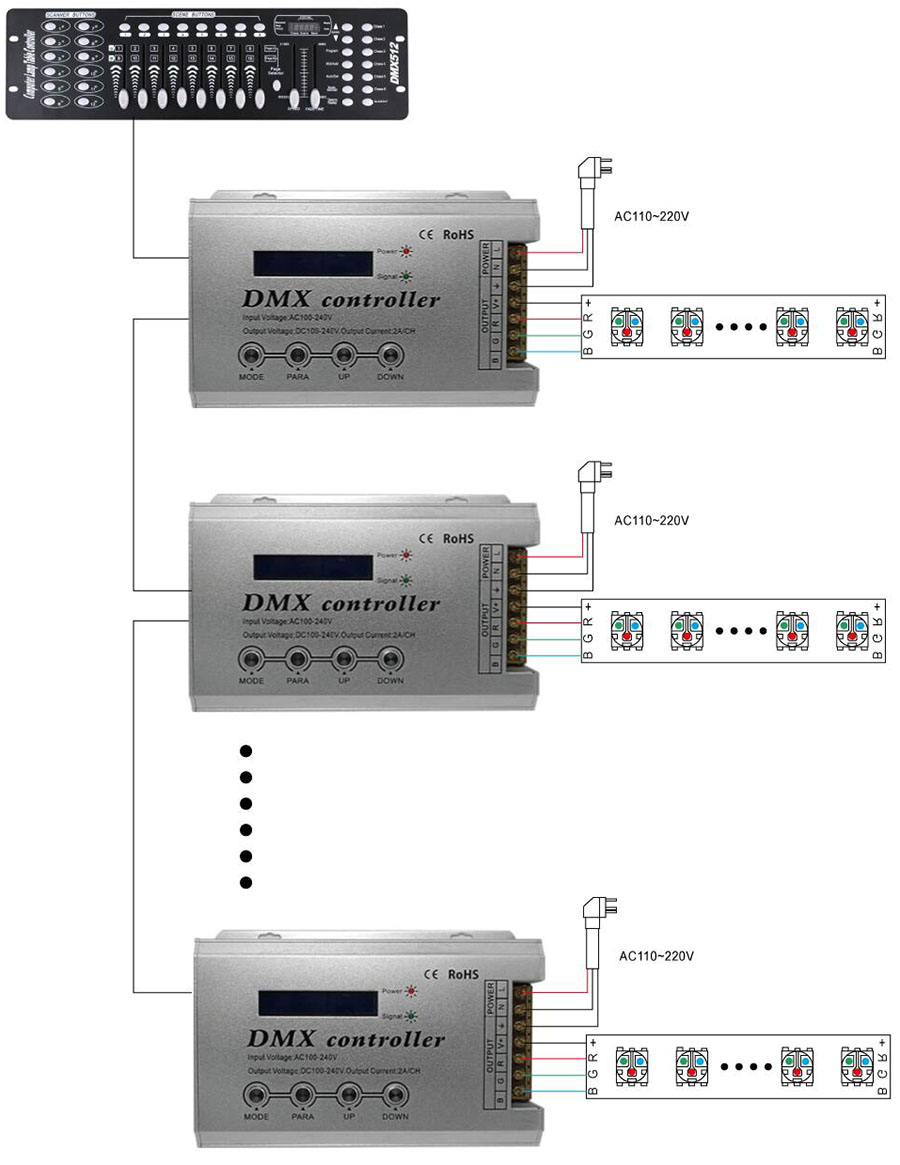
DMX512 signal input and output interface: the interface sequence and details are shown in the figure below
Instructions for use
1. Connect the load line and then the power line; make sure there is no short circuit between the connection lines before power on. The controller has 4 function setting keys MODE, PARA, UP, DOWN.
2. Press the MODE key to select in sequence or press the UP and DOWN keys to select up and down:
|
Serial number |
Display content |
Explanation |
|
1 |
BLACK |
Static black |
|
2 |
STATIC RED |
Static red |
|
3 |
STATIC GREEN |
Static green |
|
4 |
STATIC BLUE |
Static blue |
|
5 |
STATIC YELLOW |
Static yellow |
|
6 |
STATIC PURPLE |
Static purple |
|
7 |
STATIC CYAN |
Static green |
|
8 |
Static green |
Static white |
|
9 |
COLOR CHANGE |
Colorful jump |
|
10 |
COLOR CHANGE2 |
Jump (flashing) |
|
11 |
6 COLOR CHANGE |
Six-color jump |
|
12 |
6 COLOR CHANGE2 |
Jump (flashing) |
|
13 |
RGB CHANGE |
3-color jump |
|
14 |
RGB CHANGE2 |
Jump (flashing) |
|
15 |
RG CHANGE |
RG jump |
|
16 |
RB CHANGE |
RB jump |
|
17 |
GB CHANGE |
GB jump |
|
18 |
WHITE CHANGE |
White strobe |
|
19 |
7 COLOR SMOOTH |
Colorful gradient |
|
20 |
4 COLOR SMOOTH |
Four-color gradient |
|
21 |
RG SMOOTH |
RG gradient |
|
22 |
RB SMOOTH |
RB gradient |
|
23 |
GB SMOOTH |
GB gradient |
|
24 |
COLOR GRADUAL |
Colorful gradually lighten and darken |
|
25 |
RGB GRADUAL |
3 colors fade in and fade out |
|
26 |
WHITE GRADUAL |
White fades into light |
|
27 |
RG GRADUAL |
RG fades into light |
|
28 |
RB GRADUAL |
RB fades away |
|
29 |
GB GRADUAL |
GB fades into light |
|
30 |
R GRADUAL |
R fades into light |
|
31 |
G GRADUAL |
G fades into light |
|
32 |
B GRADUAL |
B fades in gradually |
|
33 |
ADJUST MODE |
RGB 0-255 color adjustable |
|
34 |
AUTO PROGRAM |
COLOR CHANGE2 Automatically run selected changes |
|
35 |
DMX512 MODE |
DMX512 control commands |
|
36 |
DMX512 DECODER |
DMX512 decoder |
3.Adjust in turn according to PARA: (1-8 is static, no adjustment function)
|
Serial Number |
Parameter display |
Explanation |
|
|
MAX |
MIN |
||
|
1 |
RUN SPEED |
100 |
0 |
|
2 |
RUN TIMES |
100 |
0 |
|
3 |
LOAD DEFAULT |
Reset |
|
4. UP: Increase parameter key / preset parameter.
5. DOWN: Decrease parameter keys / preset parameters.
6. The AUTO PROGRAM mode is to repeat 7-32 part of the pattern or all of it. You can set whether to participate in the repeated loop operation in RUN TIMES.
7. RUN TIMES (run times): Compile the running times of the pattern in 34 AUTO PROGRAM mode. If the running times are 0, skip the pattern, that is, the pattern is not run.
8. Preset parameters: Each program has independent factory preset parameters, which are saved separately in the controller. LOAD DEFAULT (preset parameters) can restore the factory parameters of the program. If in AUTO PROGRAM mode, using LOAD DEFAULT (preset parameters) can restore all the parameters of the program to the factory parameters.
9, 33 ADJUST MODE is manual dimming, you can adjust the brightness of RGB 0-256 level.
10. 35 DMX512 MODE is to control all patterns (first address) and speed (second address).
11, 36 DMX512 DECODER is a DMX decoder, fully accepts external DMX512 signal work. Occupy three addresses, R (one address), G (second address), B (third address), need to set the address (PARA button to enter)
Typical application
1 --- Without DMX function:
2 --- With DMX function
Applications
Back/task lighting
Cove LED lighting
Retail LED lighting
Display case LED lighting
Accent LED lights
Under cabinet lighting
led stage lighting
Note
A. is 110V/220V power input, the output high voltage 110/220 v article lamp directly. Article 110/220 v meet in the same line, at the same time electricity.
D. can theoretically with the highest 5050-60 light RGB light 50 meters.(according to the measured, to achieve ideal control effect, suggested that connect 3528 RGB colorful lights with 50 m or 5050 RGB lights with 30 meters)
E. This products only is only available for high voltage RGB led strip lights.
Safety
Supply input voltage of this product is AC110/220V.
Shorting output wires my cause damage to dimmer.
Always observe proper polarity when connecting high voltage led strip lights and load.
For indoor use only - this product is not waterproof or weatherproof.
Package including
1 x High Voltage led dimmer controller
3 × accessories
1 x Piece of User's Manual