

| Availability | In Stock |
|---|---|
| Condition | Brand New |
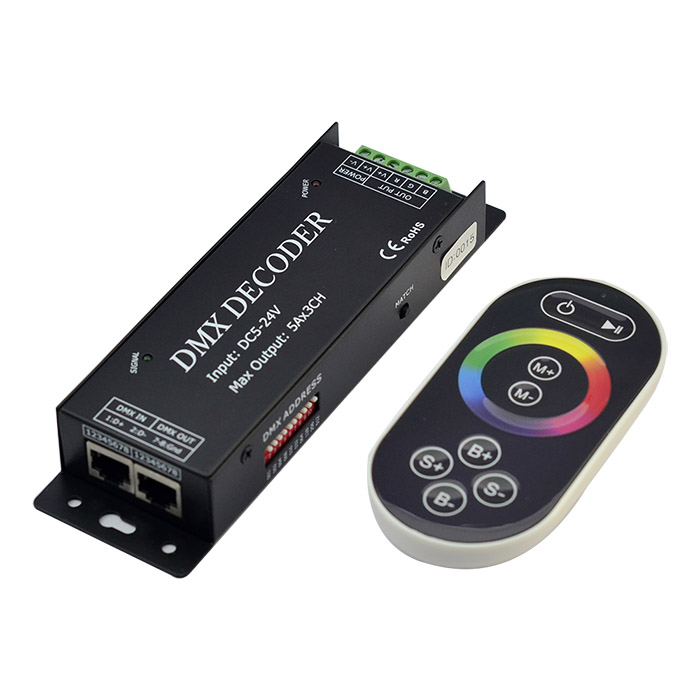
The DMX decoder adopts the advanced micro control unit, it receives standard DMX-512 digital control signal that is widely used in the and transform it into PWM signal to drive LED; the port of DMX signal has lightning protection measures, while the load output has over-current protection circuit; You could connect the DMX decoder with DMX digital console to achieve dimming or various changes in procedures. Not connected with DMX console, you can choose select the built-in 11 kinds of default patterns through the wireless remote control.
Our RGB Color Chianging LED Strip Lights
Specification Instructions Download 
Standards and Certifications


Product Specification
Decoder
Working Temperature: -20-60 ℃
Input voltage: DC5-24V
Output: 3 channel
Connection mode: common anode
External Dimension: L175 * W53 * H27 (mm)
Packing Size: L180 * W58 * H58 (mm)
Net Weight: 300g
Gross Weight: 480g
Output Current: <5A (each channel)
Output Power: 5V:<75W, 12V:<180W, 24V:<360W
Touch remote
Working Temperature: -20-60℃
Power Supply Mode: AAA*3 battery
Supply Voltage: 1.5V*3
Standby Power Consumption: 0.015mW
Standby Current: 3uA
Emission Current: 10mA
Remote Distance: 15m
Standby Time: 6 months
Decoder External Dimension

Remote Control External Dimension

Interface Specification
Interface of DMX signal adopts RJ45 cable interface, wiring is as follows:

DMX IN: input interface of DMX signal, D+ should be connected with positive of signal, D- connected with negative of signal, Gnd connected with ground.
DMX OUT: output interface of DMX signal, D+ should be connected with positive of signal, D- connected with negative of signal, Gnd connected with ground.
Power and load output adopts the 6PIN green terminal, wiring is as follows:

POWER: input interface of power, V+ should be connected with positive of power, V- connected with negative of power, the range of supply voltage is DC5-24V
OUT PUT: load output interface, V+ should be connected with the positive of light, R, G, B connected with negative, correspond to the three channels.
Direction for use
1. DMX address code settings
Each DMX decoder occupies 3 DMX addresses, it adopts coding switches to set address, the coding switches from 1 to 9 are Binary numerical code switches which are used for setting DMX original address code. The first is the lowest bit, and the tenth is the highest, 1023 address codes could be setted in all. DMX original address code is equal to the sum of the bit values of the coding switch from 1 to 10, dial the coding switch down (ON is setted to 1), the value of bit can be obtained; the coding switch upwards (OFF is setted to 0), and the value of bit is 0.
Example 1:
In figure 1, if you want to set the original address code to 37, you can dial down the first, the third and the sixth code switch, and the sum of the bit values of the coding switch from 1 to 10 is 32+4+1, that is the original address code of DMX512 is 37.

Example 2:
In figure 2, if you want to set the original address code to 328, you can dial down the ninth, the seventh and the fourth code switch, and the sum of the bit values of the coding switch from 1 to 10 is 256+64+8, that is the original address code of DMX512 is 328.

2. Instruction for touch remote control
1. There are 64 touch buttons (points), the functions are as follows:
 : you could turn on/off controller at any state;
 : pause key, in dynamic mode, it allows the controller to stop the current state;
 : The key has two functions:
(1) mode increase selection button, when the current control mode is pulley mode (color), if you want to realize the mode (color) in the controller, you can press this button.
(2) mode switch button, when the current control mode is "M" key mode, you can press this button to switch the mode (color) specified in M+ key table;
 : The key has two functions:
(1) mode reduce selection button, when the current control mode is pulley mode (color), if you want to realize the mode (color) in the controller, you can press this button.
(2) mode switch button, when the current control mode is "M" key mode, you can press this button to switch the mode (color) specified in M- key table;
 : It is used for increasing the output brightness, once pressed, the series of brightness increase 1, total 25 series (it is effective in static mode)
 : It is used for reducing the output brightness, once pressed, the series of brightness reduce 1, total 25 series (it is effective in static mode)
 : It is used for increasing the output speed, once pressed, the series of speed increase 1, total 32 series (it is effective in dynamic mode)
 : It is used for reducing the output speed, once pressed, the series of speed reduce 1, total 32 series (it is effective in dynamic mode)
 : multicolor pully touch key, static mode selection key, up to 56 touch points.
The button has two functions:
(1) Pulley static color selection key, so when the current control mode is M key mode (color), if must realize pulley static color, you can press this key.
(2) Pulley static color switch key, can change from 56 kinds of colors (as the pulley shown)
2. Match the code of remote control: The first time use the decoder and remote control, maybe because
the decoder address and remote control address is not match, it will cause the remote control can not
control, at this time, it need to use this button to make this 2 address matched. Firstly, press the
controller "Match" key, at the same time press any key of the remote control, more than 2s, now the
remote control indicator light RF will flicker 3 times, release "Match" key, then finished.
3. Power management: Stop using remote control more than 20s, remote control will automatically enter
into standby mode (the state can not touch), to extend the battery life for use; shake the remote mildly
remote return to work station(the state can touch).
4. Indicator descriptions: The indicator of touch remote control lights up indicates that it detects the touch
button, the indicator off means that no touch button is pressed.
5. The remote control can be used only when the decoder is not connected with DMX signal, when the
decoder is connected with DMX console, the mode of console takes precedence, at this time, the
touch remote does not have any effect.
Mode changes table is as follows

Typical application
