| Availability | In Stock |
|---|---|
| Condition | Brand New |
Low-voltage DMX controller with LCD display is an LCD digital interface display, used to control the RGB colour and one-way brightness of four-wire three-loop (common anode) LED luminaires, with up to 34 change mode selections, while accepting DMX512 Multifunctional controller controlled by international standard protocol. The controller can be operated in a stand-alone mode, self-connecting, and receiving standard DMX512 console control signals. According to the actual needs of customers, light changes such as jumping, gradual change, and strobe can be achieved.
Standards and Certifications


Technical Parameters
Working Temperature: -20-60℃
Power Supply Voltage: DC 12 to 24V
Output Voltage: DC 12 to 24V
Output Connect Way: common anode 4 channels
External Dimension: L203 Χ W134 Χ H50 mm
Packing Size: L255 Χ W155 Χ H60 mm
Net Weight: 0.59kg
Gross Weight: 0.92kg
Static Power Consumption: <3.96W
Maximum Output Current: 8A/each channel
Specifications Download 
External Dimension

Interface description

①. Fence type terminal with cover ②. XLR male seat (input) ③. XLR female seat (input)
Barrier type terminal with cover

①. Power negative ②. Power positive
③. Load output common positive terminal
④. Load red output terminal
⑤. Load green output ⑥. Load blue output
DMX XLR interface

Product packaging diagram

Direction for us
1. Connect the load wire at first, following by the power wire; Please ensure short circuit cannot occur between connecting wire before you turn on the power.Controller have 4 function setting key: MODE, PARA, UP, DOWN.
2. MODE key choose in turn or press UP, DOWN key to choose:
|
No. |
Display content |
Instruction |
|
0 |
BLACK |
Static black |
|
1 |
STATIC RED |
Static red |
|
2 |
STATIC GREEN |
Static green |
|
3 |
STATIC BLUE |
Static blue |
|
4 |
STATIC YELLOW |
Static yellow |
|
5 |
STATIC PURPLE |
Static purple |
|
6 |
STATIC CYAN |
Static green |
|
7 |
STATIC WHITE |
Static white |
|
8 |
COLOR CHANGE |
Seven color jumpy changing |
|
9 |
COLOR CHANGE2 |
Jumpy changing (flicker) |
|
10 |
SIX COLOR CHANGE |
Six color jumpy changing |
|
11 |
SIX COLOR CHANGE2 |
Jumpy changing (flicker) |
|
12 |
RGB CHANGE |
Three color jumpy changing |
|
13 |
RGB CHANGE2 |
Jumpy changing (flicker) |
|
14 |
RG CHANGE |
RG jumpy changing |
|
15 |
RB CHANGE |
RB jumpy changing |
|
16 |
GB CHANGE |
GB jumpy changing |
|
17 |
WHITE CHANGE |
White stroboflash |
|
18 |
COLOR SMOOTH |
Seven color gradual changing |
|
19 |
4 COLOR SMOOTH |
Four color gradual changing |
|
20 |
RG SMOOTH |
RG gradual changing |
|
21 |
RB SMOOTH |
RB gradual changing |
|
22 |
GB SMOOTH |
GB gradual changing |
|
23 |
COLOR GRADUAL |
Seven color fade in and out |
|
24 |
RGB GRADUAL |
Three color fade in and out |
|
25 |
WHITE GRADUAL |
White fade in and out |
|
26 |
RG GRADUAL |
RG fade in and out |
|
27 |
RB GRADUAL |
RB fade in and out |
|
28 |
GB GRADUAL |
GB fade in and out |
|
29 |
R GRADUAL |
R fade in and out |
|
30 |
G GRADUAL |
G fade in and out |
|
31 |
B GRADUAL |
B fade in and out |
|
32 |
ADJUST MODE |
Four channel, 0-255 level adjusted color |
|
33 |
AUTO PROGRAM |
Auto operation selecting result of changing |
|
34 |
DMX512 MODE |
DMX512 control order |
|
35 |
DMX512 DECODER |
DMX512 decoder |
|
No. |
Parameters display |
Instruction |
|
|
Maximum |
Minimum |
||
|
1 |
RUN SPEED |
100 |
0 |
|
2 |
RUN TIMES |
100 |
0 |
|
3 |
LOAD DEFAULT |
Restore the factory parameter |
|
4. UP: increase parameter key/preset parameter.
5. DOWN: decrease parameter/preset parameter.
6. AUTO PROGRAM mode is repeatedly cycle running part or all of 6-31 patterns run,you can set whether participating in repeated cycle of operation or not in RUN TIMES.
7. RUN TIMES: compiling the run times of the pattern under 33 AUTO PROGRAM, if the run times is 0, you can skip the pattern,that means not running the pattern.
8. Preset parameter: each form has independent factory preset parameter, which is kept in controller separate. LOAD DEFAULT can recover the factory parameter of the form. If under AUTO PROGRAM mode, using LOAD DEFAULT can unified recover the parameter of all forms to factory parameter.
9. 32 ADJUST MODE is manual dimming, it can adjust the brightness of RGB 0-256 level respectively.
10. 34 DMX512 MODE is controlling all patterns (the first address) and speed (the second address).
11. 35 DMX512 DECODER is DMX decoder, completely accepting outside DMX512 signal to work. Taking 4 addresses, R(the first address), G(the second address), B(the third address), reserved channel(the fourth channel), in need of setting address (by pressing PARA).
Typical Applications
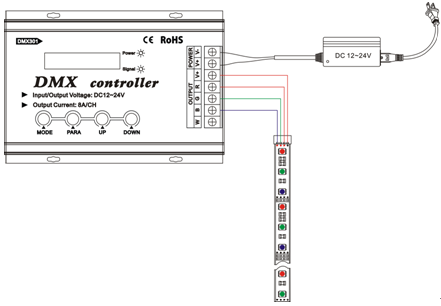
Typical application 1---do not have DMX function:
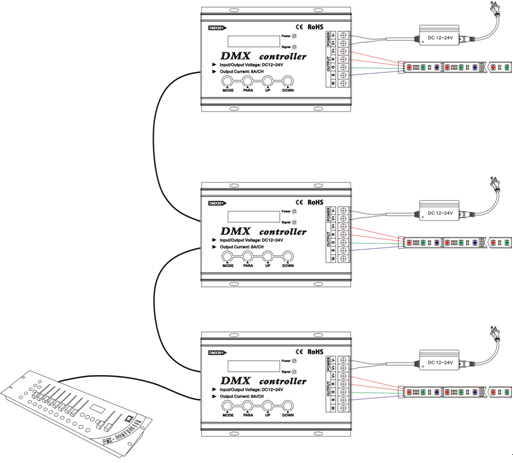
Typical application 2---with DMX function