

| Select Current: | 5A Per Channel (Base) |
|---|---|
| Select Input Voltage: | 12-36VDC (Base) |
| Availability | In Stock |
| Condition | Brand New |
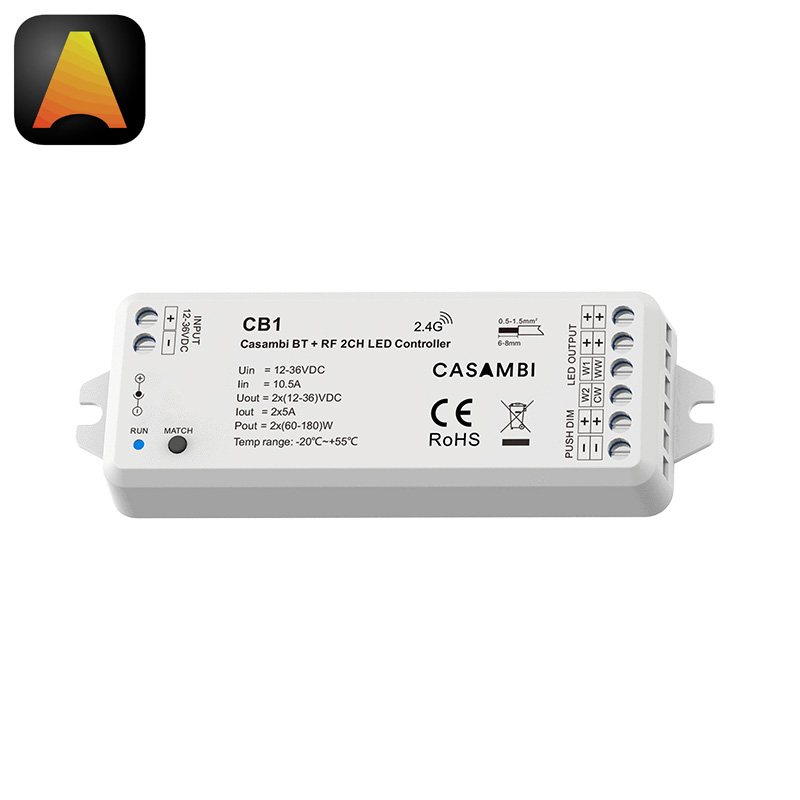
Model: CB1 | For Dimming & CCT Tunable White Light Strips
The CB1 is a high-performance 2-channel constant voltage LED controller integrated with the Casambi cloud platform. It provides professional-grade control for Single Color or CCT LED strips via the Casambi App, 2.4G RF remotes, or external push switches.
Through the Casambi APP, users can manage on/off switching, precise color temperature, and brightness adjustments. The system supports advanced lighting management, including group control, custom scene editing, and the ability to define minimum or maximum brightness levels. For specialized setups, users can configure the power-on startup status and choose from multiple power-down memory functions. Additionally, the light on/off fade time is fully customizable from 0 to 3 seconds to ensure a smooth visual transition.
Casambi uses Bluetooth Mesh network technology and each Casambi device can also be used as a repeater for longer distances.

| Model | SK-CB1 |
| Input Voltage | 12-36V DC |
| Input Current | 10.5A |
| Power Input | DC socket or terminal screw |
| Output Current | 2 Channels, 5A/CH |
| Control Signal | Bluetooth + RF 2.4G + Push Switch |
| APP | Casambi (Android 4.4 and ios10.0 or above) |
| Apply to | Single-color or CCT led strip lights |
| Dimming Range | 0-100% |
| Dimming Curve | Logariththmic |
| Dimming Gray Scale | 4096 (2^12) Levels |
| PWM Frequency | 4000Hz (Default) |
| Size | 114mm*38mm*20mm |
| Safety Protection | Reverse Polarity, Over-heat, Short-circuit |
● LED Strip Connection
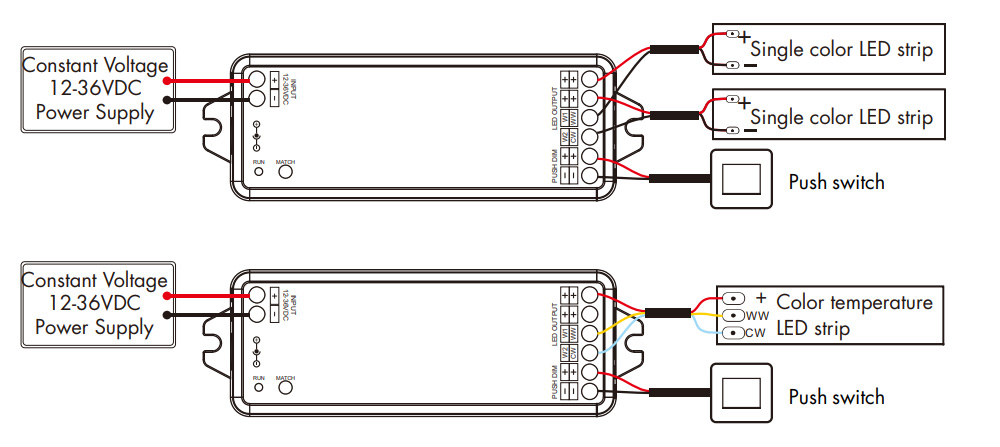
Connect your constant voltage LED strips (12-36V) to the output channels. For CCT dual white LED strips, assign one channel to Warm White (WW) and the other to Cool White (CW).
The controller offers flexible output configurations, allowing you to control two single-color LED strips either synchronously or independently.
When switching between different light types via the Casambi APP, the onboard LED indicator provides immediate visual feedback: a white light signifies Dimming (DIM) mode, while a yellow light indicates Color Temperature (CCT) mode.
● Casambi App Pairing
Download the Casambi App.
Ensure Bluetooth is enabled on your smartphone.
The app will automatically discover the CB1; add it to your network for full control.
● RF Remote Matching
Method 1: Short press the 'Match' key, then immediately press the ON/OFF key on the remote.
Method 2: Power off, then power on again (repeat twice). Immediately press the ON/OFF key 3 times on the remote.
● External Push Switch Support
This unit supports an optional external push switch. Short Press to toggle power; Long Press (1-6s) for continuous dimming.
● Installation Precautions
1. The products shall not be stacked, the distance should be ≥ 20cm, so as not to affect lifespan of the products due to poor heat dissipation.
2. The product shall not be installed close to the switching power supply with an interval of ≥ 20cm to avoid radiation interference of the switching power supply.
3. The installation height shall be ≥ 1m from the oor to avoid shortening the remote control distance due to too weak reception signal.
4. The products are not allowed to be close to or covered by metal objects, with an interval of ≥ 20cm to avoid signal attenuation and shorten the remotedistance.
5. Avoid installation at the corner of the wall or the corner of the beam, with an interval of ≥ 20cm to avoid signal interference.