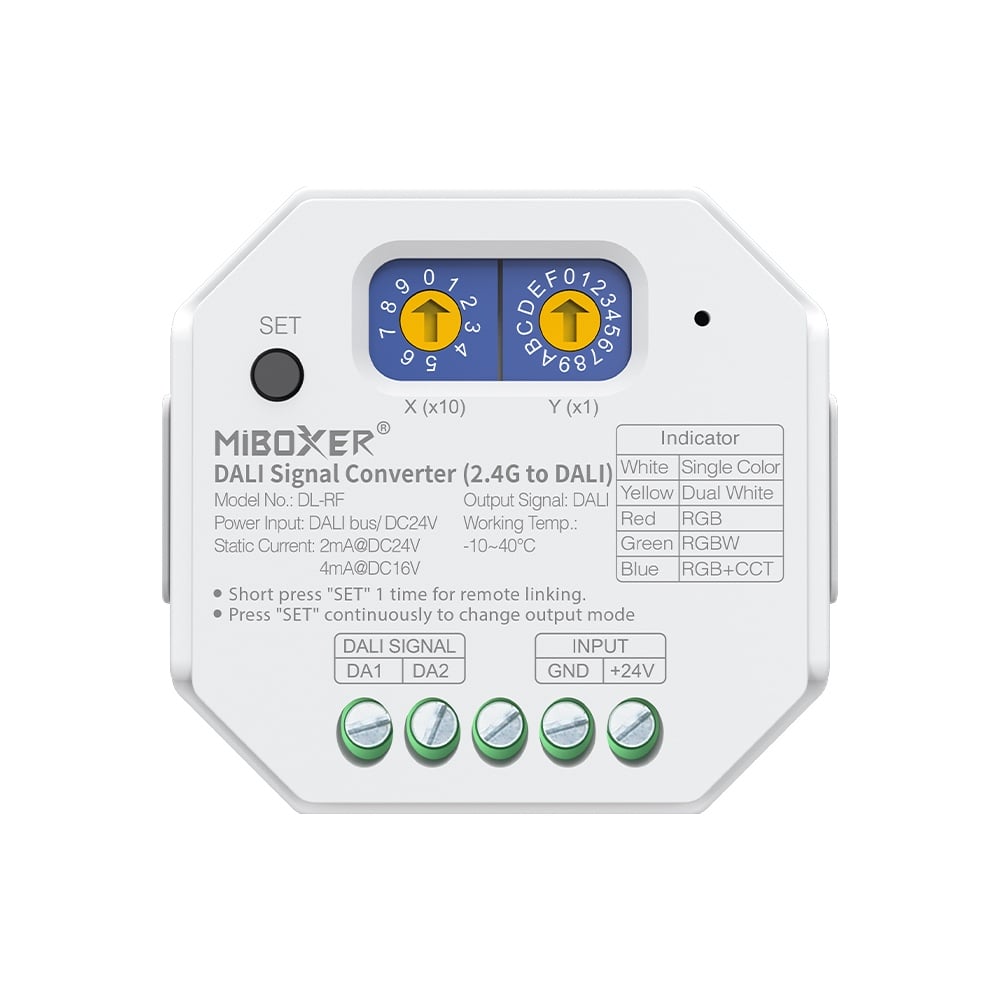
The DL-RF DALI Signal Converter is an essential bridge for integrating modern wireless control with wired DALI lighting systems. It translates commands from MiBoxer 2.4G RF remotes into standard DALI signals, allowing you to control DALI-addressable fixtures without running new control wiring. This makes it ideal for retrofits or for adding convenient handheld control to sophisticated DALI installations.
This converter is fully compliant with DALI standards IEC 62386, supporting DT6 (dimming), DT8-TC (tunable white), and DT8-RGBWAF (color changing) fixtures. For smart home integration, the DL-RF can be paired with a 2.4GHz gateway to enable control via the Tuya Smart app and voice assistants like Amazon Alexa and Google Assistant, bringing your professional DALI system into your smart home ecosystem.
Key Features
- DALl compliant: lEC 62386-101,102,207,208,209
- Supports DT6 dimming, DT8-TC CCT, DT8-RGB, DT8-RGBW
- Built-in 18 dynamic mode with jumping, gradually changing( only for
2.4G remote control)
- Auto-forwarding: Automatically forward the remote control signal to another controller, making the remote control distance infinite
- Automatic synchronization: The same dynamic mode is automatically synchronized, so that the mode is always consistent
- Have DND function, usually used in power failure area and save power
- Support TUYA SMART app control (2.4GHz gateway is needed)
- Support third party voice control like Alexa, Google assistant,Yandex Alice, Tmall Genie,Baidu and Xiaomi(2.4GHz gateway is needed)
Why Choose This Model
The DL-RF offers exceptional flexibility for lighting integrators. It can be powered directly from the DALI bus or via a separate 24V DC input, adapting to different system architectures. Its two rotary dials allow for easy and precise setting of DALI addresses for unicast, group, or broadcast control without needing any software. For clean and professional installations, the converter is designed for mounting on standard TS-35/7.5 or TS-35/15 DIN rails.
Beyond basic conversion, the DL-RF incorporates advanced 2.4G RF features. Auto-forwarding allows one converter to relay signals to another, extending the remote control range indefinitely as long as units are within 30m of each other. Auto-synchronization ensures that multiple converters set to the same dynamic mode will display effects in perfect unison, creating seamless, large-scale lighting scenes.
Specifications
| Name | DALl Signal Converter(2.4G to DALI) |
|---|
| Model No. | DL-RF |
|---|
| Power Input | DALIBUS/ DC24V |
|---|
| Standby Power | 2mA@DC24V/4mA@DC16V |
|---|
| DALI Bus Standard | IEC 62386 |
|---|
| Protocol | 2.4G to DALI |
|---|
| RF Control distance | 30m |
|---|
| Working Temperature | -10~40℃ |
|---|
Wiring & Installation
- Mount the Converter: Secure the DL-RF converter in a suitable location. It can be mounted on a standard TS-35/7.5 or TS-35/15 DIN rail (purchased separately).
- Set DALI Address: Use the two rotary switches (X and Y) to set the desired DALI address before powering on.
- Unicast (Address 0-63): Set X to 0-6 and Y to 0-9. The address is (X * 10) + Y. Example: X=3, Y=2 sets address 32.
- Group (Group 0-15): Set X to 7 and Y to 0-F. The group is the value of Y. Example: X=7, Y=8 sets group 8.
- Broadcast: Set X to 9. The device will control all fixtures on the bus.
- Set Light Type: Before use, short press the "SET" button repeatedly to cycle through the supported DALI types. The indicator light will change color to confirm the selection:
- White: Single Color (DT6)
- Yellow: Dual White / CCT (DT8-Tc)
- Red: RGB (DT8-RGBWAF)
- Green: RGBW (DT8-RGBWAF)
- Blue: RGB+CCT (DT8-RGBWAF)
- Connect to DALI Bus: Wire the DALI bus lines to the DALI 1 and DALI 2 terminals on the converter.
- Provide Power: Choose one of the two power options:
- Option A (DALI Bus Power): The device can be powered directly from the DALI bus if a DALI bus power supply is present on the network.
- Option B (External DC Power): Connect an external 24V DC power supply to the dedicated power input terminals.
Setup & Operation
- Linking with a 2.4G Remote
- Short press the "Link/Unlink" button on the DL-RF converter once.
- Within 3 seconds, short press the desired zone's ON ("I") button on the remote control 3 times.
- The connected DALI lights blinking 3 times slowly indicates a successful link. If they do not blink, repeat the steps.
- Unlinking a 2.4G Remote
- Short press the "Link/Unlink" button on the DL-RF converter once.
- Within 3 seconds, short press the desired zone's ON ("I") button on the remote control 5 times.
- The connected DALI lights blinking 10 times quickly indicates a successful unlink.
- Selecting Dynamic Mode Table (Remote Control Only)
The converter has two tables of dynamic modes. To switch between them:
- Select Table 1 (Default): While the lights are in a static mode, short press the "S+" button on the remote 5 times quickly. A blue light flashing 3 times slowly confirms the change.
- Select Table 2: While the lights are in a static mode, short press the "S-" button on the remote 5 times quickly. A yellow light flashing 3 times slowly confirms the change.
- Toggling "Do Not Disturb" Mode (Power-On State)
This feature determines the light's state after a power outage. It is ON by default.
- Turn ON DND Mode (Restore last state): Short press the remote's main OFF button 3 times, then short press the main ON button 3 times. The light flashing 4 times quickly confirms success. After a power outage, the light will return to the state it was in before the power was lost.
- Turn OFF DND Mode (Default to ON): Short press the remote's main ON button 3 times, then short press the main OFF button 3 times. The light flashing 4 times slowly confirms success. After a power outage, the light will always turn ON.
Typical Applications
- Integrating wireless remote control into existing wired DALI installations
- Adding smart home app and voice control to commercial DALI lighting
- Controlling DALI-based architectural lighting with handheld remotes
- Synchronizing dynamic color effects across multiple DALI zones wirelessly
- Retrofitting DALI systems for control without running new control wires
- Stage and event lighting control using 2.4G RF remotes
Learn More
Frequently Asked Questions
What do I need to use this converter?
You need a DALI lighting system with a DALI bus power supply, DALI drivers/fixtures, and a compatible . For app/voice control, you also need a .
How is the DL-RF powered?
It offers two options: it can be powered directly from the DALI bus, or you can connect a separate DC 24V power supply to its dedicated input terminals.
What types of DALI lights can this control?
It supports DALI DT6 for single-color dimming and DALI DT8 for color control, including Tunable White (CCT), RGB, and RGBW fixtures.
How do I set the DALI address?
Use the two rotary switches on the device. Addresses 0-63 are for unicast (individual) control, 70-7F for group control (groups 0-15), and 90-9F for broadcast (all devices).
Can I control multiple DALI converters with one remote?
Yes, you can link multiple DL-RF converters to the same remote zone. The auto-synchronization feature ensures their dynamic modes will play in unison if they are within 30m of each other.
What is the wireless range?
The direct range from a remote is 30 meters (approx. 100 feet). The auto-forwarding feature allows converters to relay the signal to each other, creating a virtually unlimited range as long as units are within 30m of the next one.
What is the 'Do Not Disturb' function?
It controls the device's behavior after a power failure. When enabled (default), the lights return to their last state before power was lost. When disabled, they will always turn on when power is restored.
Is this device compatible with any DALI system?
It is compliant with IEC 62386 standards (101, 102, 207, 208, 209), making it compatible with other standards-compliant DALI systems and .
Precautions
- Verify your power source voltage is in accordance with the device requirements before connecting.
- Always disconnect power before wiring. Ensure all connections are correct and secure before restoring power.
- Installation should be performed by a qualified professional. Do not attempt to dismantle the device.
- For optimal remote performance, avoid installing near large metal surfaces or sources of strong electromagnetic interference.
- This device is for indoor use only and should not be installed in humid or damp locations.