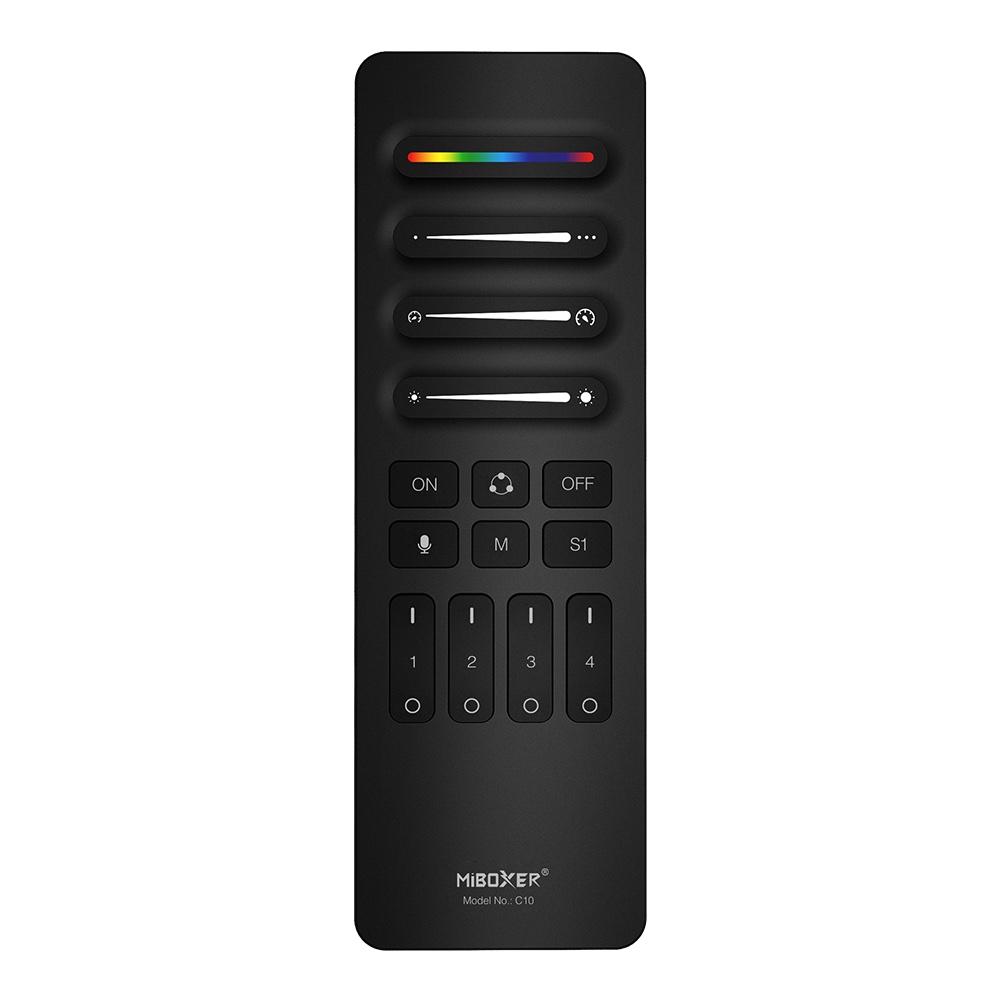
The C10 is a 4-channel wireless remote designed for detailed control over addressable SPI LED lighting. Using a stable 2.4GHz RF signal, it allows you to manage up to four separate zones of lighting from a single, intuitive interface. It must be paired with a compatible SPI LED controller to function.
This remote is ideal for installers and users who need precise control over their lighting effects. You can adjust static colors, select dynamic modes, change speed and brightness, and even set the exact number of pixels in your LED strip. The C10 also features a music-sync mode and the ability to save and recall up to four custom scenes, making it a versatile tool for both commercial and residential ambient lighting projects.
Browse more in Addressable SPI RGBIC LED Strip Controller.
Key Features
- Support 4 individual channel
- Setting your favorite mode, color and brightness
- Dynamic, static,music mode adjustable
- Adjust color, pixel point, speed, dynamic and static mode
- Support to save 4 scenes
- Working with mulit controllers ( control distance 30m)
- Simple installation, magnetic installation
Why Choose This Model
The C10 remote offers granular control that goes beyond basic remotes. Its key feature is the ability to define the length of your addressable LED strip, supporting anywhere from 8 to 2048 pixels for precise mapping of effects. The 2.4GHz wireless protocol ensures a reliable connection with a control distance of up to 30 meters (approx. 98 feet), allowing for flexible placement and control across large spaces. The ability to manage four independent channels and save custom scenes makes it easy to create complex, multi-part lighting designs and recall them with a single button press.
Specifications
| Product Name | 4-Channel SPI Remote |
|---|
| Model No. | C10 |
|---|
| Working Voltage | 3V (AAA*2PCS) |
|---|
| Standby Power Consumption | 15μA |
|---|
| Transmitting Power | 6dBm |
|---|
| RF | 2.4GHz |
|---|
| Modulation Method | GFSK |
|---|
| Control Distance | 30m |
|---|
| Working Temperature | -10~40°C |
|---|
| EMC Standard (EMC) | ETSI EN 301 489-1 V2.2.3 (2019-11)
ETSI EN 301 489-3 V2.3.2 (2023-01) |
|---|
| Safety Standard (LVD) | EN 61347-2-11:2001+A1:2019
EN 61347-1:2015+A1:2021
EN 62493:2015 +A1:2022 |
|---|
| Radio Equipment (RED) | ETSI EN 300 440 v 2.2.1 (2018-07) |
|---|
| Certification | CE, EMC, RED |
|---|
Wiring & Installation
The remote includes a magnetic holder for simple, tool-free installation. Before starting, insert two AAA batteries (not included) into the remote.
- Clean the desired mounting surface to ensure it is free of dust and grease.
- Remove the protective film from the adhesive sticker on the back of the holder.
- Press the holder firmly onto the wall or surface.
- The remote can now be placed into the holder, where it will be held magnetically.
Setup & Operation
The C10 remote must be linked to a compatible SPI controller before use. Follow these procedures for setup and operation.
Linking and Unlinking
- To Link: Turn the power to your SPI controller OFF for at least 10 seconds. Turn the power back ON. Within 3 seconds, short press the desired zone's 'ON' ( | ) button 3 times. The connected LED strip will flash 3 times slowly to indicate a successful link.
- To Unlink: Turn the power to your SPI controller OFF for at least 10 seconds. Turn the power back ON. Within 3 seconds, short press the linked zone's 'ON' ( | ) button 5 times. The connected LED strip will flash 10 times quickly to indicate it has been successfully unlinked.
Configuration
- Setting Pixel Length (8-2048 pixels): Long press the main 'ON' button for 5 seconds. The strip will light up white, and the last pixel will start blinking. Use the 'Pixel points slider' or the +/- buttons to set the correct number of pixels for your strip. Short press the main 'ON/OFF' button to save and exit.
- Setting Width for Dynamic Modes: In certain dynamic modes that use multiple sections, the 'Pixel points slider' can be used to adjust the width or number of pixels in each section, altering the appearance of the effect.
- Setting ON/OFF Timer and Color: Press the main 'OFF' button 5 times continuously. The LED strip will enter a 'running horse' state to indicate it's in timer setting mode. Use the 'Speed' slider to set the ON/OFF time and the 'RGB' slider to set the color that will be used. Short press the main 'ON/OFF' button to save and exit.
Typical Applications
- Multi-zone residential ambient lighting
- Commercial accent lighting in retail or hospitality
- Creating dynamic effects for entertainment venues
- Controlling custom cove and under-cabinet lighting
- Synchronizing multiple addressable LED strip installations
- Architectural lighting with precise pixel control
Frequently Asked Questions
What do I need to use the C10 remote?
You need a compatible MiBoxer SPI LED controller, an appropriate for your controller and strips, and two AAA batteries for the remote itself.
Is this remote compatible with any addressable LED strip?
This remote does not connect directly to an LED strip. It wirelessly controls a compatible MiBoxer , which in turn drives the addressable LED strip.
How many separate areas can I control with one remote?
The C10 is a 4-channel remote, allowing you to control up to four separate zones independently. You can link multiple controllers to the same zone if you want them to act as one.
How do I pair the C10 remote to my controller?
Power cycle your controller. Within 3 seconds of turning it back on, press the 'ON' button for your desired zone three times. A slow flash of the lights confirms the pairing was successful.
What is the maximum number of pixels I can control?
You can configure the remote to control an LED strip with a length of 8 to 2048 pixels.
What is the wireless range of the C10 remote?
The 2.4GHz RF signal provides a control distance of up to 30 meters (approximately 98 feet) in an open environment.
What does the music mode do?
In music mode, the remote uses a built-in microphone to make the lights react to ambient sound. The brightness slider adjusts the microphone's sensitivity in this mode.
What kind of batteries does the C10 remote use?
The remote is powered by two AAA batteries (3V), which are not included.
Precautions
- This remote is only compatible with MiBoxer brand SPI LED controllers.
- Do not use in areas with high humidity or high temperatures.
- Remove batteries if the remote will not be used for an extended period to prevent leakage.
- Keep the remote away from large metal objects or strong magnetic fields, as they can interfere with the wireless signal and reduce the control distance.