Go to Top
SuperLightingLED
SUPERLIGHTINGLED CO., LTD
Web: www.superlightingled.com
Email: [email protected]
Date: 2026-11-03 | ID: 2188

DALI touch panel EDA3 For LED Strip Light

MODEL: EDA3
Price based on selections below:
$48.99
AvailabilityIn Stock
ConditionBrand New
Technical Specifications

The LTECH EDA3 is a wall-mounted 3-channel DALI touch panel dimmer engineered to control static white and architectural lighting circuits over an IEC62386 DALI bus. Operating completely on bus power without requiring an auxiliary AC line or external low-voltage power supply, the unit draws only 6mA static current and 4mA standby current at 16V. It integrates two rotary encoding switches (X and Y) on the backplate, enabling quick hardware configuration for unicast (0-63), group (0-15), scene (0-15), and broadcast control modes without specialized software programming tools. Designed to fit standard European 86 style electrical back boxes, the EDA3 provides smooth switching and logarithmic 0.1% to 100% dimming response across 3 independent channels. 
DALI touch panel EDA3 For LED Strip Light - photo 1
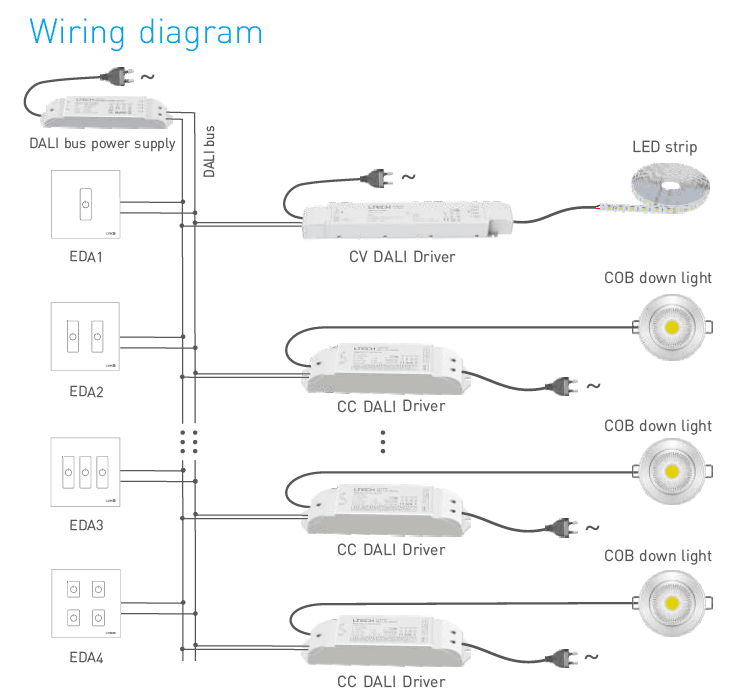
Complete wiring diagram connecting EDA3 panel to DALI bus power and LED drivers

Key Features of the EDA3 Touch Panel Dimmer

Standard IEC62386 Protocol

Full compliance with international DALI standards guarantees seamless interoperability across standard DALI bus networks and third-party certified drivers.

DALI Bus Powered Design

Draws operating energy directly from the two-wire signal line with a low static current of 6mA at 16V, eliminating dedicated high-voltage AC feeds behind the switch box.

3 Independent Touch Channels

Features 3 discrete capacitive touch keys with integrated status LED backlighting for quick tap on/off control and smooth press-and-hold dimming.

Dual Rotary Address Switches

Onboard 10-level (X) and 16-level (Y) rotary switches allow direct setup of unicast addresses, 16 groups, 16 scenes, or full broadcast mode.

European 86-Style Form Factor

Compact dimensions of 86 × 86 × 37 mm mount neatly onto standard European 86-type embedded junction boxes.

Wide Operating Temperature

Tested and rated for stable performance across harsh industrial and commercial temperature bands from -30℃ to 55℃.
Technical Highlights & System Integration

  • Eliminates complex software setup: hardware rotary switches X and Y let installers commission initial addresses, zones, or scenes directly on site.
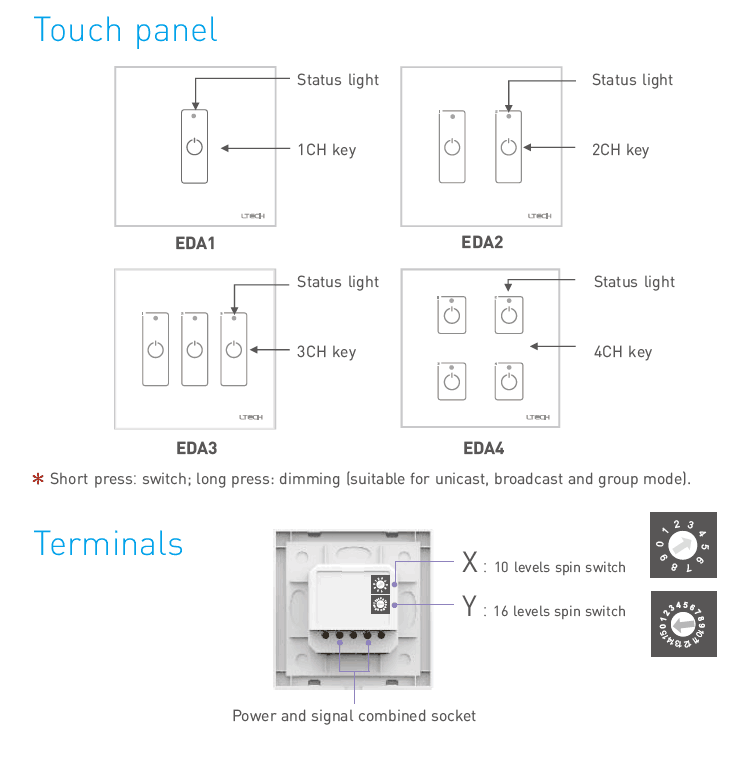
  • X switch selects mode: 0-6 for unicast addresses (0-63), 7 for group mode (0-15), 8 for scene recall (0-15), and 9 for broadcast mode.
  • Short touch toggles light output on or off; sustained long press smoothly raises or lowers brightness without perceptible flicker.
  • Ultra-low power consumption on the DALI line: 6mA operating static current and 4mA idle standby current at 16V bus potential.
  • Sturdy glass-surface touch interface with subtle status indicators provides clear tactile visual feedback under dim ambient conditions.
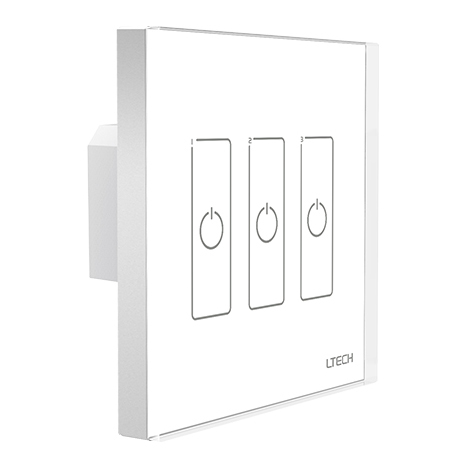
LTECH EDA3 3-channel DALI touch panel wall controller front faceplate
Rear terminal layout and rotary address switches on the EDA3 DALI controller

Product Specifications

ParameterDetails
Product ModelEDA3
Product TypeDALI Touch Panel Master Dimmer
Communication ProtocolDALI (IEC62386 standard)
Power SupplyDALI Bus Power
Static Current6mA @ 16V
Standby Current4mA @ 16V
Output SignalDALI Digital Signal
Controlled Channels3 Channels (3 Touch Keys)
Control ModesUnicast (0-63), Group (0-15), Scene (0-15), Broadcast
Addressing MethodDual Rotary Dial Switches (X: 10-level, Y: 16-level)
Dimming ActionShort press switch ON/OFF; long press continuous dimming
Operating Temperature-30℃ ~ 55℃
Dimensions (L × W × H)86 × 86 × 37 mm
Package Dimensions113 × 112 × 50 mm
Gross Weight200 g
Wall Box CompatibilityEuropean standard 86 style back box
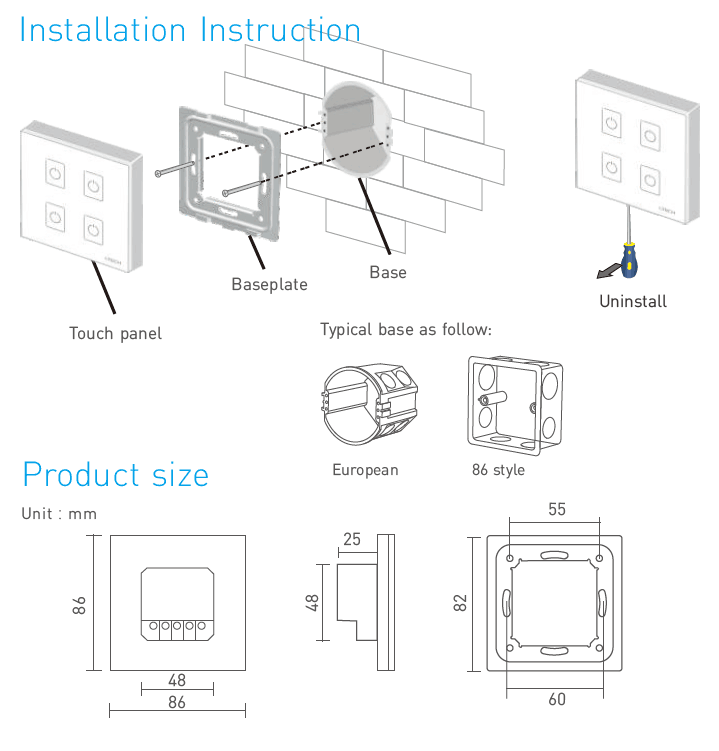
Dimensional diagram and mounting layout for European 86 style back box

Practical Application Scenarios

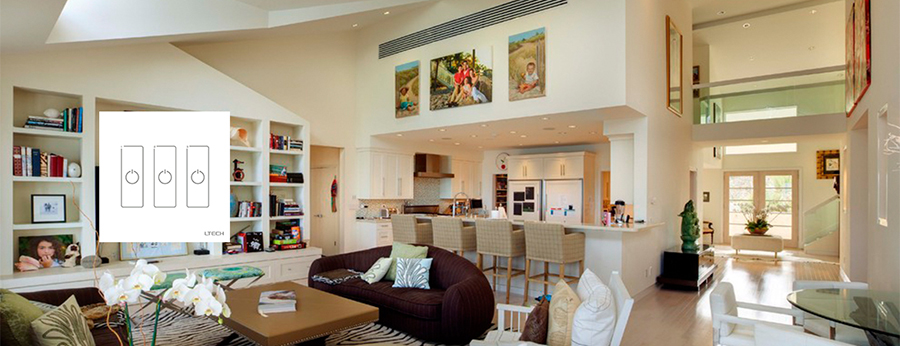
Commercial Office Linear Lighting Manage 3 distinct lighting zones within open-plan offices or conference rooms. Connect the EDA3 directly to a shared DALI bus line to dim overhead troffers, cove accent strips, and perimeter task lights independently.
Hospitality & Restaurant Ambience Control Set dedicated lighting moods using the rotary scene addressing function. Operators can adjust pendant fixtures, bar counters, and wall washers smoothly from a single modern touch interface without software gateways.
Residential Architectural Cove & Accent Lighting Integrate low-voltage constant voltage drivers driving architectural LED strip fixtures throughout living and dining areas, providing flicker-free dimming down to low thresholds over standard 2-wire DALI cabling.
Retail Display & Gallery Spotlighting Control track spotlights and under-shelf showcase lighting with precision. Touch keys enable staff to adjust illumination levels manually to highlight seasonal merchandise without rewiring existing circuits.

How to Control & Use This Controller

  1. Step 1: Disconnect all mains power to the DALI bus power supply before starting installation.
  2. Step 2: Carefully pry off the front touch glass faceplate from the baseplate using a flat-blade tool at the bottom slot.
  3. Step 3: Connect the 2-wire DALI signal bus cable into the rear screw terminals labeled for DALI signal/power. Note that standard DALI lines are polarity-free.
  4. Step 4: Set your desired operating mode and start address using the rotary switches on the back. Set switch X between 0 and 6 for unicast addressing (Initial Address = X*10 + Y), set X to 7 for group control (Group = Y), set X to 8 for scene recall (Scene = Y), or set X to 9 for broadcast control.
  5. Step 5: Secure the mounting baseplate to the European 86 style wall box using the supplied screws.
  6. Step 6: Align and snap the front glass touch panel firmly back onto the baseplate until it clicks into position.
  7. Step 7: Power on the DALI bus power supply. Tap a key briefly to toggle the corresponding channel on or off; press and hold the key to dim brightness up or down smoothly.
⚠ Precautions
  • Ensure the DALI bus has an active certified DALI bus power supply (12V-20.5V DC, typically 16V DC nominal) installed on the circuit.
  • Do not connect 100-240V AC line voltage directly to the EDA3 terminals, as this will permanently damage the controller and bus components.
  • Total current consumption of all control panels, sensors, and drivers on a single DALI loop must not exceed the power rating of the bus supply (maximum 250mA per standard loop).
  • Keep total DALI bus line cable run under 300 meters using minimum 1.5 mm² two-core copper cable to prevent signal voltage drop.

What's in the Box

  • ✓1 × LTECH EDA3 3-Channel DALI Touch Panel Controller
  • ✓1 × User Manual & Wiring Reference Sheet

⇩ Downloads & Documents

PDFEDA3

Frequently Asked Questions

Q: Does the EDA3 touch panel require an external 12V or 24V power supply?

A:No. The EDA3 is completely powered by the DALI bus line, drawing a nominal 6mA at 16V during operation and 4mA in standby.

Q: Can the EDA3 control 3 separate DALI addresses independently?

A:Yes. In unicast mode, the 3 touch keys control 3 consecutive DALI short addresses starting from the initial address set by the rotary switches.

Q: How do I configure the DALI address without software?

A:Use the two rotary switches on the rear of the panel. Dial X sets the mode (unicast, group, scene, or broadcast) and tens digit, while dial Y sets the units value.

Q: What is the difference between short pressing and long pressing a key?

A:A short press toggles the assigned channel or group on or off, while a continuous long press raises or lowers the brightness level.

Q: Will the EDA3 fit standard US gang boxes?

A:The EDA3 is built to standard European 86 style dimensions (86 × 86 mm) with 60 mm screw spacing, designed for European 86-type embedded wall boxes.

Q: Can I use the EDA3 with constant current and constant voltage DALI drivers?

A:Yes. As an IEC62386 master controller, it transmits standard digital DALI commands compatible with all compliant constant voltage and constant current drivers.


© 2026 SuperLightingLED. All specifications are subject to change without notice.