Go to Top
SuperLightingLED
SUPERLIGHTINGLED CO., LTD
Web: www.superlightingled.com
Email: [email protected]
Date: 2026-11-03 | ID: 3507

EDT3 DALI RGB Touch Panel For RGB LED Light Strip

MODEL: EDT3
Price based on selections below:
$55.98
AvailabilityIn Stock
ConditionBrand New
Technical Specifications

The Ltech EDT3 is a sophisticated DALI master controller designed for intuitive and precise control of RGB LED lighting. Encased in an elegant 86x86mm glass panel, this dimmer touch panel is the ideal user interface for high-end residential, commercial, and architectural lighting projects. It operates on the DALI standard protocol, supporting advanced DT8 (x-y coordinate) color control for seamless integration into any modern DALI lighting system. Power is supplied directly from the DALI bus, simplifying installation and eliminating the need for additional wiring. With dedicated controls for RGB color, saturation, and brightness, plus 4-zone management and scene memory, the EDT3 provides comprehensive and effortless command over your ambient lighting.
EDT3 DALI RGB Touch Panel For RGB LED Light Strip - photo 1
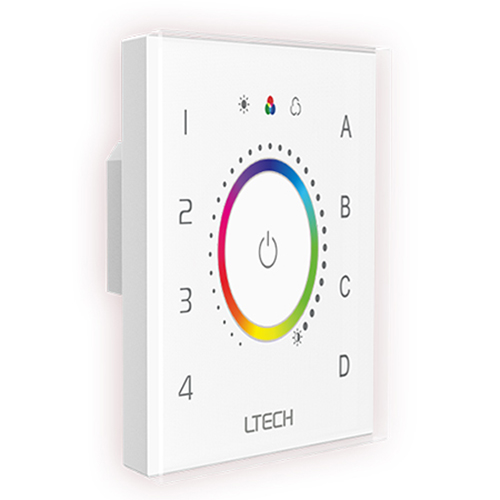
Ltech EDT3 DALI RGB Touch Panel with intuitive color wheel.
EDT3 DALI RGB Touch Panel For RGB LED Light Strip - photo 3
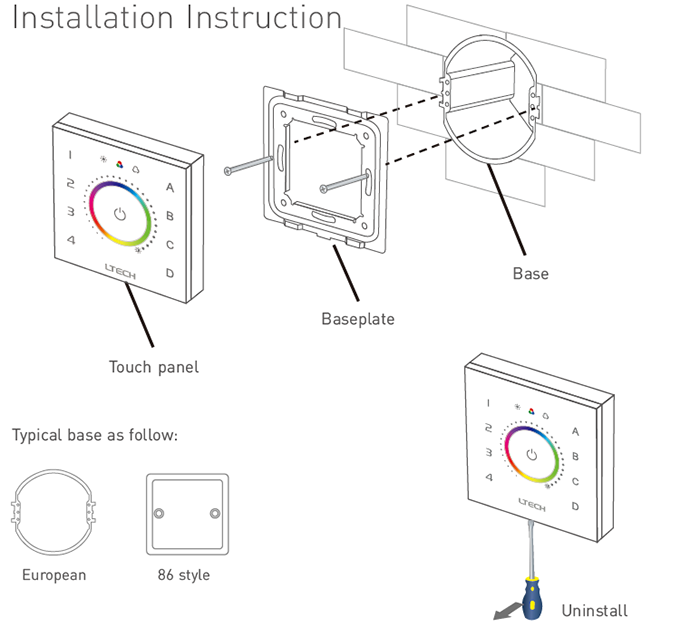
Installation instructions for a standard European 86-style base.
EDT3 DALI RGB Touch Panel For RGB LED Light Strip - photo 4
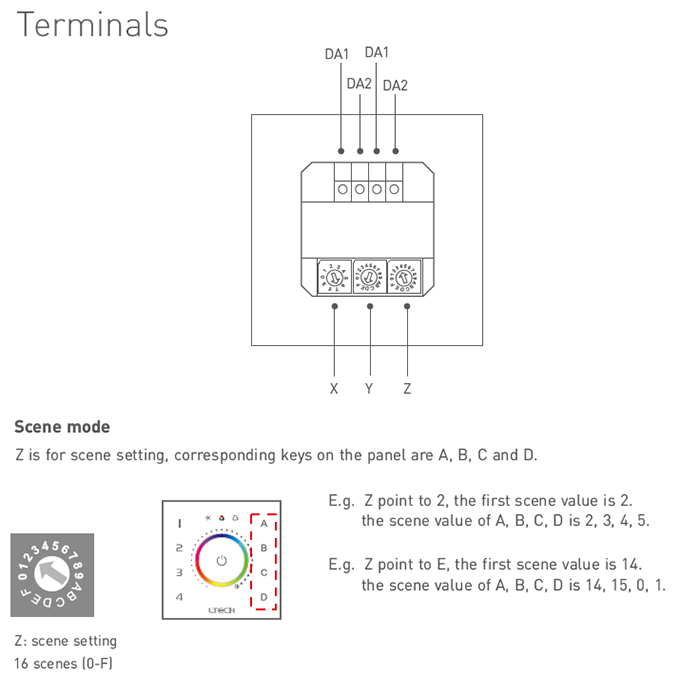
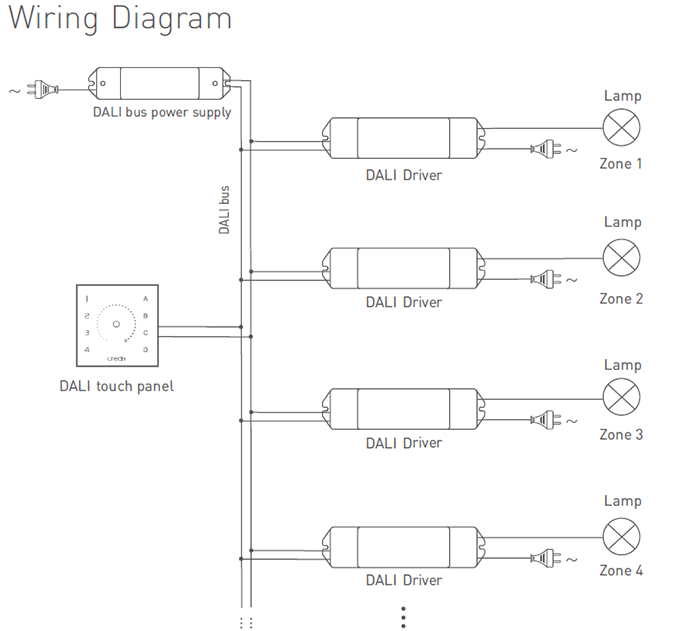
Typical wiring diagram showing connection to the DALI bus and drivers.

Key Features

Intuitive RGB & Saturation Control

Features a highly responsive touch circle for smooth adjustment of RGB color, saturation, and overall brightness.

DALI DT8 Compliant

Adopts DALI standard protocols IEC62386-102, 207, & 209, ensuring compatibility and advanced DT8 color control.

Comprehensive Zone & Scene Management

Independently control up to 4 zones and save/recall 4 custom lighting scenes with dedicated touch keys.

Flexible DALI Addressing

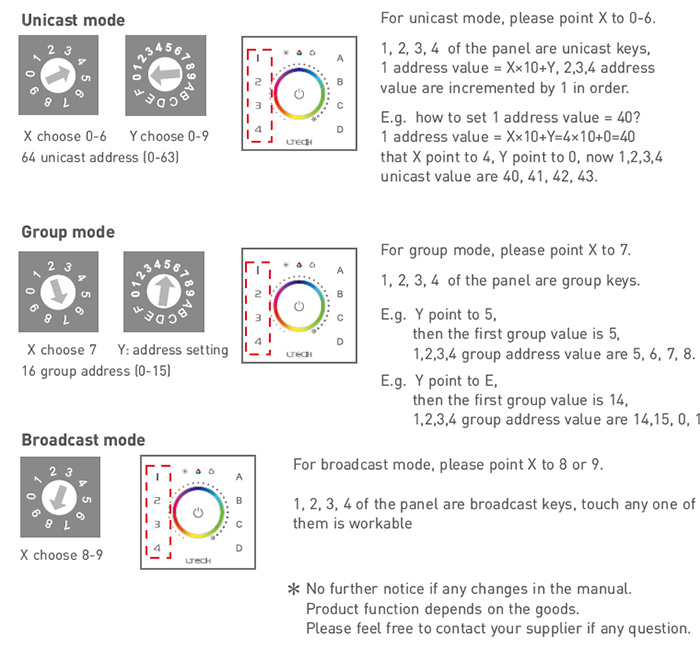
Supports unicast, group, and broadcast modes, easily configured via rotary switches for system flexibility.

Bus-Powered Simplicity

Draws its minimal power (<6mA) directly from the DALI bus, simplifying wiring and installation.

Tactile Feedback

Built-in touch vibration provides physical confirmation of user input for a premium interactive experience.

Technical Highlights

  • Standard DALI Protocol: Fully compliant with IEC62386 for seamless interoperability.
  • DT8 Color Control: Supports advanced x-y coordinate color control for precise color rendering.
  • Multi-Mode Operation: Easily set addresses for Unicast, Group, or Broadcast control.
  • Wide Temperature Range: Operates reliably in extreme temperatures from -30°C to 55°C.
EDT3 DALI RGB Touch Panel For RGB LED Light Strip - photo 7
Detailed interface layout for the EDT3 RGB touch panel, showing color, saturation, and brightness controls.

Product Specifications

ParameterDetails
ModelEDT3
Power SupplyDALI Power
Power Consumption< 6mA@16V
Input SignalDALI
DALI ProtocolIEC62386-102, IEC62386-207, IEC62386-209
Control TypeDT8 (RGB Color Control)
Dimming InterfaceTouch Panel
Control ModesUnicast, Group, Scene, Broadcast
Working Temperature-30°C ~ 55°C
Dimensions86 × 86 × 37 mm (L×W×H)
Package Size113 × 112 × 50 mm (L×W×H)
Weight (Gross)240g
EDT3 DALI RGB Touch Panel For RGB LED Light Strip - photo 8
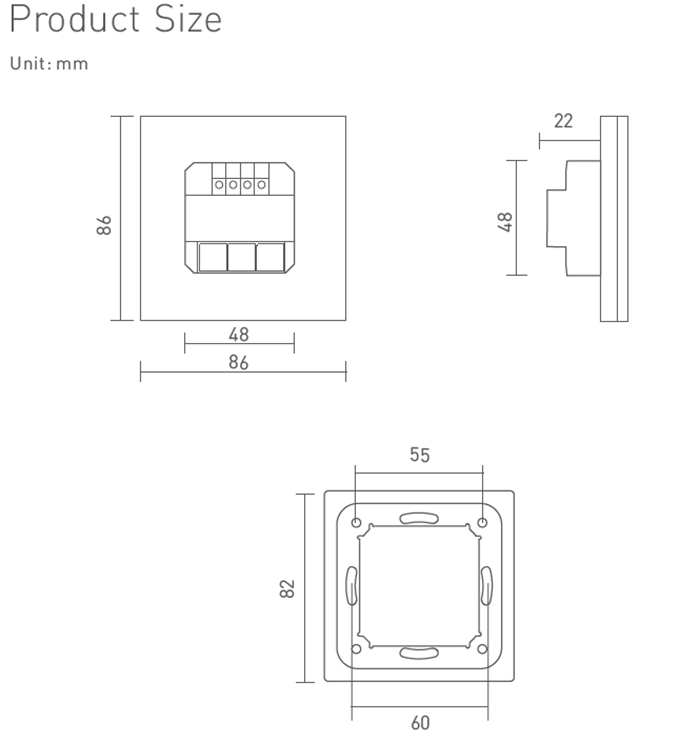
Dimensional drawing of the EDT3 touch panel (in mm).

Application Scenarios

High-End Residential Lighting Perfect for modern homes, home theaters, and living spaces where creating the perfect mood is essential. Effortlessly adjust the color and brightness of cove lighting, accent walls, and entertainment areas with a simple touch.
Commercial & Hospitality Spaces Ideal for restaurants, bars, hotel lobbies, and retail stores. Use the zone and scene control to create dynamic, brand-aligned atmospheres that can be changed instantly to suit the time of day or a special event.
Architectural & Office Lighting Integrate into a sophisticated DALI lighting system for conference rooms, reception areas, and architectural features. The EDT3 provides a sleek, professional interface for controlling complex lighting installations.

How to Install & Configure Your DALI Touch Panel

  1. Mounting: Secure the panel base into a standard European 86-style wall box.
  2. Wiring: Connect the two terminals labeled 'DA1' and 'DA2' on the back of the panel to your DALI bus line. Polarity is not critical for DALI connections.
  3. Addressing: Before attaching the touch panel to the base, use the rotary dials (X, Y, Z) on the back to set the desired control mode and starting addresses. For example, to set unicast addresses starting from 40, point X to 4 and Y to 0.
  4. Final Assembly: Clip the glass touch panel onto the installed base.
  5. Control: Short-press a zone key (1-4) to select it. Then, use the touch keys for brightness, RGB, or saturation, and slide your finger on the color circle to adjust. Short-press a scene key (A-D) to recall a saved scene.
  6. Scene Programming: To save a lighting state, adjust the lights to your desired setting, then long-press one of the scene keys (A, B, C, or D) until the indicator light flickers.
⚠ Precautions
  • This panel is a DALI master controller and must be used within a DALI system that includes a DALI bus power supply.
  • The panel does not connect directly to mains power (110V/220V AC).
  • This device sends control signals to DALI drivers; it does not power LED strips directly.
  • For detailed addressing tables and calculations, please refer to the product datasheet available in the Downloads section below.

What's in the Box

  • ✓1 x EDT3 DALI RGB Touch Panel
  • ✓1 x User Manual

⇩ Downloads & Documents

PDFEDT3

Frequently Asked Questions

Q: What is a DALI lighting system?

A:DALI stands for Digital Addressable Lighting Interface. It's a professional, standardized protocol for digital lighting control that allows for individual addressing of fixtures, two-way communication, and robust, scalable installations.

Q: Does this touch panel power my RGB LED Light Strip?

A:No. This is a DALI master controller. It sends commands over the DALI bus to DALI drivers, which then control and power the LED strips.

Q: How is the EDT3 different from the EDT1 and EDT2 models?

A:The EDT3 is specifically for RGB color control. The EDT1 is designed for single-color dimming, and the EDT2 is for CCT (tunable white) color temperature adjustment.

Q: Do I need a separate power supply for this panel?

A:No, the panel is powered directly by the DALI bus. However, your DALI bus itself requires a dedicated DALI power supply to function.

Q: What kind of wall box is required for installation?

A:The EDT3 is designed to fit a standard European 86x86mm style electrical wall box.

Q: Can I use this panel without a DALI system?

A:No, this product is designed exclusively for use within a DALI-compliant lighting control system.
EDT3 DALI RGB Touch Panel For RGB LED Light Strip - photo 5
For comparison: Interface diagram for the EDT1 single-color dimming model.
EDT3 DALI RGB Touch Panel For RGB LED Light Strip - photo 6
For comparison: Interface diagram for the EDT2 CCT color temperature control model.


© 2026 SuperLightingLED. All specifications are subject to change without notice.