
Go to Top
SuperLightingLED
SUPERLIGHTINGLED CO., LTD
Web: www.superlightingled.com
Email: [email protected]
Date: 2026-11-03 | ID: 3518

Q1 2 Zone RF 2.4GHz Touch Remote Control

MODEL: LT-Q1
Price based on selections below:
$33.99
AvailabilityIn Stock
ConditionBrand New
Technical Specifications
Experience precise, intuitive control over your lighting with the Ltech Q1 2-Zone RF 2.4GHz Touch Remote Control. This sleek, handheld device is engineered for managing the brightness of single-color LED installations across two independent areas. Featuring a highly responsive touch dimming slider, the Q1 allows for smooth, flicker-free adjustments. Its powerful 2.4GHz RF wireless remote signal ensures reliable operation up to 30 meters away, even through walls and obstacles. As a core component of the Ltech LT-BUS Control System, this remote pairs seamlessly with compatible wireless receivers to provide a professional and user-friendly control solution for both residential and commercial environments. For guidance on selecting the best control solution for your project, our guide on how to choose LED strip light controllers offers expert advice.
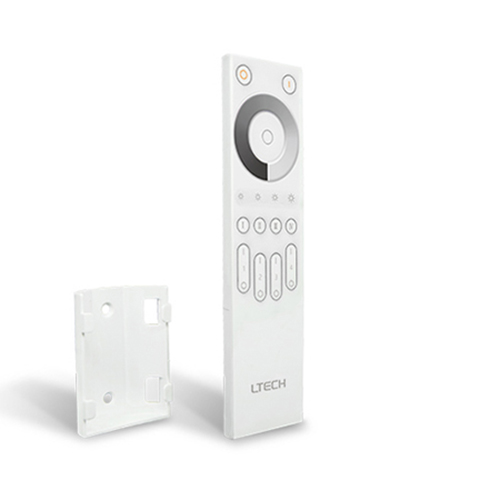
Front view of the Ltech Q1 2-Zone RF Touch Remote Control.

Key Features

Dual-Zone Management

Independently control and dim two separate groups of LED lights from a single, convenient remote.

Intuitive Touch Dimming

Utilize the sensitive touch slider for smooth, continuous brightness adjustments from 0.1% to 100%.

Reliable 2.4GHz RF Signal

Enjoy a stable, interference-resistant wireless connection with a range of up to 30 meters, no line-of-sight required.

Multi-Receiver Synchronization

Pair an unlimited number of Ltech wireless receivers to a single zone for perfectly synchronized control over large lighting areas.

Visual Feedback Indicators

Integrated indicator lights provide clear visual confirmation of brightness levels and selected zones.

Sleek & Ergonomic Design

Features a modern, comfortable design that is easy to hold and operate for everyday use.

Technical Highlights

  • Advanced 2.4GHz wireless sync technology ensures stable, interference-free performance.
  • Low power consumption design for extended battery life.
  • Precision touch interface for granular control over dimming levels.
  • Seamless integration with Ltech's F-series and other compatible wireless receivers.
Detailed view of the touch-sensitive dimming slider on the Q1 remote.
Diagram showing the dimensions of the Ltech Q1 remote controller.

Product Specifications

ParameterDetails
ModelLT-Q1
Control Type2-Zone Single Color Dimming
Wireless ProtocolRF 2.4GHz
Input VoltageDC 3V (2x AAA Batteries)
Transmission RangeUp to 30m (in open area)
Working Temperature-20°C to 55°C
DimensionsL166 × W47 × H22 mm
Compatible ReceiversF4-5A, F5-DMX-4A, and other Ltech RF receivers

Application Scenarios

Residential Multi-Room Control Effortlessly manage different lighting levels in your home. Use Zone 1 for bright, functional under-cabinet lights in the kitchen and Zone 2 for soft, ambient cove lighting in the adjacent living room, all from one remote.
Commercial & Retail Displays Create focused and inviting retail environments. This RF remote control light switch is perfect for adjusting accent lighting on product displays in one area while controlling general illumination in another, enhancing the customer experience.
Hospitality & Restaurant Ambiance Set the perfect mood in restaurants, bars, or hotel lobbies. Independently control the lighting over the bar area and the dining section to transition smoothly from a bright daytime setting to an intimate evening atmosphere.

How to Control & Use This Controller

  1. Install two AAA batteries into the remote's battery compartment.
  2. Ensure your Ltech wireless receiver (sold separately) is correctly wired to your LED power supply and single color LED strip lights.
  3. To pair the remote, briefly press the 'Learning Key' on the receiver.
  4. Within 5 seconds, touch the desired zone key (1 or 2) on the Q1 remote.
  5. The connected LED lights will flash once to confirm the pairing is successful.
  6. To control, first select a zone by pressing its number. Then, use the touch slider to adjust the brightness. Slide up to increase brightness and down to decrease.
⚠ Precautions
  • This remote is designed for dimming single-color (monochromatic) LED lighting systems only.
  • Batteries are not included.
  • The 30m range is an estimate for open areas; walls and other obstacles may reduce the effective range.
  • Always refer to the manual of your specific Ltech wireless receiver for detailed pairing instructions and specifications.

What's in the Box

  • ✓1 x Q1 2-Zone RF 2.4GHz Touch Remote Control
  • ✓1 x User Manual

⇩ Downloads & Documents

PDFQ1

Frequently Asked Questions

Q: What type of LED strips can this remote control?

A:The Q1 is specifically designed to control the brightness (dimming) of single-color LED strips.

Q: How many separate lighting areas can I control?

A:This is a 2-zone remote, allowing you to independently control two different groups of lights. You can pair multiple receivers to each zone for synchronized control within that area.

Q: What is the wireless range of this RF wireless remote?

A:The Q1 uses a reliable 2.4GHz RF signal that typically reaches up to 30 meters (approx. 100 feet) in an open environment.

Q: Do I need to point the remote directly at the lights?

A:No. The RF (Radio Frequency) signal does not require a line of sight, so it can operate through walls and furniture within its range.

Q: What kind of batteries does the Q1 remote require?

A:The remote is powered by two standard AAA batteries, which are not included with the product.

Q: Can I use this remote with a non-Ltech receiver?

A:This remote is engineered for seamless operation with Ltech's ecosystem of wireless receivers, such as the F4-5A. Compatibility with third-party brands is not guaranteed.

Q: How do I pair this RF remote control light switch with my receiver?

A:Pairing is straightforward. Press the 'Learning Key' on your Ltech receiver, then immediately press the desired zone button (1 or 2) on the Q1 remote. The lights will flash to confirm.

© 2026 SuperLightingLED. All specifications are subject to change without notice.