Go to Top
SuperLightingLED
SUPERLIGHTINGLED CO., LTD
Web: www.superlightingled.com
Email: [email protected]
Date: 2026-11-03 | ID: 3508

EDT2 DALI CT Touch Panel For LED Light Strip

MODEL: EDT2
Price based on selections below:
$54.98
AvailabilityIn Stock
ConditionBrand New
Technical Specifications

The Ltech EDT2 DALI CT Touch Panel is a sophisticated master controller and elegant user interface for any professional DALI lighting system. Designed specifically for tunable white (CCT) applications, this dimmer touch panel provides seamless, intuitive control over both brightness and color temperature. It operates on the DALI digital addressable lighting interface, ensuring broad compatibility with DT8-Tc compliant drivers and fixtures. Powered directly from the DALI bus, the EDT2 simplifies installation while offering advanced features like multi-zone management, scene recall, and various control modes. Its sleek glass finish and haptic feedback make it an ideal choice for high-end residential, commercial, and hospitality environments seeking precise and stylish lighting control.
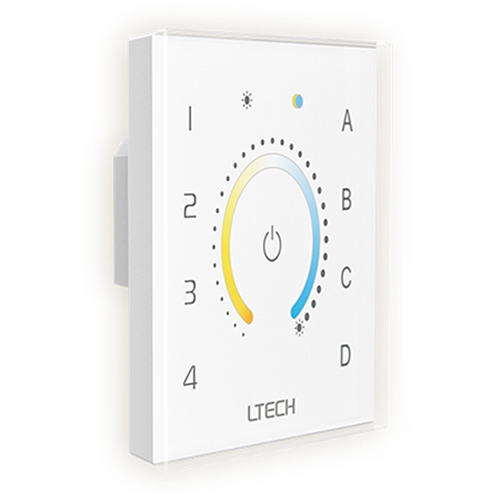
Front view of the EDT2 DALI CT Touch Panel.
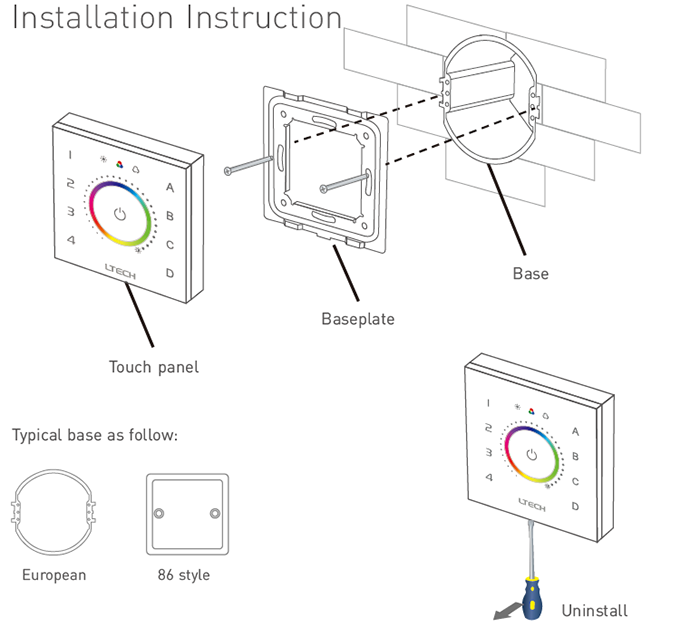
Installation diagram showing the base, baseplate, and touch panel assembly.
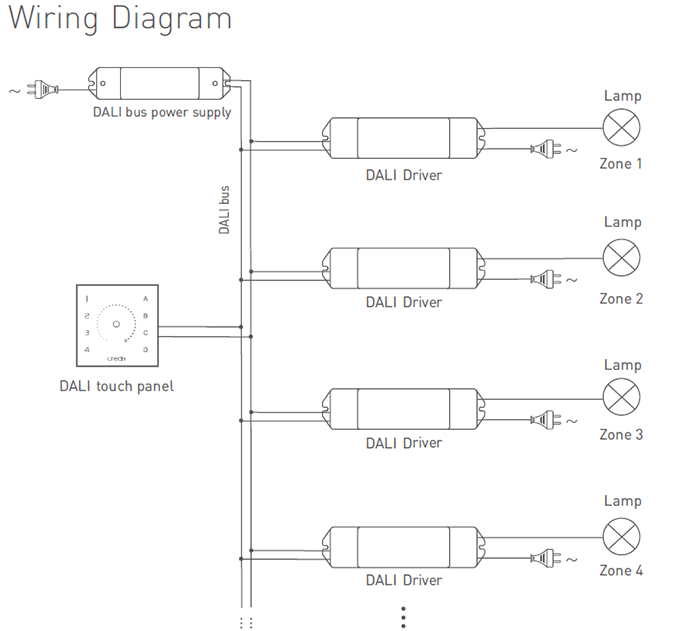
DALI system wiring diagram for the touch panel, bus power, and drivers.
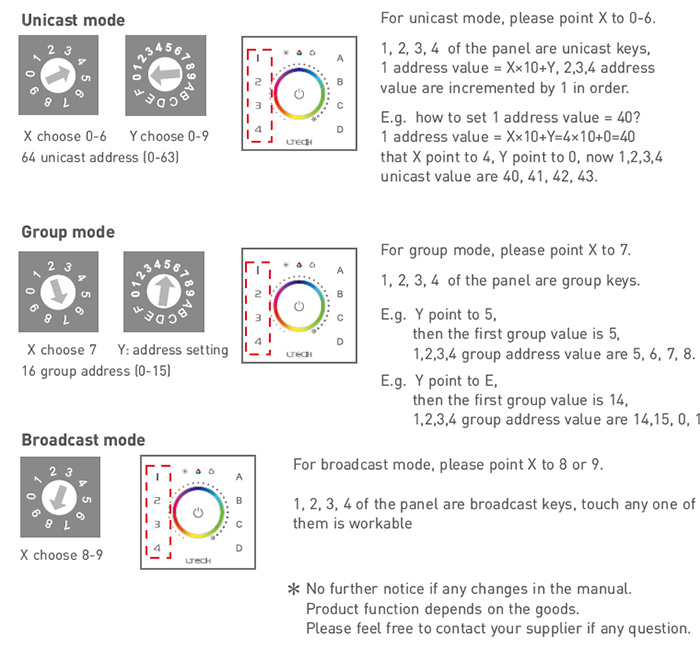
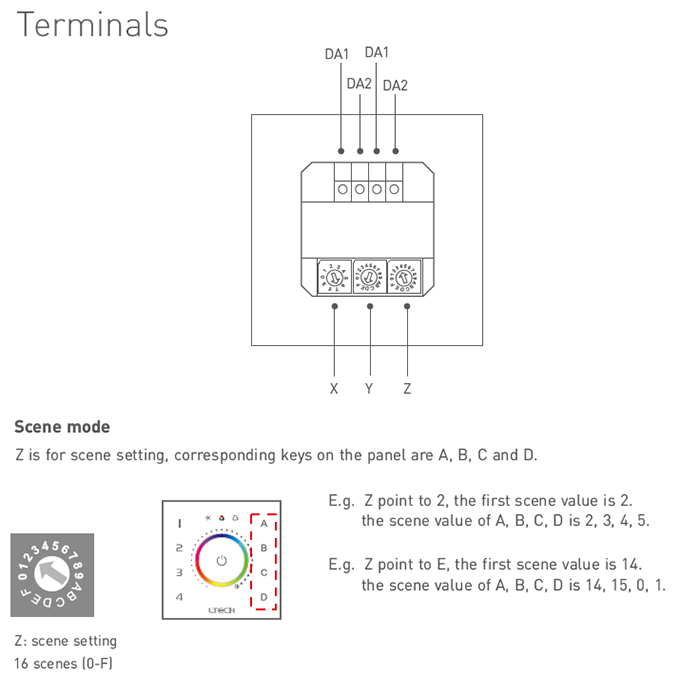
Diagram of the rear rotary switches for setting unicast, group, and scene modes.
EDT2 DALI CT Touch Panel For LED Light Strip - photo 1
Example of setting a unicast address using the X and Y rotary switches.

Key Features

DALI DT8-Tc Compliant

Adheres to DALI standards IEC62386-102, 207, and 209 for reliable integration and precise control of color temperature in modern lighting systems.

Intuitive Touch Interface

Features a high-sensitivity glass touch panel with a central color circle for smooth adjustment of brightness and CCT, enhanced by touch vibration feedback.

Comprehensive Control Modes

Supports unicast, group, broadcast, and scene modes, offering versatile control options from single fixtures to entire building zones.

Multi-Zone & Scene Management

Equipped with 4 dedicated zone keys and 4 scene keys, allowing you to easily manage different areas and save/recall custom lighting ambiences.

DALI Bus Powered

Draws minimal power (<6mA) directly from the DALI bus, eliminating the need for an additional power supply to the panel and simplifying wiring.

Easy Address Configuration

Utilizes physical rotary switches on the back to set addresses and modes, enabling quick, software-free commissioning of the DALI system.
Technical Highlights

  • Compliant with DALI standards IEC62386-102, 207, 209.
  • DT8 Type Tc control for precise color temperature adjustment.
  • Supports Unicast (0-63), Group (0-15), and Broadcast addressing.
  • Directly powered from the DALI bus (<6mA @ 16V consumption).
  • Haptic feedback with touch vibration for a premium user experience.
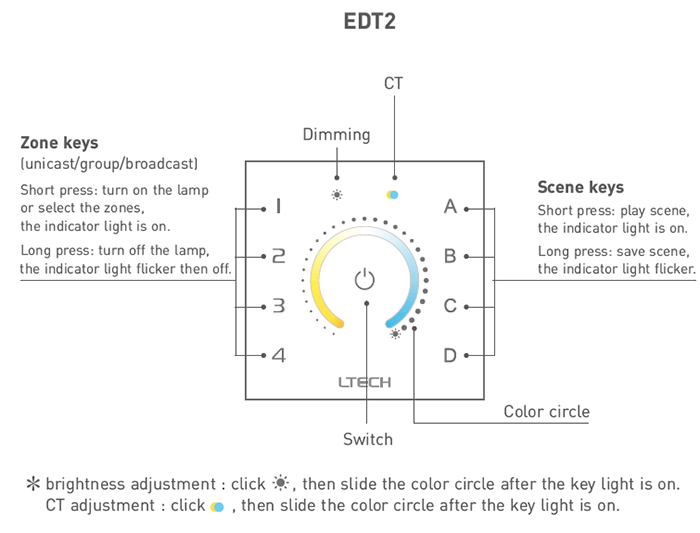
Interface close-up of the EDT2, highlighting CT and Dimming controls.

Product Specifications

ParameterDetails
ModelEDT2
Input SignalDALI
Power SupplyDALI Bus Power
Power Consumption< 6mA@16V
Control TypeDimming & Color Temperature (CT)
ProtocolDALI (IEC62386-102, 207, 209), DT8-Tc
Control ModesUnicast, Group, Broadcast, Scene
AddressingRotary Switches (Unicast 0-63, Group 0-15)
Operating Temperature-30°C ~ 55°C
Dimensions (L×W×H)86 × 86 × 37 mm
Package Size (L×W×H)113 × 112 × 50 mm
Gross Weight240g
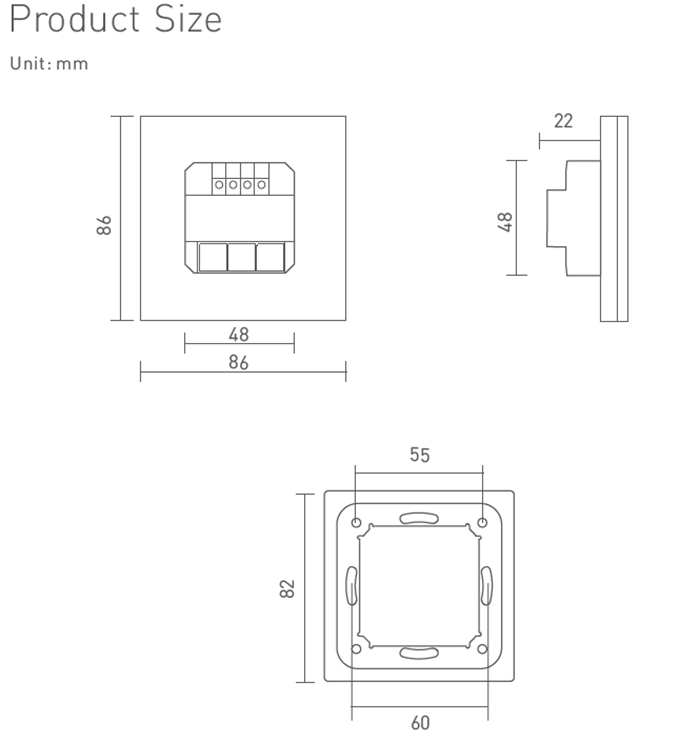
Detailed dimensions of the EDT2 touch panel (86x86x37mm).

Application Scenarios

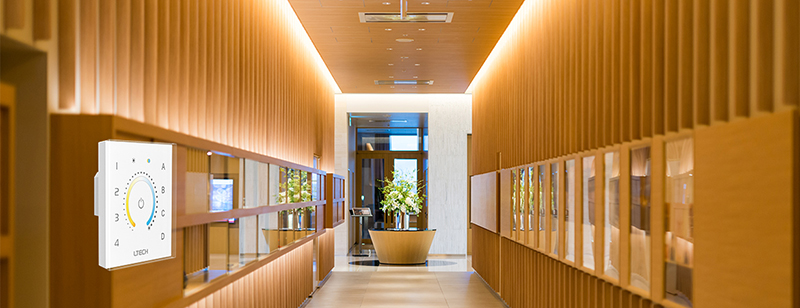
High-End Residential Lighting Install in living rooms, home theaters, and master bedrooms to create dynamic lighting moods. Effortlessly shift from bright, cool task lighting to warm, relaxing ambient light with a simple touch, perfectly controlling your tunable white LED strips.
Commercial & Hospitality Spaces Ideal for hotel rooms, lobbies, restaurants, and retail stores where atmosphere is critical. Empower staff to easily adjust lighting to suit the time of day, an event, or a specific promotion, enhancing the customer experience.
Modern Office & Wellness Environments Implement human-centric lighting in offices, conference rooms, and healthcare facilities. Adjust the color temperature throughout the day to support natural circadian rhythms, improving focus, comfort, and well-being for occupants.

How to Install & Configure This DALI Touch Panel

  1. Installation: Secure the mounting base into a standard European 86-style wall box using the provided screws.
  2. Wiring: Connect the two DALI bus wires to the DA1 and DA2 terminals on the rear of the panel. Polarity does not matter for DALI connections.
  3. Address/Mode Setting: Before final assembly, use a small screwdriver to configure the rotary switches (X, Y, Z) on the back of the panel.
  4. - Unicast Mode: Set X to 0-6 and Y to 0-9 to assign a starting address (calculated as X×10+Y) to Zone 1. Zones 2, 3, and 4 will be assigned subsequent addresses automatically.
  5. - Group Mode: Set X to 7 and Y to 0-F to assign a starting group address to Zone 1. Subsequent zones control subsequent groups.
  6. - Broadcast Mode: Set X to 8 or 9. Touching any zone key will control all devices on the DALI bus.
  7. - Scene Setting: Use the Z rotary switch (0-F) to set the starting scene number for scene key 'A'. Keys B, C, and D will correspond to the next scenes in sequence.
  8. Final Assembly: Carefully align and snap the touch panel onto the mounted baseplate.
  9. Operation: Short press a zone key to select it. Press the 'sun' icon for brightness control or the 'CT' icon for color temperature control, then slide your finger on the color circle to adjust.
  10. Saving Scenes: Select a zone, set your desired brightness and color temperature, then long-press a scene key (A, B, C, or D) until the indicator light flickers to save the current state as a scene.
⚠ Precautions
  • A compatible DALI bus power supply must be present on the DALI line for the panel to operate.
  • This panel is a DALI Master Controller and must be connected to a DALI system with compatible DALI drivers for your LED lights.
  • Ensure the total current draw of all devices on the DALI bus does not exceed the DALI power supply's rated output.

What's in the Box

  • ✓1 x EDT2 DALI CT Touch Panel
  • ✓1 x User Manual

⇩ Downloads & Documents

PDFEDT2

Frequently Asked Questions

Q: Does this touch panel need its own power supply?

A:No, the EDT2 is powered directly by the DALI bus, which simplifies wiring. Your overall DALI system, however, does require a dedicated DALI bus power supply.

Q: What kind of LED strips can this control?

A:This EDT2 model is specifically designed to control tunable white (CCT) LED strips. The strips must be connected to a DALI DT8-Tc compatible driver to allow control of both brightness and color temperature.

Q: Is this a standalone controller?

A:No, this is a DALI Master Controller that functions as part of a complete DALI system. It requires a DALI power supply and DALI-compatible LED drivers to control lights.

Q: How do I set the DALI address for the zones?

A:Addresses for unicast, group, and scene modes are configured physically using the rotary switches on the back of the panel before installation. No computer software is required.

Q: Can I control multiple groups of lights independently?

A:Yes, the panel features four dedicated zone keys. You can configure these to control four different unicast addresses or four separate groups of lights within your DALI system.


© 2026 SuperLightingLED. All specifications are subject to change without notice.