

| Select Input Voltage: | 5-24VDC (Base) |
|---|---|
| Select Output: | DMX512 signal (Base), SPI signal (Base) |
| Availability | In Stock |
| Condition | Brand New |
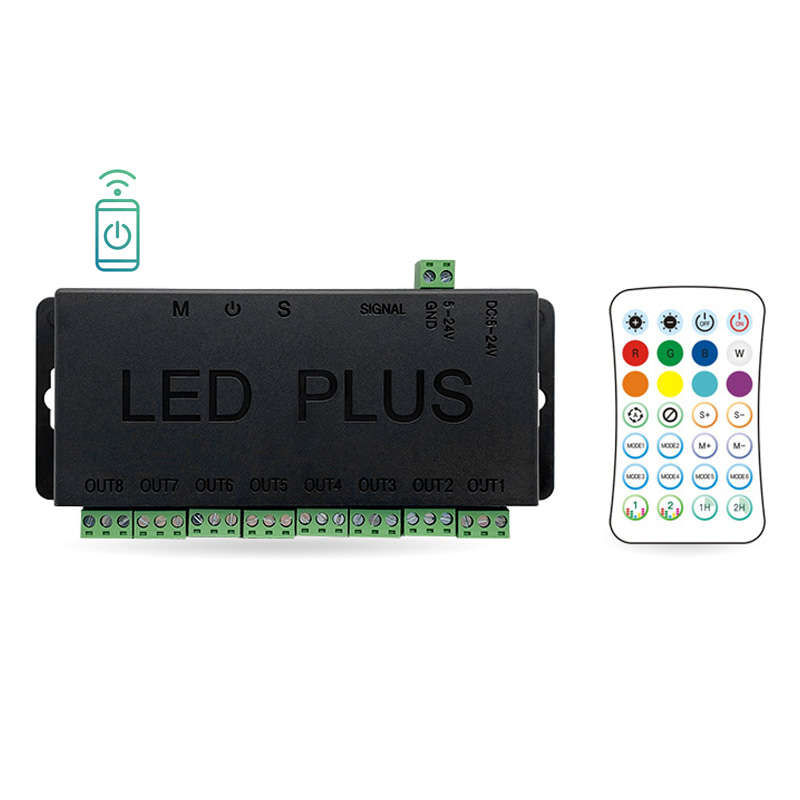
A Bluetooth/WiFi 8-channel output digital LED controller supporting APP programming and RF remote control, compatible with SPI/TTL signal output and DMX512 data output, ideal for controlling large addressable LED strip lighting projects and digital LED matrix screen displays.
The multi-channel light controller is capable of controlling multiple LED strips at the same time, and by managing 8 channels LEDs with one controller, you can ensure the color effect synchronization between all the light strips.
• 8-channel data signal output, GND DAT VCC output ports for SPI led strips or GND A B output ports for DMX led strips, 1024 pixels or 200 DMX ICs per channel
• Support SPI and TTL signals, DMX512 (UCS512) signals
• Bluetooth 4.0 wireless control, support mobile phone APP remote control and RF remote control, through the APP "LED Plus" to customize the light color, mode, timing, etc.,
• Support Android 11 and iOS15 and above phone system
• 3 simple buttons on the controller, you can easily adjust the light switch, speed and mode
• The LED lights controlled by the controller can be changed with music rhythm
• RF remote control functions: light on/off, brightness, speed, mode, effect loop, static color, music

How to match this controller with your light:
1) Search "LED Plus" in APP Store, Google Play and other major app stores to download and install.
2) Power on the digital LED lights, turn on Bluetooth on your cell phone, open "LED Plus", scroll down and refresh to automatically search for nearby devices.
3) Click the device to enter the light control interface. LED WiFi (WiFi) or 12-9CCA (Bluetooth).
4) Setting RGB order, pixel point, timing, etc; Support color value of light color; Customize the lighting effect of a certain zone of the strip; Music function includes voice-activated mode (optional) and cell phone music.
After the controller is powered on, open the cell phone system Bluetooth and WIFI. Open the APP, select the WIFI device to pop up the password setup, press and hold the "S" and "M" buttons on the controller together, and then enter the setup password into the APP, the light flashes three times white light, the password is set successfully. (The initial factory password is A1234567, reset the password, the password is the best English + numbers composition).
Product Specification
| Product Name: | Wireless Digital 8 Channel LED Light Controller |
| Input Voltage: | DC5-24V |
| Wireless: | RF, Bluetooth, WiFi |
| Output Channel: | 8, 1024 SPI pixels or 200 DMX pixels per channel |
| Digital Signal: | SPI/TTL, DMX |
| Color Type: | RGB |
| IP rating: | IP20 |
| Working Temperature: | -10℃ ~ 60℃ |
