

| Availability | In Stock |
|---|---|
| Condition | Brand New |
TM113 panel has been discontined, but you can use the replacement, such as TM120E, TM120U, KL, T18-3, T18-2, P1-010V, E610P.
Product Summarization
TM113 touch panel dimmer is a self-developed low-voltage controller that integrates WiFi and touch dimming.TM113's low-voltage controller is powerful and flexible. It does not need to switch the wireless network when using, which is convenient for users to access the Internet. upgrade Version software makes the network configuration of TM113 more convenient, no need to use a computer, as long as the mobile phone can choose the wireless network. Coupled with the unique function of our mobile phone control software TouchHome+, which is independently developed by our company, it makes TM113 control more convenient. The capacitive touch chip is used for touch to achieve precise dimming and the hardware layout is reasonable, which can reduce false triggers, provide smart lighting control that is more comfortable, safe and convenient than traditional lighting control, optimizes the way people control the lighting, and brings users Here comes a new and comfortable lighting environment.


Technical Parameters
Software Parameters
Name: Touch Home+
Operating Platform: IOS (iPhone, iPad), Android (phone, pad) devices must have WiFi function
Language: English Chinese
Category: Communication
Technical parameter of touch panel dimmer
Working Voltage: AC90-240V/50-60Hz
Working Temperature: -20-60℃
Working Power consumption: about 2W
Dimming Method: PWM output dimming
Output Power: <200W
Net Weight 160g
Gross Weight: 265g
Dimensions: L86*W86*H37 (mm)
Packing Size: L90*W90*H40(mm)
Instructions for use
Step 1: familiar with WiFi touch panel dimmer
Step 2: Interface description
Step 3: Install TouchHome+ control software
Step 4: Configure the touch panel dimmer
Step 5: Mobile phone control
Step 6: Install the touch panel dimmer
Step 1: familiar with WiFi touch panel dimmer
The control panel has four scene keys, a power key, and a sliding dimming bar, plus a WiFi control software. Let's understand the function of each key of the dimmer and its basic usage.
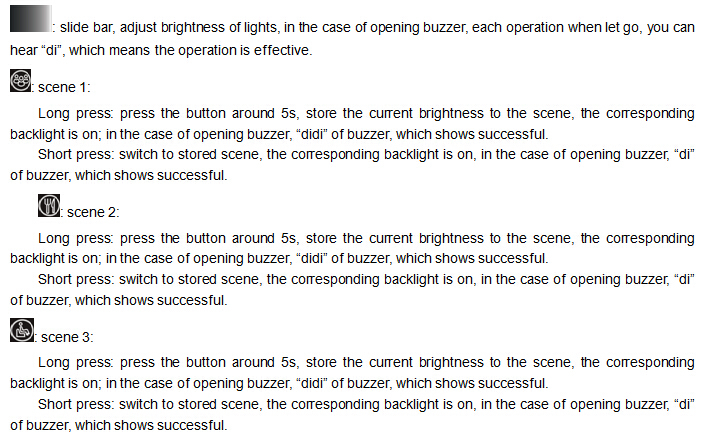
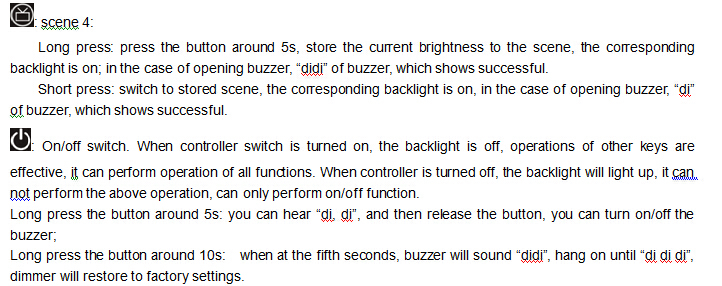
Step 2: Interface description:
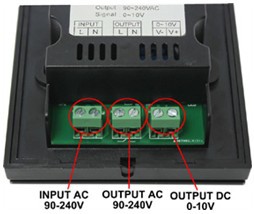
Input AC90-240V: It is the power input interface of the dimmer, and the input voltage range is between 90-240V AC.
Output AC90-240V: Connect to the power interface of the dimming power supply, let the controller supply power to the dimming power supply, the output voltage range is AC 90-240V.
Output DC0-10V: Connect to the dimming power supply 0-10V interface, this interface outputs 0-10V output signal.
Step 3: Mobile phone software installation
1. iOS version software installation
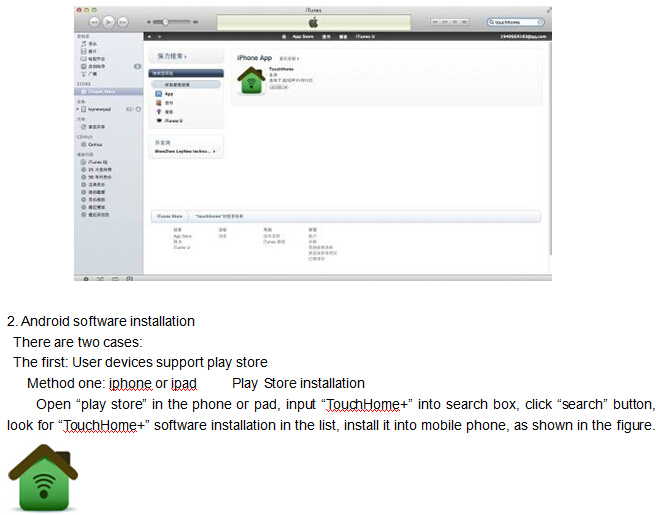
Method 1: Install on iPhone or iPad App Store
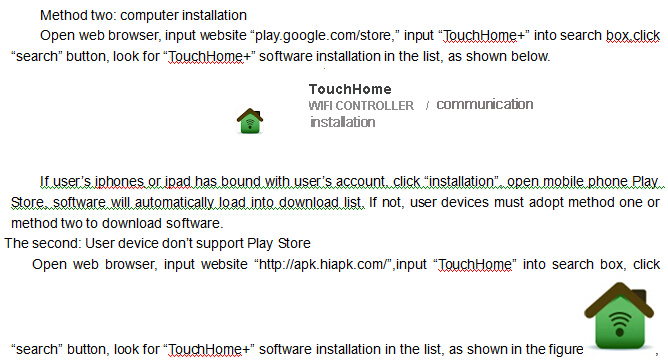
Open the iPhone or iPad App Store, enter "TouchHome+" in the search box, click the search button to find the "TouchHome+" software installation in the list as shown above, click "Install", the software will be installed in the phone.
Step 4: Configure the touch panel dimmer
Factory default parameters of dimmer: mode: ad hoc network (AP), SSID: TM113-XXXXXXXXXXXX, password: none;
The mobile phone with dimmer should be installed with "TouchHome+" dimmer software.
Step 5: Mobile phone control
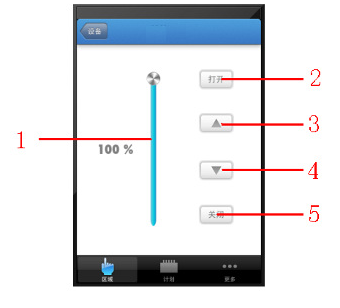
Open "TouchHome+", click "Area", add room -> add device -> control device. Click the added device to enter the page as shown in the figure below.
Page description:
1. Slider: Brightness adjustment slider
2. Open: turn on the dimmer output
3. Upper triangle button: brightness increases, brightness increases by 1 for each point, long press continuously increases
4. Lower triangle button: the brightness decreases, the brightness decreases by 1 for each point, and long press continuously decreases
5. Close: Close the device output.
Step 6: Install the touch panel dimmer
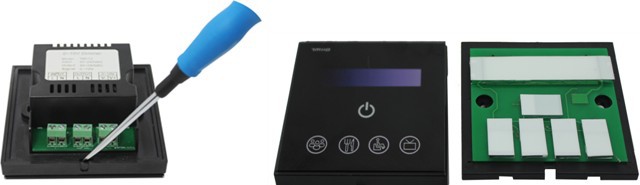
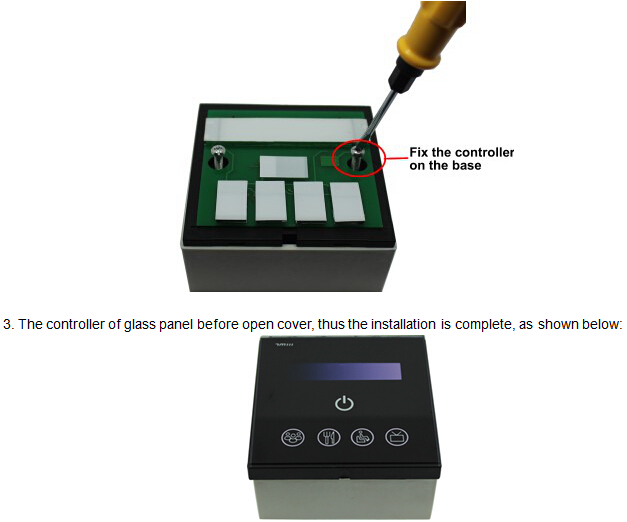
1. Use a "one" screwdriver to gently pry at the notch of the touch panel and slowly remove the panel, as shown in the following figure:

System Application Diagram
When there are multiple dimmers in user’s wireless network, the system structure is as shown below. User can intelligently control these dimmer through “TouchHome”. In a control system, it can accommodate multiple dimmers, about control mode, please refer to “TouchHome” software instructions.
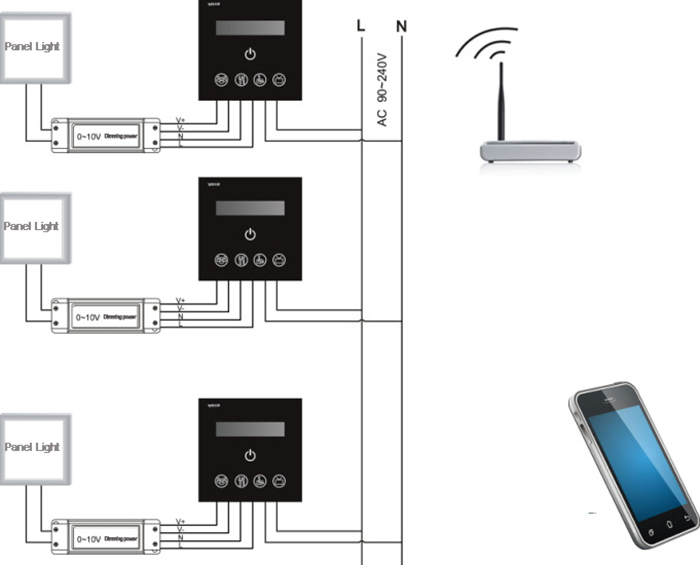
Note: the dimmers in the diagram is connect with external power supply, output AC80-240V of TM113 is not enabled, and can also provide AC90-240V power supply for external device.
Notice
1. Please don't install dimmers in a seal off , high magnetic field ;
2. In order to reduce the risk of fire disaster and device damage caused by short circuit , please make sure correct connection;.
3. Installation position of dimmers should be as near as possible to the router so as to ensure normal controlling;
4. Any problem , please do not open the shell of dimmers at will.
5. This manual is only applicable to this model of dimmers, if there is an update without prior notice.