

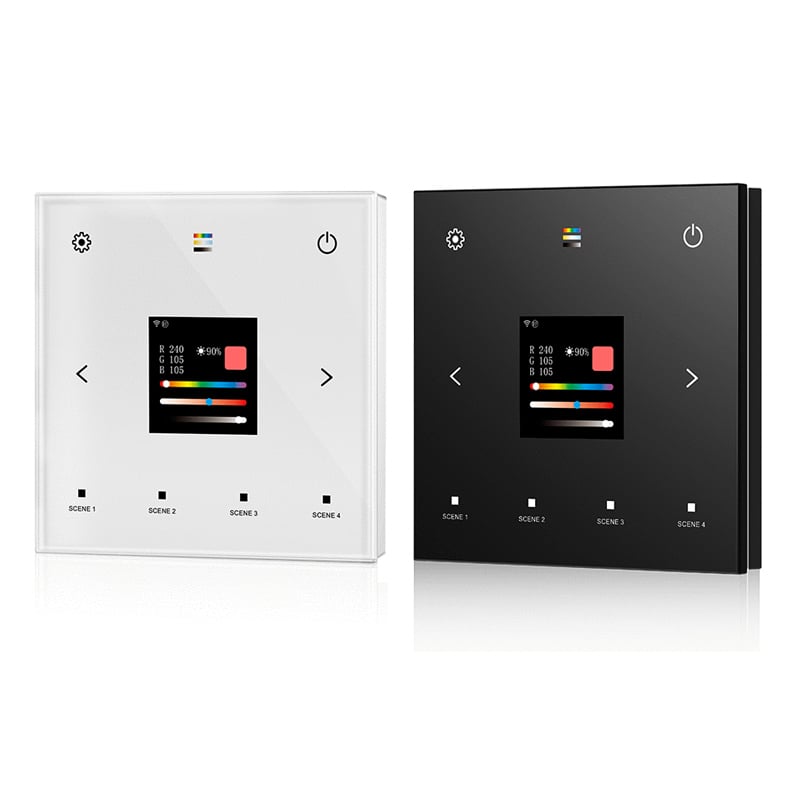
| Select Colour: | Black (Base), White (Base) |
|---|---|
| Availability | In Stock |
| Condition | Brand New |
The TD-W smart DALI master touch panel controller provides unified lighting management using DALI IEC 62386 standard protocols alongside 2.4GHz WiFi and RF wireless communication. Engineered with an integrated 1.54-inch TFT color screen (240x240 resolution) and a tempered glass faceplate, this 5-in-1 master unit controls single-color (DT6), tunable white (DT8-TC), RGB (DT8-RGB), RGBW (DT8-RGBW), and RGB+CCT (DT8-RGBCCT) lighting loads directly from the wall. Operators configure unicast, group, and broadcast addressing on-screen without requiring external handheld programming tools or specialized PC software.
The TD-W connects seamlessly to DALI CV dimmer units for constant-voltage installations, or to downstream DALI constant current dimmer modules when driving constant-current commercial fixtures. As part of our complete line of DALI master controller solutions, this panel also pairs with the Tuya Smart app for cloud scheduling, remote dimming, and scene automation.
Integrated 240x240 pixel TFT screen provides clear visual readouts for bus addressing, color tuning, brightness levels, and operating parameters.
Supports DT6 single-color dimming, DT8-TC tunable white, DT8-RGB, DT8-RGBW, and DT8-RGB+CCT color mixing on a single hardware interface.
Combines 9-key tempered glass capacitive touch control with 2.4GHz WiFi Tuya cloud connectivity and optional 2.4GHz RF remote operation.
Operates in accordance with international standards IEC 62386-101, 102, 207, 208, and 209 for full interoperability with certified third-party drivers.
Provides native unicast, group, and broadcast command modes selectable directly via the on-screen configuration menu.
Features 4 dedicated physical touch buttons for instant scene selection alongside precision left/right parameter adjustment keys.
| Parameter | Details |
|---|---|
| Model / SKU | TD-W |
| Controller Type | DALI Master Touch Panel |
| Display Screen | 1.54-inch TFT LCD (240x240 pixels) |
| DALI Standard Compliance | IEC 62386-101, 102, 207, 208, 209 |
| Supported DALI Device Types | DT6, DT8-TC, DT8-RGB, DT8-RGBW, DT8-RGB+CCT |
| Input Voltage | AC100-240V, DALI Bus Power Supply Required |
| Input Signal / Connectivity | WiFi 2.4GHz (Tuya), RF 2.4GHz, Capacitive Touch |
| Output Signal | DALI protocol broadcast / group / unicast |
| Control Channels | 5-in-1 selectable output profile |
| Bus Power Consumption | ≤ 30mA (bus powered mode) |
| Touch Buttons | 9 capacitive touch keys (including 4 scene buttons) |
| Panel Material | Tempered glass faceplate + ABS base |
| Panel Color Options | White or Black |
| Dimming Range | 0% - 100% |
| RF Control Range | Up to 30m (open line of sight) |
| App Support | Tuya Smart / Smart Life (iOS and Android) |
| Memory Function | Non-volatile EEPROM (retains settings upon power loss) |
| Operating Temperature | -20℃ to +50℃ |
| Dimensions | 86mm x 86mm x 37mm (standard 86-type box) |
Q: What LED types is this controller compatible with?
A: The TD-W supports 5 load types: single-color (DT6), tunable white (DT8-TC), RGB (DT8-RGB), RGBW (DT8-RGBW), and RGB+CCT (DT8-RGB+CCT) via standard DALI protocol commands.
Q: Can this master controller assign DALI addresses directly without a PC?
A: Yes, the 1.54-inch TFT LCD color display and capacitive directional buttons allow you to assign, browse, and select unicast addresses (0-63), groups (0-15), or broadcast mode directly on the unit.
Q: Does the TD-W require a separate DALI bus power supply?
A: Yes, this product does not have a built-in DALI bus power supply and needs to be used with a DALI bus power supply.
Q: Can I pair an optional handheld remote with this panel?
A: Yes, the TD-W features an integrated 2.4GHz RF receiver that pairs with optional handheld RF remotes to provide wireless dimming up to 30 meters away.
Q: How many scenes can be saved and recalled on the panel?
A: The front touch panel includes 4 dedicated physical scene recall buttons, while additional custom scenes and automation schedules can be configured within the Tuya Smart app.