
WIFI-RDM Programmer
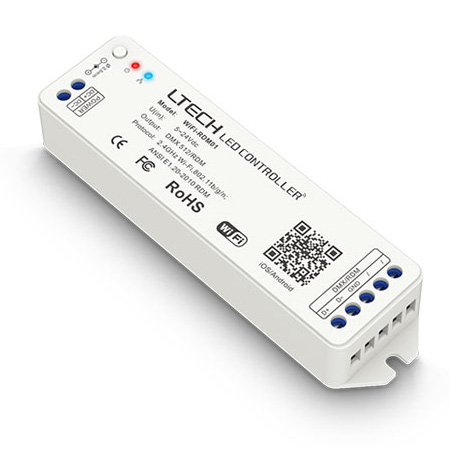
1 productsThe LTECH WiFi-RDM01 WiFi-RDM Programmer is a compact, portable device that allows users to wirelessly configure, test, and control DMX512 and RDM-compatible fixtures via Wi-Fi and RDM (Remote Device Management) protocol. Featuring built-in Wi-Fi AP/STA modes, the device connects seamlessly with iOS and Android mobile devices via dedicated App, as well as Windows and Mac computers.
With advanced functionality including wireless DMX addressing, fixture parameter setup, dynamic scene programming, automated RDM device discovery and status management, signal testing, and rechargeable lithium battery power, the LTECH WiFi-RDM01 Programmer is an essential field-tool for lighting professionals who want to streamline on-site installation, speed up troubleshooting, and achieve creative lighting effects. It offers broad, universal compatibility with standard RDM and DMX512 fixtures across the market.
Frequently Asked Questions About WIFI-RDM Programmers
Got questions before you buy? We've got answers. Here's what our engineers tell customers about using a WIFI-RDM programmer on a real job site.
A WIFI-RDM Programmer is for setup and diagnostics, not just running the show. It lets you use your phone to find, address, and configure every RDM-enabled fixture on the line without ever climbing a ladder. A standard DMX controller just sends out lighting commands; it can't listen back. RDM is a two-way conversation, and this device is the translator.
Yes, it's designed to work with any fixture that follows the standard RDM protocol. We've tested it against a wide range of lights from different manufacturers. As long as your fixture says it's RDM compatible, this programmer should be able to discover and configure it. It's not locked into just the Ltech ecosystem.
The programmer takes a DC input from 5V to 24V. You can power it from the same power supply as your DMX fixtures if it's in that range, or just use a separate wall adapter. It doesn't draw much power, so a simple DC 24V adapter is usually all you need to get it running for configuration jobs.
No, you don't. The Ltech WIFI-RDM Programmer creates its own local WiFi network. You just connect your phone or laptop directly to the programmer's network, open the app, and you're ready to go. It's made to work out in the field where you might not have access to the building's WiFi.
The app is called 'L-BUS' and it's a free download for both iOS on the App Store and Android on Google Play. Just search for "L-BUS" by LTECH. It's what you'll use to scan for devices, set DMX addresses, change modes, and all the other RDM functions.
It's primarily a configuration tool, not a live performance controller. While you can use it to test fixtures and trigger scenes for setup, it's not designed for the complex, real-time cueing you'd need for a show. For that, you'd pair your RDM-addressed fixtures with one of our 51 different DMX512 master controllers.
The most common mistake is a simple one: the fixtures you're trying to find aren't actually RDM-enabled. Standard DMX-512 is a one-way street; the fixtures can't talk back. Make sure your lights specifically list RDM compatibility. The second most common issue is a wiring fault, like a reversed D+ and D- line somewhere in the chain.
They solve different problems. An ArtNet gateway converts DMX data sent over an Ethernet network into a standard DMX signal for your lights, and it's built for live control. This WIFI-RDM Programmer is for *configuration* over WiFi. It uses the RDM protocol to talk back and forth with individual fixtures to set them up before the show even starts.
Yes, it is. The programmer's local WiFi network is password protected, and you can change the default password in the L-BUS app. This prevents unauthorized access while you're working. It's a closed loop between your phone and the programmer, not connected to the internet, so it's designed for secure on-site use.
A dedicated handheld tester is a great tool, but this WIFI-RDM Programmer gives you a much better user interface on your phone's screen. It's easier to see all your fixtures at once, type in labels, and manage complex setups. You're not carrying another single-purpose device; you're just using the phone that's already in your pocket. For more on the DMX world, check out our guide to DMX control.
Setting the DMX start address is the most common use, but a WIFI-RDM Programmer can do much more. You can change the fixture's personality (e.g., from a 4-channel mode to a 10-channel mode), get sensor readings like temperature, check for errors, and even remotely identify a specific light by making it flash. It's a full diagnostic toolkit for your entire DMX/RDM rig.