
Wireless Single Zone Series
9 productsDMX512 & 2.4GHz RF Panel Control for CV and CC LED Lighting
The BinColor Wireless Single-Zone Touch Panel Controller Series combines a mains-powered in-wall touch panel with wireless LED receivers to provide flexible control for both constant voltage (CV) LED strips and constant current (CC) LED fixtures.
Supporting single-color DIM, CCT tunable white, RGB, and RGBW lighting configurations, this series offers a particularly versatile control solution by integrating two different control technologies into one touch panel: wired DMX512 output and 2.4GHz RF wireless communication.
Wired DMX512 Control – For DMX Decoders & Fixtures
Connect the touch panel's DMX512 output to compatible external DMX decoders, which then control the connected LED strips or lighting fixtures. This provides centralized touch control of DMX-compatible lighting through a standard wired DMX512 connection.
Wireless 2.4GHz RF Control – For CV & CC LED Lighting
Pair the touch panel wirelessly with compatible BinColor PX CV or CC receivers. Connect constant voltage LED strips or constant current LED fixtures to their corresponding receivers, and the panel can wirelessly control their brightness, color temperature, or color-changing functions according to the connected lighting type.
Multiple R4-2.4G wireless receivers can be paired with the same single-zone panel and operated together, allowing different lighting circuits and fixtures to respond to one common control interface.
The PX touch panels are designed for in-wall installation and AC85–265V mains power, eliminating the need for a separate low-voltage power adapter for the wall panel itself. Compatible CV and CC wireless receivers are powered separately according to their respective DC input requirements and connect directly to the LED lighting loads.
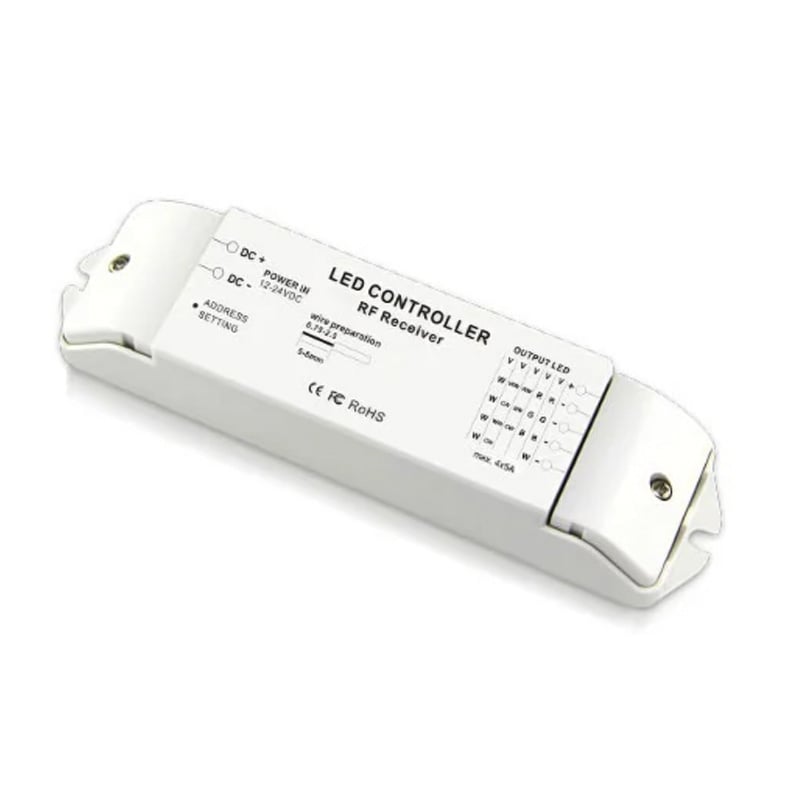
BinColor R4-2.4G Wireless 4-Channel LED Light Strip Receiver For PX Panel Remotes


Ideal for Integrated Residential & Commercial Lighting
BinColor Wireless Single-Zone Touch Panel Controllers are particularly suitable for residential and commercial lighting projects that combine different types of LED lighting and control systems.
Applications include living rooms, hotels, restaurants, retail stores, offices, architectural accent lighting, display areas, and other installations where DMX-controlled fixtures and conventional CV or CC LED lighting need to work together under one intuitive wall-mounted control system.
FAQ About Wireless Single Zone Series
Direct answers to technical questions about wiring, pairing, and specifying BinColor wireless single-zone touch panels and RF receivers.
This wireless single-zone touch panel controller for LED strip lights broadcasts 2.4GHz RF signals while outputting a hardwired DMX512 signal through its rear terminals simultaneously. That dual-output architecture lets you mount the glass panel in an entrance box, run two-wire shielded DMX cable directly to architectural drivers, and wirelessly sync separate R4-2.4G receivers tucked inside remote ceiling coves. Both downstream loads respond in exact lockstep to every touch slide, color pick, and dimming adjustment without requiring external signal splitters.
Your LED strip lights dictate the receiver type: standard 12V or 24V tape uses constant voltage and requires the R4-2.4G receiver, whereas high-power LED spots or downlights driven at fixed milliamps require constant-current models like the R4-CC-2.4G. Hooking constant-voltage tape to a constant-current receiver will instantly overdrive and burn out the emitter chips, while connecting constant-current fixtures to a constant-voltage supply causes intense heat buildup or zero light. Check your light tape label before ordering; if it marks DC12V or DC24V cut points, take the CV kit.
Pairing an R4-2.4G receiver to the wireless touch panel controller for LED strip lights takes five seconds using the hardware learning button. Power up both the wall panel and the 12V-24V DC receiver. Press the 'ID Learning Key' on the R4-2.4G receiver briefly, then immediately touch the power key or color slider on your wall panel. The connected strip flashes twice to confirm synchronization. If you install multiple receivers in the same room, repeat that sequence on each unit so they all latch onto the identical panel ID code.
Third-party DMX decoders wire directly into the DMX512 screw terminals on the back of the wireless single-zone touch panel controller for LED strip lights using standard D+, D-, and GND connections. The panel outputs standard protocol channel mapping (CH1 red/dimmer, CH2 green/CCT, CH3 blue, CH4 white). If your project requires high-channel stage fixtures or complex multi-output stage drivers that standard decoders cannot address, our DMX master decoders resolve large-scale addressing hurdles while keeping the clean wall-mount interface intact.
The 2.4GHz RF signal transmits up to 30 meters in unobstructed open air, but indoor building materials attenuate that distance. Standard 1/2-inch drywall drops usable range to roughly 15 to 20 meters, while concrete block, double-brick, and foil-backed insulation reduce reliable reach to around 10 meters. If your driver cabinet sits further away, position the R4 receiver just outside dense enclosures or use the panel's hardwired DMX terminals, which push signal through shielded twisted-pair cable up to 300 meters without packet loss.
One wireless single-zone touch panel controller for LED strip lights can operate an unlimited number of R4-2.4G receivers across its 30-meter broadcast radius. Every receiver paired to that panel receives the same wireless packet at the exact same millisecond, eliminating visible delay across long perimeters. This setup is standard practice for large retail floors and hotel lobbies where running low-voltage wiring between separate 24V power supplies across the room would be labor-prohibitive. Simply install a dedicated power supply and receiver at each cove, then pair them all to the single wall touch panel.
The R4-2.4G receiver for LED strip lights handles up to 5A per channel across 4 channels, delivering a 20A total current ceiling. At 12V DC, that allows 60W per channel (240W total); at 24V DC, it doubles to 120W per channel (480W total). If your tape draws more than 20A total, do not overload the receiver board. Instead, connect additional power repeaters downstream or divide the run across multiple R4 receivers paired wirelessly back to that single wall controller.
BinColor PX panels communicate on 2.4GHz using short-burst GFSK modulation, meaning ordinary home Wi-Fi traffic will not cause your lights to flicker or switch on unexpectedly. However, placing an R4 receiver within 50 cm of a high-throughput wireless access point can occasionally cause dropped commands when adjusting brightness sliders. Keep receiver bodies at least 1 meter away from Wi-Fi routers and microwave equipment to ensure smooth, immediate slider response.
Clearing the paired memory on an R4-2.4G receiver requires pressing and holding the 'ID Learning Key' for roughly 5 seconds until the status indicator light flashes rapidly or the strip blinks. That action wipes stored panel addresses from the onboard memory chip. Once cleared, the receiver will no longer respond to transmissions from the old touch panel, allowing you to link it to a new controller or reassign it to a different zone cleanly.