
Related Products
Tick the accessories you need and add them in one go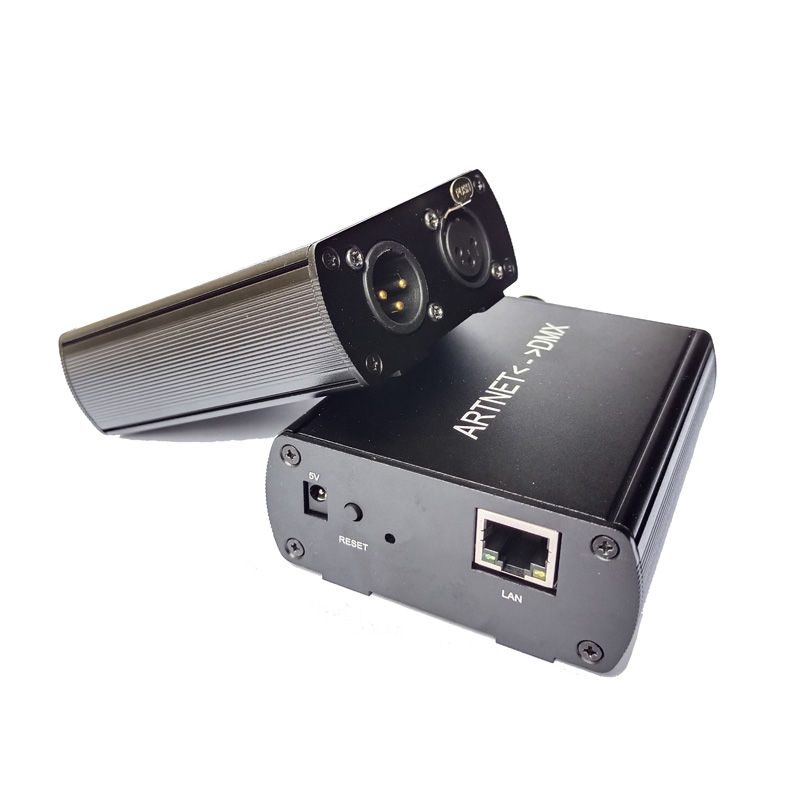 $136.98
 $74.99
 $22.98$37.9839% off
 $32.98$48.9833% off
 $189.99
 $13.98
 $84.99
Product Information
The ArtNet-DMX512 bidirectional signal converter provides real-time protocol conversion between Ethernet Art-Net networks and standard DMX512 equipment. Operating on a DC 5V power input, this compact interface operates in two configurable directions: converting network packets into 512 DMX channels to control stage fixtures or architectural lighting from computer software, or encoding incoming console data back into Art-Net network streams. Lighting operators can connect fixtures to software suites such as Madrix, WYSIWYG, and FreeStyler over 10/100 Mbps Ethernet. Available in 3 configurations—Standard wired Ethernet, integrated WiFi, or WiFi plus RDM bi-directional device monitoring—this unit bridges complex lighting setups without latency.


Key Hardware & Protocol Features
Bidirectional Signal Conversion
Translates Ethernet ArtNet data packets into 512 discrete DMX channels, or captures incoming DMX512 frames from a lighting desk to broadcast across IP networks.
512 Channel DMX Universe
Controls up to 170 individual RGB LED fixtures or 128 RGBW lighting addresses across a complete physical 512-channel universe at 44 Hz refresh rates.
Software Platform Compatibility
Functions natively with lighting programs including Madrix, WYSIWYG, FreeStyler, xLights, Resolume, and MagicQ without specialized proprietary driver layers.
Low Voltage 5V DC Power
Powers via standard DC 5V 1A adapter or regulated USB sources, ensuring minimal heat output and safe continuous 24/7 bench or rack operation.
Three Hardware Choices
Available in 3 choices: Standard Ethernet wired model, 2.4 GHz WiFi wireless model, or 2.4 GHz WiFi model equipped with RDM remote device management.
Network Protocol Stability
Processes unicast and broadcast Art-Net II and Art-Net III datagram packets through an RJ45 Ethernet port operating at 10/100 Mbps line speeds.
Technical Highlights & System Architecture
- Bidirectional conversion latency measures under 20 ms between Ethernet frame reception and physical DMX differential line transmission.
- Built-in web management interface allows users to configure subnet addresses, universe IDs (0-255), and network IP addresses without opening the chassis.
- The optional RDM extension permits bidirectional querying of fixture sensor telemetry, addressing updates, and operational status directly over the DMX cable.
- Standard 3-pin XLR connection layout (Pin 1 Ground, Pin 2 Data-, Pin 3 Data+) ensures instant plug-and-play matching with commercial stage lighting runs.
- Supplied with a dedicated 100V-240V AC to DC 5V 1A regulated power adapter and high-speed USB-to-DC barrel power cable for flexible field deployment.
Detailed Hardware Specifications
| Parameter | Details |
|---|---|
| Product Model | ArtNet-DMX512 |
| Operating Voltage | DC 5V (±0.25V) |
| Power Consumption | < 2.5W (500mA at DC 5V) |
| Power Input Interface | DC 5.5×2.1mm jack / USB 5V |
| DMX Output / Input Channels | 512 DMX Channels (1 Universe) |
| DMX Refresh Rate | 40 Hz to 44 Hz |
| DMX Connector Type | 3-Pin XLR (Standard Neutrik style) |
| Pin Configuration | Pin 1: Shield/GND, Pin 2: Data-, Pin 3: Data+ |
| Ethernet Interface | RJ45 Female, 10/100Base-T auto-sensing |
| Supported Protocols | Art-Net I, Art-Net II, Art-Net III, DMX-512(1990) |
| Optional Protocols | ANSI E1.20 RDM (on WiFi+RDM model) |
| Wireless Connectivity (Optional) | IEEE 802.11 b/g/n (2.4 GHz band) |
| Default IP Address | 2.x.x.x or 192.168.1.x (configurable) |
| Default Subnet Mask | 255.0.0.0 or 255.255.255.0 |
| Operating Temperature Range | -20°C to +55°C (-4°F to +131°F) |
| Storage Humidity Range | 10% to 90% RH non-condensing |
| Enclosure Material | Extruded aluminum alloy housing |
| Ingress Protection Rating | IP20 (Indoor installation) |


Application Scenarios
How to Control & Use This Controller
- Step 1: Connect the supplied DC 5V 1A power adapter to the DC 5.5×2.1mm input socket. Verify that the power LED glows steady green.
- Step 2: Connect an RJ45 Ethernet patch cable from your host computer or network switch directly into the converter's network port.
- Step 3: Configure your host computer's network adapter to the matching IP range (for example, setting your PC static IP to 2.0.0.100 with subnet 255.0.0.0).
- Step 4: Open your host lighting software (such as Madrix or FreeStyler), activate the Art-Net output device in network preferences, and map Universe 0 (or 1) to the node's detected IP address.
- Step 5: Connect a 3-pin XLR DMX cable from the converter's output port to your first DMX decoder or fixture, and set the starting fixture address to channel 001.
- Step 6: If using the WiFi configuration, connect your control laptop or tablet to the device's wireless SSID access point before initiating software broadcast.
- Step 7: For DMX-to-ArtNet input mode, toggle the direction switch in the web configuration console and attach your master lighting console to the XLR port.
- Do not feed higher than DC 5V into the power port; connecting 12V or 24V directly will permanently damage the internal processor.
- Ensure standard DMX 120-ohm termination resistors are installed across pins 2 and 3 at the final fixture of long cable runs exceeding 50 meters.
- The enclosure carries an IP20 rating; house the device inside a weatherproof enclosure if operating in damp outdoor stage setups.
- Keep total DMX channel assignments within the 512-channel universe boundary to avoid command dropping across unmapped fixtures.
What's in the Box
- ✓1 × 512CH ArtNet-DMX512 Bidirectional Signal Converter Node
- ✓1 × AC 100-240V to DC 5V 1A Power Adapter
- ✓1 × USB to DC Barrel Plug Power Cable
- ✓1 × Quick Start Guide with Default IP & Subnet Parameters
Frequently Asked Questions
Q: Can this unit convert DMX signals back into ArtNet network data?
A:Yes, this converter supports full bidirectional transmission. You can convert ArtNet packets to DMX for fixtures, or feed physical DMX console data into the unit to output an ArtNet network stream for software monitoring.
Q: How many total RGB or RGBW LED fixtures can one 512-channel universe control?
A:A standard 512-channel universe controls up to 170 discrete 3-channel RGB fixtures (170 × 3 = 510 channels) or up to 128 discrete 4-channel RGBW fixtures (128 × 4 = 512 channels).
Q: What is the difference between the 3 selectable options?
A:The base model provides standard RJ45 wired Ethernet connectivity. The WiFi version adds a 2.4 GHz wireless transceiver for cable-free control, while the WiFi+RDM version adds RDM remote parameter configuration alongside wireless control.
Q: Can I power this controller using a computer USB port?
A:Yes, the unit operates on DC 5V at less than 500mA. You can power it using the included USB-to-DC cable from a standard 5V USB 2.0 or USB 3.0 port on your computer or laptop.
Q: Does this converter work with software other than Madrix and WYSIWYG?
A:Yes, it works with any lighting control software that broadcasts or receives standard Art-Net I, II, or III packets, including FreeStyler, xLights, Resolume Arena, QLC+, and ChamSys MagicQ.
Q: What network IP settings does the converter use out of the box?
A:The device comes pre-configured with a factory standard Art-Net IP address in the 2.x.x.x range with a 255.0.0.0 subnet mask, both of which are customizable via its internal web server.
Reviews
Customer Experience
Your feedback is important to us! Share your thoughts and photos with other customers.
Downloads
Files for ArtNet-DMX512Images
These images were taken with Canon EOS 5D Mark IV and the studio light source is provided by Ra 98's full spectrum LED strip to realistically reproduce the colors of the item itself. All copyrights are created by the superlightingled team, please feel free to browse and download if you are a registered user!


LED Strip Lights Guide
Here you can learn anything about LED strip lights — pick the topic you are interested in to go deeper. We cover LED strip lights, power supplies, controllers, accessories, and how to connect LED strip lights. You can also watch our demo videos.
Led strip lights
►Everything you need to know before you buying led strip lights
| Top 6 Considerations Before Buying LED Strip Lights 1. Where do I want to place the LED strip lights? Indoor or outdoor? • What are waterproof led strip lights? • How to cut and connect waterproof led strip lights? 2. How much LED brightness do I need? 3. The working voltage is available? • 5V VS 12V VS 24V led strips • AC VS DC 4. How long is the LED strip light suitable for my project? 5. Do I need an LED light controller to adjust the LED color and brightness? 6. How to power the LED strip lights? 1. How do led strip lights work? 2. How long can you run an LED strip? 3. How long do LED strip lights last? Is it worth getting led strip lights? 1. Do LED strip lights use a lot of electricity? 2. Why are LED lights energy efficient? 3. Are LED Strip Lights sustainable? 4. What are the pron and cons of led strip lights? 5. Precautions for led strip lights 1. Do LED strip lights overheat? 2. How do you stop LED strips from overheating? 3. Can LED strips catch fire? 4. Is it safe to sleep with LED strip lights on? What are the types of led strip lights? Flexible led strip lights VS rigid led strip lights - 1. What are flexible led strip lights? 2. What are rigid led strip lights? 3. What happens if you bend LED strip lights? 4. What is the difference between flexible led strips and rigid led strips? 1. Can you cut led light strips? 2. What happens if you cut an led strip? 3. How to cut led strip lights? 4. How to connect RGB color changing led strip lights with a connector? 5. How to know what your led strip light is? How to choose the correct SMD led for your strip? Which is the brightest SMD LED? What does SMD 5050 mean? How many lumens is a 5050 SMD LED? How to know what type of LED strip? What is the difference between 2835 and 5050 LED? |
►COB led strip light
| 1. What is COB? 2. What is the COB production process? 3. Different types of COB strip lights 4. What is the difference between COB and SMD led strip lights? 5. What is the difference between COB and LED? 6. Are COB led strips better? 7. How to cut and connect COB led strips? 8. How to install COB led strip lights? 9. Can COB light strips use aluminum channels? 10. Why choose superlightingled? |
►Led neon lights
| 1. What is led neon light? 2. What are neon led lights used for? 3. Are led neon lights good? 4. How to choose led neon rope lights? 5. Are led neon ropes use DC or AC? 6. Can you change the light-emitting angle or the luminous way of neon led strip? 1. How to cut led neon lights 2. Can led neon lights be connected? 3. Easy 7 steps to make led neon lights 4. How to install led neon rope? |
►Addressable led strip
| Ultimate Guide to Choosing the Right Addressable LED Strip What is an addressable LED strip? Can you cut addressable LED strips? How to judge if an LED strip is individually addressable? How to choose the best DC12V addressable led strips? How to choose the best DC5V digital led strips? How to choose the right IC for your project? Which IC is most commonly used? How do I know my IC type? How do I know if my IC is good or bad? How many types of IC are there? |
►Color, color temperature, and CRI
| The Color Difference Between Warm White 2700K, 3000K, 4000K, 6000K Pure White and 7000K Cool White 1. What is color temperature? 2. What color temperature is right for me? • 2700K VS 3000K • How obvious is the difference between 2700K and 3000K? • Warm White 3000K VS Natural White 4000K VS Daylight White 6000K • Warm White VS Cool White 3. Enjoy 2700K, 4000K, 6000K 4. Further Reading: How to install Warm White LED light strip? How to choose the right color for your led strip lights? - 1. How many colors are in LED strip lights? 2. What do LED light colors mean? 3. Why do white LED light turns to yellow? 4. Why are your led strip lights not the same color? 5. What is the most relaxing color for LED lights? 6. What color led lights is best for sleeping? 7. Are led lights bad for your eyes? 8. Is cool white or warm white better for eyes? 1. What is the best color temperature? 2. Does color temperature keep the same as time goes by? 3. What color temperature is best for night? 4. Led strip lights about color temperature,CCT VS RGBW VS RGBCCT; What is color rendering index? 1. What is CRI in led lights? 2. How to choose the right CRI when buying led strip lights? 3. What is the relationship between CRI and brightness? 4. Is higher CRI better? High CRI VS Low CRI; 5. How to find CRI value? |
Led strip light connection
| How to connect led strip lights? 1. How to connect led strip lights together? 2. How to connect LED light strips without connectors? 3. How to solder wires to LED strips? 4. How to connect LED strips without soldering? 5. Which one is better between soldering and using a connector? 6. How to connect mutiple led strip lights? 7. How many LED strip lights can you connect? How to connect led strip to the power supply? 1. Ensuring the working voltage and power first 2. How to hardwire led strip lights? 3. Can I connect multiple LED strips to the same LED power supply? How to wire led strip lights? How to wire single color led strip lights? How to wire tunable white/CCT led strip lights? How to wire RGB color changing led strip lights? |
Controller for led strip lights
| How to choose led strip light controllers? 1. WIFI controller 2. RF controller 3. IR controller 4. Bluetooth controller 5. Remote control and panel control 6. Single color controller and multi-color controller 7. DMX512 controller 8. SPI controller 9. DALI controller 10. 0/1-10V dimmer 11. Triac series 12. Sonsor series |
Led power supply
| How to calculate power for led strip lights? 4 steps to calculate the power you need Performance And Reasons Of LED Voltage Drop How to choose led strip light power supply? 1. Alternating current power supply VS Direct current power supply 2. Constant current power supply VS Constant voltage power supply 3. How to choose the best led power supply for your led strip light? |
Led strip light installlation
| How to install led strip lights? What accessories will be needed? 1. Adhesive installation for IP20 and IP65 led strip lights 2. How to choose the right led tape? 3. Can IP20 and IP65 led strip lights use aluminum profiles? 4. How to use aluminum profiles? 5. Mounted clip installation for IP67 and IP68 light strips How to install LED sensor stair lights? Lighting Up Your Stairs With LED Strip Lights Ideas How to install led strip lights on TV? How to install led strip lights outdoor? |
Accessories
| How to choose led strip light connectors? 1. Are all LED light strip connectors the same? 2. How do LED strip lights connectors work? 3. What connectors do you need for LED strip lights? 4. What are the different kinds of LED connectors? 5. How to choose the right connector for your led strip lights? Ultimate Guide on Aluminum Profile for LED Strip Lighting 1. What are aluminium profiles used for? 2. Why choose aluminum profiles? 3. Different types of LED aluminum profiles 4. LED aluminum profile VS COB LED strips 5. How to install LED aluminum channels? 6. How To Get Ideal Light Diffuser For Your LED Strip? 7. Add Black Aluminum LED Light Diffusers For Your Home Lighting 8. How To Find The Right Aluminum LED Light Strip Diffuser Channel? |