Related Products
Tick the accessories you need and add them in one go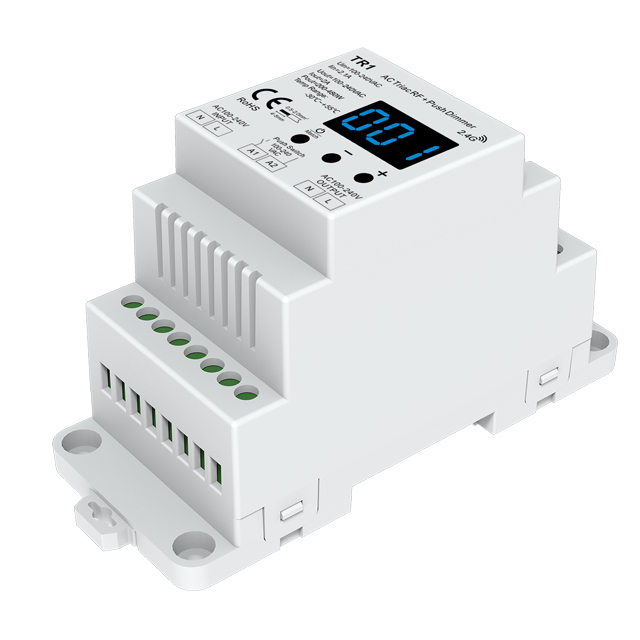 $23.99
.jpg "100 to 240VAC WiFi and RF Smart Dimmer Light Switch SS-C(WT)") $20.98
$20.98 $13.98
 $13.98
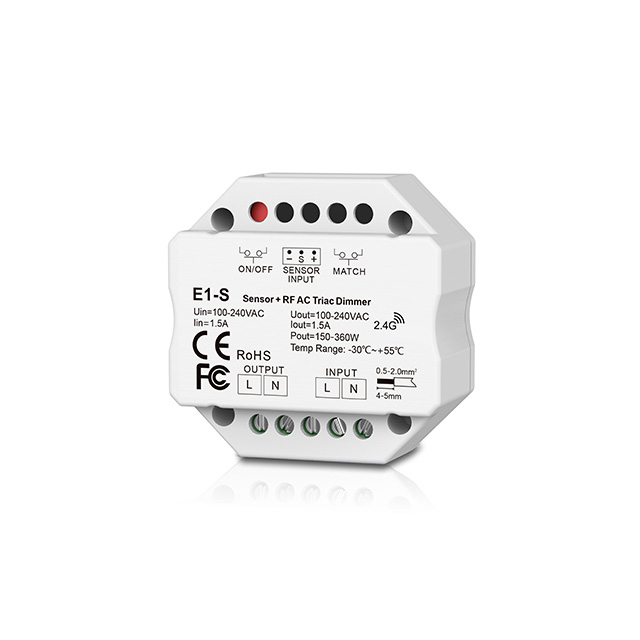 $15.98
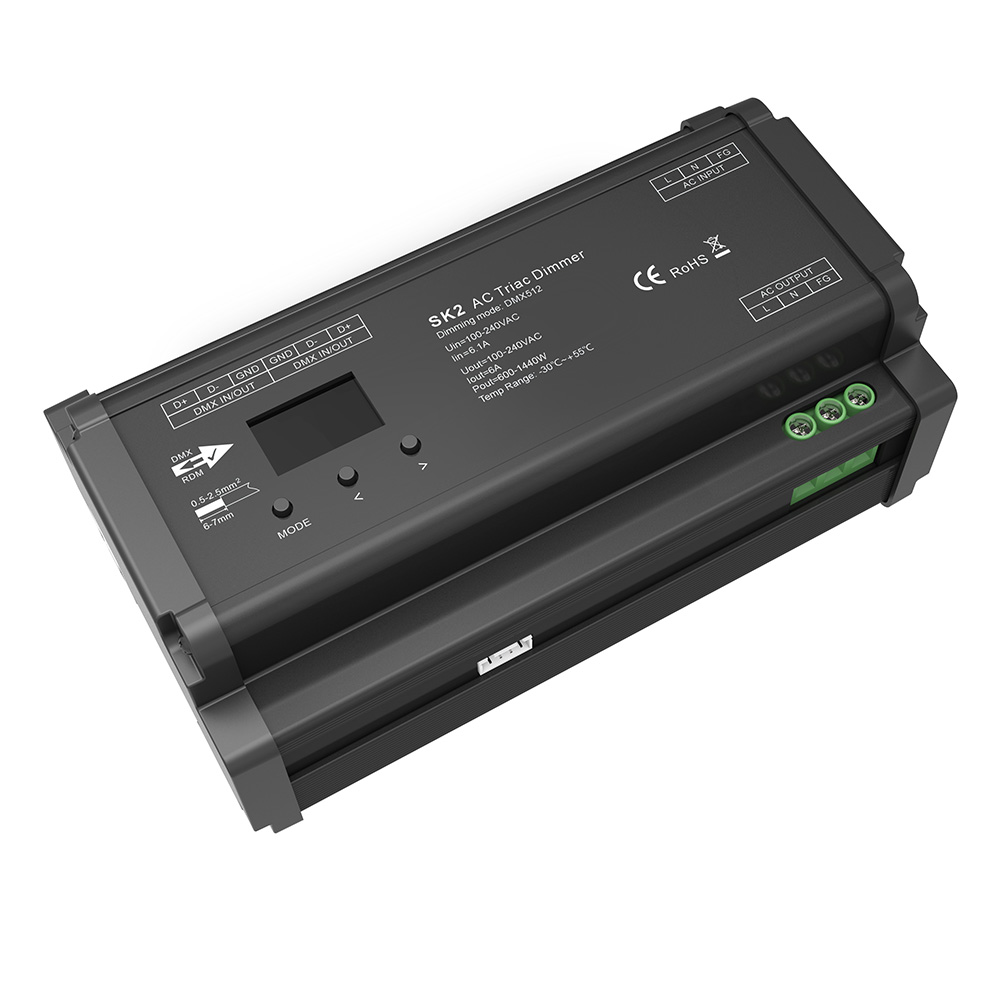 $69.98
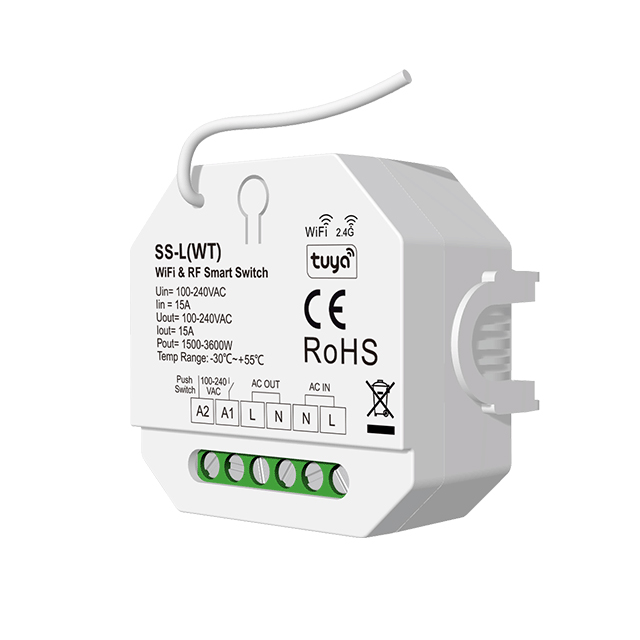 $17.98
Product Information
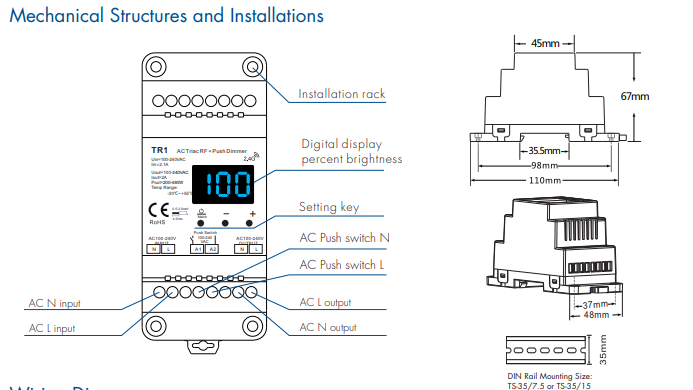
The Skydance TR1 is a compact 100-240VAC 1-channel 2A line voltage phase dimmer engineered for architectural and residential load management. Delivering 200W to 480W of phase-cut power, the controller manages single-color dimmable LED lamps, traditional incandescent fixtures, halogen bulbs, and high-voltage dimmable power supplies. Unlike generic inline units, the TR1 features an integrated three-digit LED display that reports real-time percentage levels and enables precise onboard parameter configuration without specialized software. Users can toggle between forward phase dimming and reverse phase dimming directly from the front keys, dial in a minimum cutoff brightness between 1% and 40% to stop low-end flicker, and activate an automated screen blackout. Designed for multi-point installations, it combines 2.4GHz RF wireless reception with hardwired momentary AC push-dim functionality, supporting smooth 0-100% control across standard TS-35 DIN rail or surface mounting setups.
Key Technical Capabilities
Forward and Reverse Phase Dimming
Switch between leading-edge (forward-phase, C-F) and trailing-edge (reverse-phase, C-R) modes using front buttons to match inductive loads, resistive loads, or sensitive electronic drivers.
Integrated Numeric LED Display
Monitors output brightness continuously from 001% to 100% and visualizes parameter setup menus directly on the unit.
Configurable Minimum Brightness Cutoff
Set bottom-end thresholds from 1% to 40% (b01 to b40) to eliminate low-voltage popping and flickering common in retrofit LED lamps.
Dual RF 2.4GHz and AC Push Inputs
Accepts wireless commands from single-zone or multi-zone remotes while connecting simultaneously to standard momentary wall push switches.
Multi-Unit Push Synchronization
Synchronize up to 25 TR1 units over 20 meters of standard wiring on a single push button circuit without running extra data cables.
Dual Mounting Architecture
Snap directly onto industrial TS-35/7.5 and TS-35/15 DIN rails or mount flush to panels using the integrated base plate.
Hardware Architecture and Dimming Mechanics
- 1-channel phase-cut output rated for 2A continuous operation, delivering 200W at 100VAC or up to 480W at 240VAC.
- Smooth 100-step logarithmic dimming resolution across the entire 0% to 100% adjustment band without flashing or visible stepping.
- Selectable auto-blanking screen timer (bon / boF) puts the display to sleep after adjustment to prevent unwanted light leak in dark utility closets or living areas.
- Non-volatile memory circuit stores output level and returns to the previous brightness setting instantly following power interruption.
- Rugged enclosure available in 2 selectable housing finishes (Black or White) to integrate cleanly into varied installation environments.
Product Specifications
| Parameter | Details |
|---|---|
| Product Model | SK-TR1 (TR1) |
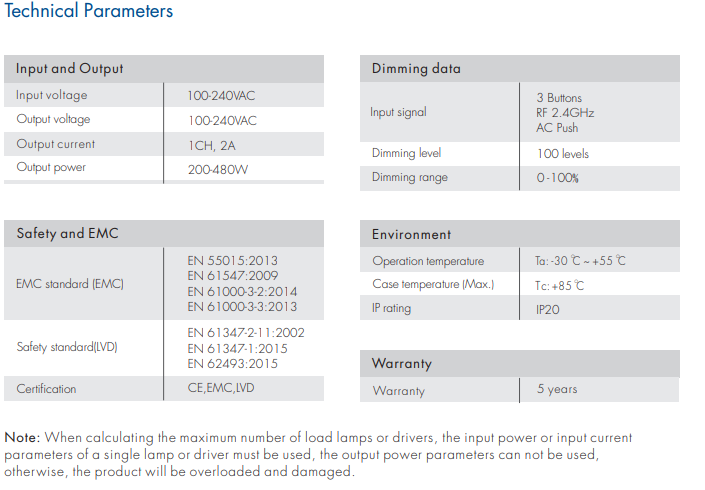
| Input Voltage | 100-240VAC |
| Output Voltage | 100-240VAC |
| Input Current | 2.1A |
| Output Current | 1CH, 2A |
| Output Power | 200W @ 100VAC / 480W @ 240VAC |
| Input Signal | 3 Front Buttons, RF 2.4GHz, AC Push-Dim |
| Dimming Methods | Forward-phase (TRIAC) / Reverse-phase (ELV) selectable |
| Dimming Range | 0 - 100% |
| Dimming Resolution | 100 levels |
| Minimum Brightness Setting | 1% to 40% (default 5%) |
| Push Switch Limits | Max 25 dimmers, max 20m cable length |
| Operating Temperature (Ta) | -30 deg C ~ +55 deg C |
| Maximum Case Temperature (Tc) | +85 deg C |
| Ingress Protection | IP20 (indoor dry location) |
| Wire Gauge Capacity | 0.5 - 2.0 mm² (strip length 4-5mm) |
| DIN Rail Compatibility | TS-35/7.5 and TS-35/15 |
| Dimensions | 67mm x 45mm x 35.5mm (outer housing depth 48mm) |
| Housing Color Choices | Available in 2 choices: Black, White |
| Safety Standards | EN 61347-1:2015, EN 61347-2-11:2002, EN 62493:2015 |
| EMC Standards | EN 55015:2013, EN 61547:2009, EN 61000-3-2:2014, EN 61000-3-3:2013 |
Application Scenarios
How to Control & Use This Controller
- 1. Disconnect main line power at the breaker panel before starting installation.
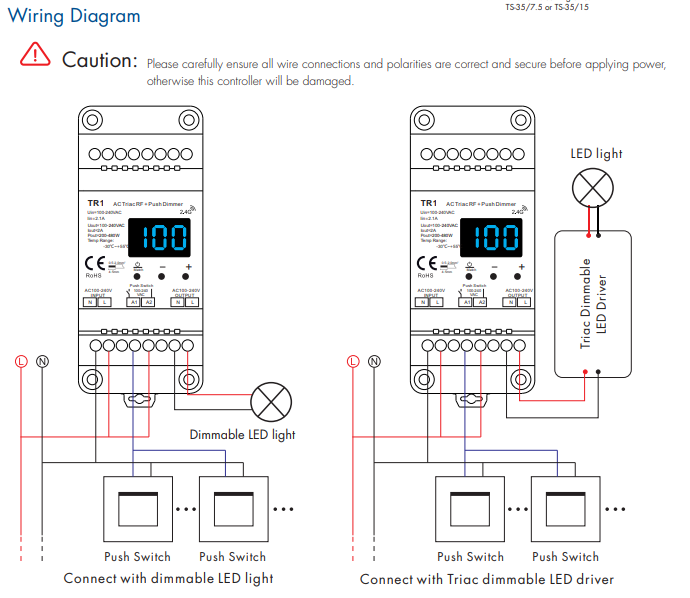
- 2. Strip line wiring by 4-5mm using 0.5-2.0mm² conductors. Connect incoming 100-240VAC to AC INPUT terminals (L and N).
- 3. Wire your dimmable luminaire or phase-dimmable driver to AC OUTPUT terminals (L and N). If connecting a momentary push switch, wire between terminals A1 and A2.
- 4. Mount the dimmer to an industrial TS-35 DIN rail track or affix it to a flat surface using the integrated mounting brackets.
- 5. Reapply power. Press and hold the middle power key and the '-' key together for 2 seconds to access system parameter setup. Press the middle key to cycle through options: C-F/C-R (forward or reverse phase), b01-b40 (minimum cutoff 1% to 40%), and bon/boF (automatic blank screen). Use '+' and '-' to adjust values, then hold the middle key 2 seconds to save.
- 6. Pair an RF remote: Long press the Match key on the TR1 for 2 seconds until the display reads 'RLS'. Within 5 seconds, press the ON/OFF key on a single-zone remote or the target Zone key on a multi-zone remote. The display shows 'RLO' when pairing is complete.
- 7. Alternative pairing: Power-cycle the AC input breaker, then immediately press the remote ON/OFF or Zone key 3 times. The connected load will blink 3 times to confirm pairing.
- 8. Test physical push dimming: Short press the momentary switch to toggle power on/off. Long press (1-6s) to smoothly ramp brightness up or down. Hold for more than 10 seconds to synchronize multiple grouped units to 100%.
- Calculate maximum connected load strictly using the input power or input current rating of each individual driver or lamp, not nominal output figures.
- Verify polarity and terminal torque before energizing the circuit; incorrect AC connections will permanently destroy the controller.
- Do not exceed the total output current ceiling of 2A (200W at 100VAC, 480W at 240VAC).
- The total wiring distance between the momentary push switch and the dimmer module must not exceed 20 meters.
- Limit the maximum number of TR1 units tied to a single push switch circuit to 25 units.
What's in the Box
- ✓1 x Skydance TR1 AC Phase-Cut RF + Push Dimmer Module
- ✓1 x User Operation & Wiring Manual
⇩ Downloads & Documents
PDFTR1
Frequently Asked Questions
Q: what is the best dimmer switch for led lights
A:The ideal dimmer depends on your fixture's internal circuitry. The TR1 provides forward and reverse phase dimming selectable via front buttons, allowing you to match leading-edge TRIAC or trailing-edge ELV fixtures to eliminate buzzing and flickering.
Q: What is the difference between forward phase dimming and reverse phase dimming?
A:Forward phase dimming (leading edge) cuts the beginning of the AC sine wave and is commonly used for resistive and magnetic loads, whereas reverse phase dimming (trailing edge) cuts the tail of the wave, making it ideal for modern electronic drivers and low-voltage phase dimming led loads.
Q: How do I eliminate low-end LED flickering with the TR1?
A:Enter system settings by holding the center button and '-' for 2 seconds, cycle to the 'b' parameter, and raise the minimum brightness cutoff value between 1% and 40% (b01 to b40) until the fixture stays stable at its lowest setting.
Q: Can I operate this dimmer without an RF remote control?
A:Yes. You can manage on/off switching and 0-100% dimming entirely using the three front buttons or an external momentary push button switch connected to the A1/A2 terminals.
Q: How many dimmers can share a single push switch line?
A:You can connect up to 25 TR1 dimmers to the same momentary push switch, provided the total wire run between the push button and dimmers does not exceed 20 meters.
Q: How do I synchronize multiple TR1 dimmers connected to the same switch?
A:Press and hold the momentary push switch continuously for over 10 seconds. The connected controllers will synchronize together and ramp to 100% brightness simultaneously.
Q: How do I restore the factory default parameters?
A:Press and hold the '-' and '+' buttons together for 2 seconds. The display will show 'RES', restoring 100% brightness, reverse-phase mode, 5% minimum brightness, and disabling automatic screen blanking.
Q: Can the digital LED screen be turned off when not in use?
A:Yes. Enable the automatic blank screen feature ('bon') in the system parameter menu to have the display turn off automatically after adjustments.
Reviews
Customer Experience
Your feedback is important to us! Share your thoughts and photos with other customers.
Downloads
Files for SK-TR1Images
These images were taken with Canon EOS 5D Mark IV and the studio light source is provided by Ra 98's full spectrum LED strip to realistically reproduce the colors of the item itself. All copyrights are created by the superlightingled team, please feel free to browse and download if you are a registered user!
LED Strip Lights Guide
Here you can learn anything about LED strip lights — pick the topic you are interested in to go deeper. We cover LED strip lights, power supplies, controllers, accessories, and how to connect LED strip lights. You can also watch our demo videos.
Led strip lights
►Everything you need to know before you buying led strip lights
| Top 6 Considerations Before Buying LED Strip Lights 1. Where do I want to place the LED strip lights? Indoor or outdoor? • What are waterproof led strip lights? • How to cut and connect waterproof led strip lights? 2. How much LED brightness do I need? 3. The working voltage is available? • 5V VS 12V VS 24V led strips • AC VS DC 4. How long is the LED strip light suitable for my project? 5. Do I need an LED light controller to adjust the LED color and brightness? 6. How to power the LED strip lights? 1. How do led strip lights work? 2. How long can you run an LED strip? 3. How long do LED strip lights last? Is it worth getting led strip lights? 1. Do LED strip lights use a lot of electricity? 2. Why are LED lights energy efficient? 3. Are LED Strip Lights sustainable? 4. What are the pron and cons of led strip lights? 5. Precautions for led strip lights 1. Do LED strip lights overheat? 2. How do you stop LED strips from overheating? 3. Can LED strips catch fire? 4. Is it safe to sleep with LED strip lights on? What are the types of led strip lights? Flexible led strip lights VS rigid led strip lights - 1. What are flexible led strip lights? 2. What are rigid led strip lights? 3. What happens if you bend LED strip lights? 4. What is the difference between flexible led strips and rigid led strips? 1. Can you cut led light strips? 2. What happens if you cut an led strip? 3. How to cut led strip lights? 4. How to connect RGB color changing led strip lights with a connector? 5. How to know what your led strip light is? How to choose the correct SMD led for your strip? Which is the brightest SMD LED? What does SMD 5050 mean? How many lumens is a 5050 SMD LED? How to know what type of LED strip? What is the difference between 2835 and 5050 LED? |
►COB led strip light
| 1. What is COB? 2. What is the COB production process? 3. Different types of COB strip lights 4. What is the difference between COB and SMD led strip lights? 5. What is the difference between COB and LED? 6. Are COB led strips better? 7. How to cut and connect COB led strips? 8. How to install COB led strip lights? 9. Can COB light strips use aluminum channels? 10. Why choose superlightingled? |
►Led neon lights
| 1. What is led neon light? 2. What are neon led lights used for? 3. Are led neon lights good? 4. How to choose led neon rope lights? 5. Are led neon ropes use DC or AC? 6. Can you change the light-emitting angle or the luminous way of neon led strip? 1. How to cut led neon lights 2. Can led neon lights be connected? 3. Easy 7 steps to make led neon lights 4. How to install led neon rope? |
►Addressable led strip
| Ultimate Guide to Choosing the Right Addressable LED Strip What is an addressable LED strip? Can you cut addressable LED strips? How to judge if an LED strip is individually addressable? How to choose the best DC12V addressable led strips? How to choose the best DC5V digital led strips? How to choose the right IC for your project? Which IC is most commonly used? How do I know my IC type? How do I know if my IC is good or bad? How many types of IC are there? |
►Color, color temperature, and CRI
| The Color Difference Between Warm White 2700K, 3000K, 4000K, 6000K Pure White and 7000K Cool White 1. What is color temperature? 2. What color temperature is right for me? • 2700K VS 3000K • How obvious is the difference between 2700K and 3000K? • Warm White 3000K VS Natural White 4000K VS Daylight White 6000K • Warm White VS Cool White 3. Enjoy 2700K, 4000K, 6000K 4. Further Reading: How to install Warm White LED light strip? How to choose the right color for your led strip lights? - 1. How many colors are in LED strip lights? 2. What do LED light colors mean? 3. Why do white LED light turns to yellow? 4. Why are your led strip lights not the same color? 5. What is the most relaxing color for LED lights? 6. What color led lights is best for sleeping? 7. Are led lights bad for your eyes? 8. Is cool white or warm white better for eyes? 1. What is the best color temperature? 2. Does color temperature keep the same as time goes by? 3. What color temperature is best for night? 4. Led strip lights about color temperature,CCT VS RGBW VS RGBCCT; What is color rendering index? 1. What is CRI in led lights? 2. How to choose the right CRI when buying led strip lights? 3. What is the relationship between CRI and brightness? 4. Is higher CRI better? High CRI VS Low CRI; 5. How to find CRI value? |
Led strip light connection
| How to connect led strip lights? 1. How to connect led strip lights together? 2. How to connect LED light strips without connectors? 3. How to solder wires to LED strips? 4. How to connect LED strips without soldering? 5. Which one is better between soldering and using a connector? 6. How to connect mutiple led strip lights? 7. How many LED strip lights can you connect? How to connect led strip to the power supply? 1. Ensuring the working voltage and power first 2. How to hardwire led strip lights? 3. Can I connect multiple LED strips to the same LED power supply? How to wire led strip lights? How to wire single color led strip lights? How to wire tunable white/CCT led strip lights? How to wire RGB color changing led strip lights? |
Controller for led strip lights
| How to choose led strip light controllers? 1. WIFI controller 2. RF controller 3. IR controller 4. Bluetooth controller 5. Remote control and panel control 6. Single color controller and multi-color controller 7. DMX512 controller 8. SPI controller 9. DALI controller 10. 0/1-10V dimmer 11. Triac series 12. Sonsor series |
Led power supply
| How to calculate power for led strip lights? 4 steps to calculate the power you need Performance And Reasons Of LED Voltage Drop How to choose led strip light power supply? 1. Alternating current power supply VS Direct current power supply 2. Constant current power supply VS Constant voltage power supply 3. How to choose the best led power supply for your led strip light? |
Led strip light installlation
| How to install led strip lights? What accessories will be needed? 1. Adhesive installation for IP20 and IP65 led strip lights 2. How to choose the right led tape? 3. Can IP20 and IP65 led strip lights use aluminum profiles? 4. How to use aluminum profiles? 5. Mounted clip installation for IP67 and IP68 light strips How to install LED sensor stair lights? Lighting Up Your Stairs With LED Strip Lights Ideas How to install led strip lights on TV? How to install led strip lights outdoor? |
Accessories
| How to choose led strip light connectors? 1. Are all LED light strip connectors the same? 2. How do LED strip lights connectors work? 3. What connectors do you need for LED strip lights? 4. What are the different kinds of LED connectors? 5. How to choose the right connector for your led strip lights? Ultimate Guide on Aluminum Profile for LED Strip Lighting 1. What are aluminium profiles used for? 2. Why choose aluminum profiles? 3. Different types of LED aluminum profiles 4. LED aluminum profile VS COB LED strips 5. How to install LED aluminum channels? 6. How To Get Ideal Light Diffuser For Your LED Strip? 7. Add Black Aluminum LED Light Diffusers For Your Home Lighting 8. How To Find The Right Aluminum LED Light Strip Diffuser Channel? |